Designing Presentations That People Actually Love
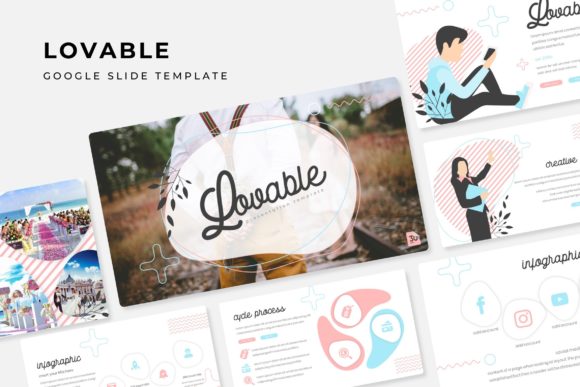
You know the feeling. You open a blank slide deck, stare at the white space, and immediately feel that familiar creative block. Whether you're pitching a new client, launching a product, or teaching a workshop, the presentation itself needs to do more than just hold information—it needs to hold attention. That's where thoughtful design templates come into play, and why tools like the Lovable Google Slide Template have become essential for professionals who refuse to settle for generic slides.
Why Slide Design Matters More Than You Think
Think about the last presentation that genuinely impressed you. Chances are, it wasn't just the content that caught your eye—it was the visual flow, the cohesive color story, and the way every element felt intentionally placed. Great presentations mirror great branding: they communicate professionalism, build trust, and make complex ideas feel accessible. For small business owners pitching investors, marketers presenting campaign results, or designers showcasing a portfolio, the slides themselves become part of the message.
The challenge is that most of us aren't full-time graphic designers. We're entrepreneurs juggling a dozen responsibilities, content creators working against deadlines, or bloggers who need to turn a workshop idea into something polished. Spending hours wrestling with alignment, font choices, and color palettes isn't realistic. This is exactly the problem that a well-built template library solves—and it's the reason the Lovable Google Slide Template has gained traction among people who care about visual quality but can't afford to spend an entire weekend on slide design.
What Makes This Template Collection Stand Out
With over 150 total slides spread across five premade color variations—30 slides per template—this collection offers genuine depth. That's not a handful of recycled layouts dressed up in different hues. Each color theme feels distinct, giving you real flexibility depending on the mood of your project. Working on a warm, approachable brand presentation? There's a palette for that. Need something sleek and corporate? Another variation handles it without missing a beat.
The handcrafted infographics deserve special mention. Infographics are where most free templates fall apart—they either look clip-art-ish or require so much editing that you might as well start from scratch. Here, the infographic slides feel designed by someone who actually understands data visualization. Charts, process flows, comparison layouts, and timeline graphics all come built in, ready to populate with your own numbers and narratives.
Section break slides are another thoughtful inclusion. These transitional pages give your presentation breathing room, helping audiences mentally shift between topics. It's a small detail that separates amateur decks from professional ones, and having them pre-designed saves you from that awkward "what do I put here?" moment mid-project.
Practical Uses Beyond the Boardroom
While presentation templates naturally serve pitch decks and meeting slides, the Lovable Google Slide Template extends into territory that surprises many users. Portfolio slides work beautifully for photographers, illustrators, and freelance designers who need to send prospective clients a curated sample of their work. Instead of building a separate PDF or maintaining a clunky website gallery, you can drop images into the drag-and-drop placeholders and share a clean, interactive deck.
The gallery slide layouts also serve crafters and product-based businesses well. Imagine a handmade jewelry brand preparing for a wholesale pitch, or a ceramics artist applying for a craft fair. Those picture placeholders let you swap in product photography without touching the underlying design structure. The result looks intentional and polished—exactly the impression you want when someone is evaluating your work.
Content creators and bloggers can repurpose these slides for social media graphics, too. Individual slides exported as images become Instagram carousels, Pinterest pins, or LinkedIn post visuals. The pixel-perfect illustrations and clean typography translate well across platforms, maintaining brand consistency whether someone encounters your content on a phone screen or a desktop monitor.
Working Smarter with Editable Graphics
One of the most practical features is how every graphic element is resizable and editable. This matters more than it might sound initially. When you're building a brand identity, consistency is everything—the same icon style, the same color values, the same proportional relationships across every touchpoint. A template that locks you into rigid dimensions forces compromises. One that lets you scale and adjust elements gives you control without requiring design expertise.
The master slide architecture is what makes this possible. Changes made at the master level cascade throughout the entire presentation, which means you can adjust a font, shift a color accent, or reposition a logo once and watch every slide update automatically. For anyone who has ever manually corrected 40 slides one by one because a client changed their mind about a hex code, this alone justifies the investment.
The drag-and-drop picture placeholders deserve acknowledgment too. Swapping images should be effortless, and here it genuinely is. You don't need to crop, reposition, or fight with aspect ratios. Drop your photo in, and the template handles the rest. It's the kind of frictionless workflow that keeps you focused on content rather than formatting.
Color Theory Working for You
Five premade color schemes might sound modest, but the execution is what counts. Each palette has been selected to feel contemporary without being trendy in a way that dates quickly. This is crucial for brand identity work—a presentation template that screams "2024 design trend" will feel stale by next year. These color variations lean toward timeless appeal, which means your decks will look relevant whether you present them this quarter or twelve months from now.
For marketers and brand strategists, having multiple color options also means you can match templates to different client brands without starting over. A wellness brand might gravitate toward the softer palette, while a tech startup might prefer the bolder option. This versatility makes the template collection practical for agencies and freelancers who serve diverse clients across industries.
Getting Started and Making It Yours
The package includes five PPTX files in widescreen format, a readme file for quick orientation, and links to download the free fonts used in the designs. That font inclusion matters because mismatched typography is one of the fastest ways to undermine a professional presentation. When the template specifies a particular typeface and provides the download, you avoid the frustration of opening a file and seeing placeholder text rendered in a default system font.
One important note: the preview images feature photographs and pictures that aren't included in the download. They're there to show you what's possible, to spark ideas about how you might style your own imagery within the layouts. Your own photography, product shots, team photos, or stock images will slot into those same placeholders and make the template genuinely yours.
Whether you're preparing a brand strategy presentation, designing social media content, building a product catalog, or creating educational materials, starting with a strong visual foundation saves time and elevates results. The Lovable Google Slide Template gives you that foundation—150-plus slides of thoughtfully designed layouts that respect both your creative vision and your packed schedule. Sometimes the best design decision isn't building from scratch. It's choosing the right starting point and making it unmistakably yours.