Sorizek: A Google Slides Template That Actually Works for Your Brand
You know that feeling when you open a blank presentation and just stare at the screen? Maybe you're pitching a new client, putting together a workshop deck, or creating a visual guide for your latest product launch. The content is there in your head, but turning it into something that looks polished and professional feels like pulling teeth. That's where a solid template comes in—not just any template, but one that gives you enough structure to move quickly and enough flexibility to make it truly yours. The Sorizek Google Slide Template does exactly that, and honestly, it solves problems most people don't even realize they have until they start using it.
What Makes This Template Different From the Usual Suspects
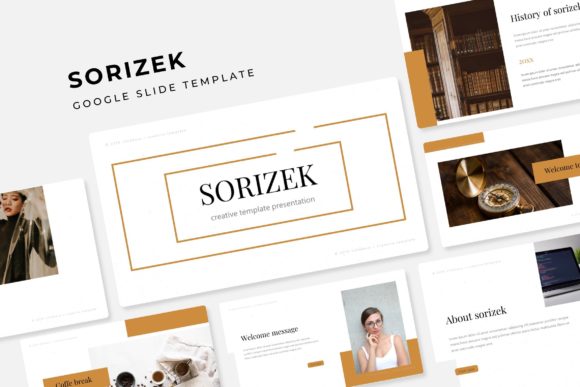
Most presentation templates fall into two camps. Either they're so generic that every slide looks like it came from a corporate training manual from 2009, or they're so over-designed that you spend more time wrestling with the layout than actually communicating your ideas. Sorizek sits in a sweet spot between those extremes. With over 150 total slides spread across five premade color variations—30 slides per color palette—you get a library of layouts that feel intentional without being rigid.
The five color variations aren't just the same slides with a different hue slapped on top. Each one has its own personality, which matters more than people think. If you're a wellness brand, you probably don't want the same color story as a tech startup. If you're a freelancer juggling multiple clients, having five distinct palettes means you can adapt the same template to completely different brand identities without starting from scratch every single time.
What really stands out, though, is the attention to detail in the design itself. The infographics are handcrafted—not pulled from some generic icon library and resized. The section break slides give your presentation natural breathing room, which is something most people overlook until they realize their audience stopped paying attention on slide twelve. There's a gallery and portfolio slide built in, which is a huge time-saver if you're a designer, photographer, or anyone who needs to showcase work visually. And every graphic element is resizable and editable, with picture placeholders that work on a simple drag-and-drop system. You're not fighting the template. You're working with it.
Practical Uses You Might Not Have Considered
When most people hear "presentation template," they think boardrooms and investor pitches. And sure, Sorizek handles those beautifully. But its real strength lies in how many other things you can do with it.
Think about social media content. If you're creating carousel posts for Instagram or LinkedIn, a well-designed slide deck is basically a content factory. You design once, export as images, and you've got a week's worth of posts that all look cohesive. The pixel-perfect illustrations in Sorizek mean those exports look sharp even at smaller sizes, which matters when someone's thumb-scrolling past your content at lightning speed.
For small business owners, this template works as a lightweight brand guide. Drop in your colors, swap the placeholder images for your product photos, and suddenly you have a consistent visual document you can share with contractors, collaborators, or new team members. It's not a replacement for a full brand identity system, but it bridges the gap between "I have a logo" and "I have a brand" in a way that feels manageable.
Content creators and bloggers can use it for media kits, course outlines, or even digital product previews. Imagine putting together a workshop for your community—instead of sending people a wall of text in a PDF, you give them a visually engaging deck that walks them through the material. It changes how people interact with your content. They're more likely to actually go through it, more likely to remember it, and more likely to see you as someone who takes their work seriously.
Marketing teams will find it useful for campaign planning documents, client reporting decks, or internal strategy presentations. The section break slides are particularly handy here because they create natural transitions between topics. No more cramming five ideas onto one slide because you ran out of space or didn't have a clean way to start a new section.
The Technical Stuff That Actually Matters
Let's talk about what you're getting, because the details matter when you're investing in design assets. The download includes five PPTX files in widescreen format, one for each color variation. Since the files are based on master slides, making global changes is straightforward—update the master once, and every slide reflects that change. This is a massive time-saver when you're customizing the template for a specific project or client.
The font used in the template is free to download, and the included readme file has the link. This is a small detail that makes a big difference. There's nothing worse than buying a template and discovering the typeface used costs an extra $50 for a commercial license. Here, you can start using it immediately without worrying about hidden costs or licensing headaches.
One thing worth noting: the preview images include photographs and stock images that aren't part of the download. This is standard practice, but it's worth mentioning so you're not surprised. The placeholders are there and ready for your own images, which is actually better—you want your presentation to look like your brand, not someone else's aesthetic choices.
Making It Work for Your Specific Needs
The best template in the world is useless if you don't adapt it to your context. Here's where practical thinking beats perfectionism. Start by picking the color variation that's closest to your brand's existing palette. Don't overthink this—you can always tweak individual slides later. The goal is to get a working draft as quickly as possible so you can focus on the content that actually moves the needle.
Use the infographic slides to simplify complex information. If you're explaining a process, showing data, or breaking down a concept, a well-designed visual does the heavy lifting. The handcrafted infographics in Sorizek aren't just decorative—they're functional tools for communication. Replace the placeholder data with your own, adjust the colors if needed, and you've got something that looks like you hired a designer for the afternoon.
The portfolio and gallery slides deserve special attention. If you're a creative professional, this is where you turn a standard presentation into a showcase. Swap in your best work, keep the layout clean, and let the images speak. The resizable graphics mean you're not stuck with awkward crops or stretched images, which is a common frustration with lesser templates.
For anyone working in branding or identity design, think of this template as a starting point for client presentations. You can use the structure to walk through brand strategy, show mood boards, present logo concepts, and lay out visual systems. The professional layout adds credibility to your process, which matters when you're asking someone to trust you with their brand.
Small Details That Add Up
Pixel-perfect illustrations might sound like marketing jargon, but it translates to something real: your slides look crisp on any screen. Whether someone's viewing your presentation on a laptop, a projector, or a phone, the details hold up. For social media graphics pulled from your deck, this means cleaner exports and better-looking posts.
The drag-and-drop picture placeholders simplify the workflow considerably. You don't need to be a PowerPoint or Google Slides expert to swap in your own images. Click, drag, done. This accessibility matters if you're collaborating with team members who aren't designers but need to update presentations regularly.
Based on master slides, every element in the template follows a consistent system. Fonts, colors, spacing, and layouts are all coordinated. This is what gives professional presentations their polished feel—not any single flashy element, but the quiet consistency of everything working together. When you apply this to your own projects, whether it's a pitch deck, a social media strategy, or a product launch presentation, that consistency reinforces your credibility.
The Sorizek Google Slide Template isn't trying to reinvent presentations. It's giving you a reliable, well-designed foundation that respects your time and your audience's attention. Whether you're building a brand from scratch, creating marketing materials for an established business, or just need a presentation that doesn't look like everyone else's, it's a practical tool that earns its place in your design toolkit. The five color variations, the handcrafted infographics, the portfolio-ready layouts—they all add up to something that works hard so you don't have to.