Master Your Next Presentation with the Babudi Google Slides Template
We have all been there: staring at a blank slide deck with a deadline looming, realizing that starting from scratch is the fastest way to ensure your presentation looks generic. Whether you are pitching a new client, teaching a workshop, or presenting quarterly results, the visual framework of your slides matters just as much as the data itself. A disjointed presentation can distract your audience, while a cohesive, professional design builds trust instantly. This is where investing in a high-quality design asset becomes not just a luxury, but a strategic necessity for anyone serious about their brand or business.
Visual Consistency Without the Design Degree
The primary challenge for small business owners and entrepreneurs is often maintaining visual consistency across all their marketing assets. You might have a great logo and a solid website, but if your presentations look like they were thrown together in five minutes, it creates a disconnect in your brand identity. The Babudi Google Slide Template solves this by offering a pre-structured environment that enforces design rules. It is not just about looking pretty; it is about coherence. When every slide shares the same design DNA—through consistent margins, typography, and color usage—your message becomes significantly easier to digest.
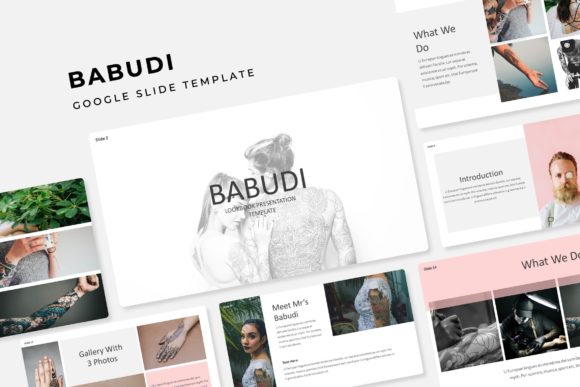
What makes this specific template stand out is its sheer volume and versatility. With over 150 total slides included, you are unlikely to run out of layouts. However, the real genius lies in the organization: the package comes with five premade color themes, offering 30 distinct slides for each variation. This means you aren't just getting a single static file; you are getting a dynamic design system. If your brand colors are teal and navy, you can likely find a variation that fits perfectly. If you are presenting a holiday-themed pitch, you can switch to a warmer palette instantly. This kind of flexibility is essential for creative professionals who need to adapt their materials for different audiences or clients without spending hours tweaking RGB codes.
More Than Just Slides: A Complete Visual Toolkit
Many people make the mistake of viewing presentation templates as purely linear tools—a sequence of slides meant to be viewed one after another. However, the Babudi Google Slide Template functions as a comprehensive design library. Think of it less as a deck and more as a collection of modular design assets. The inclusion of handcrafted infographics is a massive time-saver. Data visualization is notoriously difficult to do well from scratch; creating a pie chart or a timeline that looks modern and clean requires an understanding of vector graphics and spacing. This template provides those assets ready to go, allowing you to plug in your data and immediately look like you have a dedicated design team on retainer.
Furthermore, the utility extends far beyond the conference room. Because the graphics are resizable and editable, you can easily repurpose elements for other parts of your business. Need a quick graphic for an Instagram story? Pull a section break slide from the template. Looking for a layout for a one-page brochure or a sales sheet? The "Gallery and Portfolio" slides are designed with grid layouts that are perfect for showcasing products or services in print materials. This adaptability means you are buying a tool that serves multiple functions across your marketing ecosystem, from digital products to physical merchandise and invitations.
Streamlining Your Workflow with Smart Design
For the busy entrepreneur, time is the most valuable currency. The technical specifications of the Babudi template are clearly designed with efficiency in mind. It is built based on Master Slides, which is a critical feature for anyone who wants to maintain control over their design. If you decide halfway through that you want to change the font style across the entire deck, you do not have to manually edit every single slide. You simply adjust the Master Slide, and the change propagates throughout the document. This ensures that your presentation remains pixel-perfect, even as you make global adjustments.
Another massive workflow enhancement is the "drag & drop" picture placeholder feature. We have all experienced the frustration of trying to crop and resize an image to fit a specific box on a slide, only to have it look stretched or distorted. Smart placeholders eliminate this headache. You simply drag your image into the designated area, and the template automatically crops and scales it to fit the frame perfectly. This feature alone can save hours of fiddling time, allowing you to focus on the narrative of your presentation rather than the mechanics of image editing. It transforms the creation process from a technical chore into a creative exercise.
Bridging the Gap Between Digital and Print
In the current market, a brand needs to exist seamlessly across both digital and physical spaces. A content creator might use these slides for a YouTube video intro, but they might also use the graphics for a printed poster or a workshop handout. The fact that the Babudi template includes PPTX files (both standard and widescreen) ensures compatibility across different platforms and mediums. While it functions beautifully as a Google Slides template, the PowerPoint file ensures that if you need to work offline or share the file with a corporate client who strictly uses Microsoft Office, the formatting will remain intact.
This cross-platform utility is particularly valuable for agencies and freelancers. You can use the Babudi Google Slide Template to create a branding guideline for a client. Use the "Section Break" slides to separate chapters of your brand story, and the "Gallery" slides to display potential logo designs or packaging mockups. The professional aesthetic of the template elevates the perceived value of your deliverables. When you present your work inside a high-end framework, it signals to the client that you care about presentation and details—qualities that are essential in branding and design.
Practical Advice for Customization
When you download a premium template like this, it is tempting to leave it exactly as is. However, to truly get the most out of it, you need to customize it to fit your specific voice. The first step is always typography. While the template comes with a recommended font (with a download link included in the readme file), you should consider how that typeface aligns with your brand personality. Is it a modern sans-serif that conveys efficiency? Or does it have script elements that suggest creativity? If the included font doesn't perfectly match your brand guidelines, take advantage of the editable text boxes to swap in your own brand fonts.
Color is the next frontier. The five premade color variations are a fantastic starting point, but don't be afraid to tweak them. If your brand has a specific shade of orange that isn't quite represented, use the eyedropper tool to update the accent colors. Because the graphics are vector-based and editable, you can change the color of icons, charts, and borders to match your exact specifications. This level of customization ensures that your presentation doesn't just look "good," it looks like it belongs exclusively to you.
Finally, pay attention to the "Picture Placeholder" logic. When swapping out the placeholder images for your own photography, try to maintain the composition suggested by the template. If the placeholder suggests a wide landscape shot, don't force a tight portrait into that space. The layout was designed with specific visual weights in mind. By respecting the grid and the layout structure, you maintain that "pixel-perfect" quality that makes the template look expensive and polished.
Elevating Your Visual Communication
Ultimately, the goal of any design asset is to facilitate better communication. Whether you are a blogger trying to engage your readers with a visual guide, a startup founder trying to secure funding, or a teacher creating educational materials, the medium shapes the message. A cluttered, amateurish slide deck can undermine even the best ideas. Conversely, a clean, well-organized, and visually striking presentation acts as a credibility booster.
The Babudi Google Slide Template offers a robust solution for anyone looking to bridge the gap between their ideas and professional visual execution. By combining a massive library of layouts with smart, time-saving features like master slides and drag-and-drop functionality, it removes the technical barriers to good design. It allows you to focus on what you do best—running your business, creating content, or sharing your story—while ensuring that the visual packaging is always up to standard. In a world where attention spans are short, having a presentation that captures and holds attention isn't just nice to have; it is a competitive advantage.