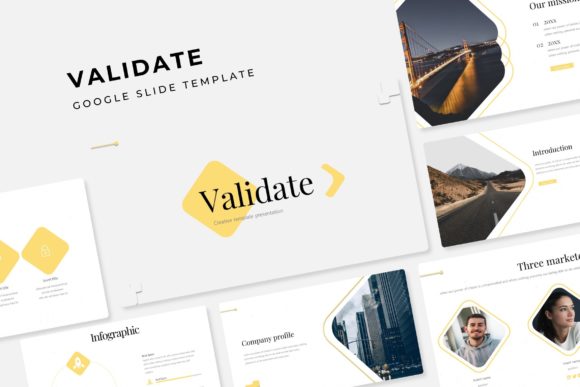
Validate Your Ideas with a Powerful Google Slides Template
Presentations are often the first serious handshake between your idea and your audience. Whether you're pitching a new business strategy, showcasing a portfolio, or teaching a complex concept, the visual framework you choose speaks volumes before you utter a single word. A cluttered, generic slide deck can undermine even the most brilliant content, while a polished, cohesive presentation builds instant credibility. This is where a meticulously designed template becomes less of a convenience and more of a strategic asset. The Validate Google Slide Template is built for professionals who understand that structure and aesthetics work in tandem to persuade, inform, and inspire.
A Foundation of Visual Consistency and Polish
One of the most significant challenges in presentation design is maintaining a consistent look and feel across dozens of slides. It's easy for fonts to shift, colors to drift, and layouts to become inconsistent when building from scratch, especially under a deadline. This template eliminates that friction by providing a master slide-based system. Every element, from the color palette to the placement of text boxes and images, is meticulously aligned to a grid. The result is a pixel-perfect foundation that ensures your presentation looks intentional and professional from the first slide to the last.
The package includes five premade color schemes, each containing 30 distinct slides for a total of over 150 options. This isn't just a color swap; each variation is thoughtfully curated to evoke a different mood or suit different branding needs. Whether you need a calm, corporate blue, an energetic orange, or a sophisticated monochrome palette, you can start with a scheme that already aligns with your brand's visual identity. This saves hours of time that would otherwise be spent tweaking hex codes and ensuring contrast ratios are accessible.
Beyond Text: Telling Stories with Handcrafted Infographics
Data and processes are the backbone of many presentations, but rows of numbers and bullet points can cause an audience's attention to drift. The Validate Google Slide Template addresses this with a rich collection of handcrafted infographics. These are not simple pie charts or basic bar graphs. They are designed to transform complex information into intuitive, engaging visual narratives. Think of process flows that guide a viewer step-by-step, comparison slides that highlight advantages at a glance, and timeline graphics that map out project milestones or company history with clarity.
For a small business owner presenting a growth plan to investors, these infographics can turn financial projections into a compelling visual story. For a marketing team, they can illustrate campaign workflows or social media analytics in a way that is immediately understandable to stakeholders across departments. The inclusion of section break slides and dedicated gallery and portfolio slides further enhances its utility. Creatives can beautifully showcase their work—be it photography, design mockups, or product images—without wrestling with formatting. The picture placeholders are designed for simplicity; you can drag and drop your images directly into the frames, and they will automatically resize and crop to fit the design perfectly.
Practical Applications Across Industries
The versatility of a well-structured template like this is its greatest strength. It's not a one-trick pony confined to boardroom pitches. Consider its application across various domains:
- Brand Identity & Marketing: Use it to present brand guidelines, launch new products, or recap marketing campaign results to clients or team members.
- Education & Training: Educators and corporate trainers can create engaging lesson plans, workshop materials, and onboarding decks that hold attention.
- Entrepreneurship & Startups: From investor pitches to internal strategy meetings, the clean, modern aesthetic helps position your venture as serious and prepared.
- Creative Portfolios: Designers, photographers, and artists can leverage the gallery slides to present their work in a curated, professional manner that impresses potential clients.
- Non-Profit & Community: Effectively communicate your mission, showcase impact through data visualizations, and present fundraising goals with clarity and emotional appeal.
The resizable and editable graphics mean you're never locked into a rigid structure. You can scale elements up or down, change colors to match your brand book, and edit text directly within Google Slides without needing advanced design software. This flexibility empowers you to tailor the presentation precisely to your message, rather than forcing your message into a predefined box.
Key Features for a Seamless Workflow
What truly sets this resource apart is its attention to the user's experience. The design is based on master slides, which means making a global change—like updating a font or adjusting a color—is as simple as editing the master once. The change automatically propagates throughout the entire deck, ensuring perfect consistency and saving a tremendous amount of time.
The package is delivered with everything you need to start immediately. It includes five PPTX files—one for each color scheme—in both standard and widescreen formats. A thoughtful Readme First document guides you through setup, and importantly, all fonts used are free for commercial use, with download links included. This removes the common hurdle of discovering mid-project that a required typeface requires an expensive license. While the preview images use placeholder photographs for illustration, the template's layout is optimized for you to insert your own visuals seamlessly.
Choosing the right design assets is about more than just aesthetics; it's about efficiency, professionalism, and reducing cognitive load. A template like Validate acts as a reliable co-designer, providing a sophisticated visual system that lets you focus on what matters most: your content, your story, and your connection with the audience. It's a practical tool for anyone who regularly communicates ideas visually and needs those ideas to land with impact and clarity.