Brekaut: A Flexible Template for Polished Presentations
We've all been there: staring at a blank PowerPoint slide, cursor blinking, feeling the pressure to create something that looks both professional and visually engaging. Whether you're pitching a new idea to investors, presenting quarterly results to your team, or crafting a workshop for your community, the visual foundation of your presentation matters. A cluttered, inconsistent, or amateurish design can distract from your message, while a clean, cohesive, and well-designed template can amplify it. This is where having a robust, ready-to-use asset in your toolkit becomes less of a luxury and more of a necessity for anyone who communicates ideas visually.
More Than Just Slides: A System for Visual Communication
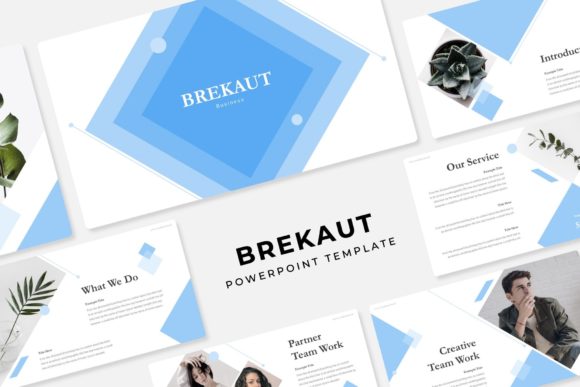
The Brekaut PowerPoint Template isn't just a collection of pre-made slides. It's a comprehensive presentation system designed to give you a professional starting point without the hours of initial design work. At its core, it's built on the principle of flexibility. With 150+ total slides, you're not getting a single, rigid look. Instead, you're getting a versatile library of layouts—section breaks to organize your narrative, dedicated gallery and portfolio slides to showcase work, and data-driven infographics that are handcrafted for clarity. The real power, however, lies in its structure and adaptability.
The template is delivered in 5 premade color variations, each containing 30 carefully designed slides. This isn't just about changing a header from blue to green. Each color scheme has been thoughtfully curated to evoke a different mood or align with various brand aesthetics. One palette might feel corporate and trustworthy, another vibrant and creative, and another minimalist and modern. This allows you to instantly match the template to the specific tone of your project or the existing branding of your client or company. You can start with the color scheme that resonates most and build from there, saving a significant amount of time in the initial design phase.
Practical Design for Real-World Projects
Let's talk about the features that make this template practical for everyday use. The pixel-perfect illustrations and graphics are all resizable and editable. This means you can scale elements up or down without losing quality, and you can change colors, shapes, and lines to fit your exact needs. The picture placeholder functionality is a huge time-saver; simply drag and drop your own images into designated areas, and they'll automatically conform to the shape and style of the design. No more fiddling with cropping and resizing frames manually.
Because everything is based on master slides, maintaining consistency across your entire presentation is effortless. Change a font style, a color accent, or a footer element on the master slide, and it updates across every single slide that uses that master. This is crucial for maintaining brand identity and ensuring a polished, professional look from the first slide to the last. For a small business owner creating a sales deck, or a marketer preparing a campaign overview, this systematic approach prevents the common pitfall of slides looking like they were pulled from different presentations.
The applications extend far beyond a standard corporate presentation. Think about a designer showcasing a recent brand identity project—the portfolio slides provide a clean framework. A content creator could use the infographic slides to break down complex data for their audience in a blog post or social media graphics. An entrepreneur might use the template to create a compelling pitch deck that feels both professional and uniquely theirs, thanks to the customizable color schemes. The structure is there to support your content, not constrain it.
Building Your Brand's Visual Consistency
One of the most significant challenges in branding and marketing is maintaining visual consistency across all touchpoints. A presentation is often a key touchpoint—whether it's shared internally, used in a webinar, or presented to potential partners. Using a well-designed template like Brekaut helps reinforce your brand identity every time you present. By selecting the color variation that aligns with your brand and using the master slides to set your brand fonts, you ensure that every presentation you deliver looks and feels like it came from the same cohesive brand.
This consistency builds brand recognition. Your audience starts to associate certain colors, layouts, and design styles with you. It also enhances readability and professional presentation. Clean layouts guide the viewer's eye, proper use of white space prevents cognitive overload, and professional graphics elevate the perceived quality of your content. When your presentation looks polished, it subconsciously communicates that your ideas and your business are also polished and trustworthy. This directly impacts audience engagement; people are more likely to stay focused and retain information from a visually appealing and well-organized presentation.
Getting Started and Making It Your Own
When you download the Brekaut template, you receive the 5 PPTX files (one for each color scheme) along with a Readme First file. This document is essential reading. It will typically include instructions on how to install the fonts used in the design. The template uses free fonts, and a download link is included, so you won't incur additional costs or run into licensing issues for the typography itself. However, it's always wise to double-check the licensing for any asset you use in commercial projects.
A practical piece of advice: before you dive into creating your presentation, take thirty minutes to explore the template thoroughly. Click through all the slides in the color scheme you've chosen. Look at the master slides. Identify the layouts that will work best for your content. This exploration phase will save you time later and help you think more strategically about how to structure your narrative.
Remember, the template is a starting point. Don't be afraid to customize it. Swap out the placeholder text with your own compelling copy. Use the drag-and-drop picture placeholders to add your own photography or graphics. Adjust the color accents if needed to better match a specific campaign. The goal is to use the professional framework to present your unique ideas, not to present the template itself. By combining the template's solid design foundation with your own content and branding, you create presentations that are not only efficient to build but also genuinely effective in communicating your message and advancing your goals.