Curcao & Co: A Google Slides Template for Polished Presentations
You’ve been there. It’s 10 PM, the presentation is tomorrow, and you’re staring at a blank slide deck, wrestling with alignment, color palettes, and a layout that just won’t cooperate. The default templates feel sterile, and your brand’s personality gets lost in a sea of generic placeholders. This is where a thoughtfully designed asset can shift your entire workflow. The Curcao & Co Google Slide Template is built to solve that exact problem, offering a robust, pre-designed system that feels less like a template and more like a professional design toolkit.
More Than Just Pretty Slides: A System for Visual Consistency
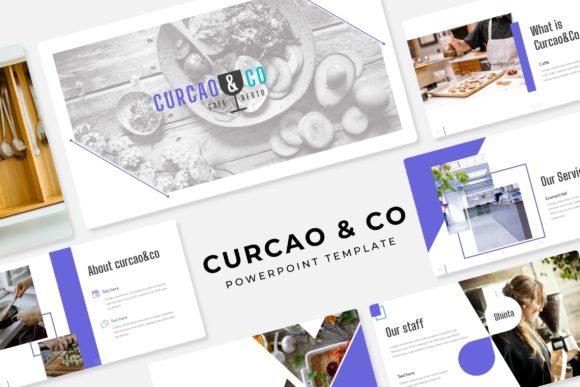
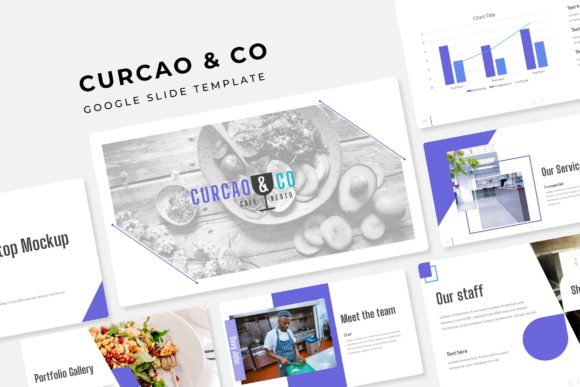
At its core, this package is about creating a seamless visual language for your brand or project. With over 150 total slides organized into five distinct, premade color schemes—each containing 30 unique layouts—you have a versatile library at your fingertips. This isn't about using the same ten slides over and over. It’s about having a cohesive set of designs for introductions, team bios, service breakdowns, timelines, data visualization, and conclusions, all sharing the same design DNA but offering variety to keep your audience engaged.
The power lies in the details. Every infographic, chart, and icon is handcrafted, meaning they aren’t generic stock graphics. They are designed to work together, ensuring that whether you’re presenting a financial report or a creative portfolio, the visual style remains pixel-perfect and professional. The inclusion of dedicated section break slides and gallery/portfolio layouts is a practical touch that helps structure complex information, guiding your audience’s focus exactly where you want it.
Unlocking Creative Applications Beyond the Boardroom
While perfect for business pitches and investor decks, the utility of a premium presentation template like this extends far into other creative and commercial realms. Consider these real-world scenarios where such a structured, visually rich asset becomes invaluable:
- Brand & Marketing Collateral: Use the layouts to design consistent social media graphics, email newsletter headers, or digital ads. The resizable graphic placeholders make it simple to drag and drop your own product shots or brand imagery, maintaining a unified look across all touchpoints.
- Client Onboarding & Proposals: For freelancers and agencies, a polished proposal can win a contract. The template’s professional design immediately communicates competence. You can map out project phases, showcase past work in the gallery slide, and detail pricing with clear, editable graphics.
- Digital Products & Course Materials: Educators and creators can transform their content. Turn a workshop into a beautifully structured slide deck, or design the visual framework for an online course. The clean typography and organized layouts enhance readability and learning.
- Event & Product Launches: Create compelling pitch decks for new products, or design visually driven invitations and event programs. The color variations allow you to quickly adapt the mood to match your event’s theme.
The key is that the Curcao & Co Google Slide Template functions as a foundational design asset. It provides the professional structure and aesthetic rigor, freeing you to focus on your core message—whether that’s a sales pitch, an educational lesson, or a creative story.
Practicality Built In: Editability and Inclusions
A beautiful template that’s impossible to edit is useless. This is where the practical design choices shine. The entire deck is based on master slides, meaning you can make global changes to fonts, colors, and logos in one place, and the entire presentation updates automatically. This is a massive time-saver and ensures absolute consistency.
The graphics are fully resizable and editable, built with vector shapes. Need to change the color of an icon or adjust the size of a chart bar? It’s a straightforward process. The picture placeholders are drag-and-drop ready, eliminating the tedious process of cropping and positioning images manually. You simply drag your photo into the designated area, and it scales to fit perfectly.
The package is straightforward in what it includes: five PPTX files for widescreen presentations, each corresponding to one of the five color themes. A readme file gets you started, and importantly, it notes the free font used and provides a download link. This is a critical detail for maintaining the design’s integrity when you edit. A reminder that the preview photographs are for illustration only sets clear expectations—you’re buying the design system, not the stock images.
Making It Your Own: A Guide to Effective Use
To get the most out of a template like this, think of it as a starting point, not a rigid cage. Here’s how to approach it for maximum impact:
- Establish Your Brand First: Before you even open the file, know your brand’s primary and secondary colors, your logo, and your core fonts (if you have them). This will guide which of the five premade color schemes you choose as your base, or how you’ll customize it.
- Customize the Master Slides: This is your first and most important step. Go into the master slide view and update the placeholder fonts to your brand’s typeface. Add your logo to the corner of the master slide so it appears on every single page. Adjust the color scheme to match your brand palette if needed.
- Curate Your Content: Don’t just fill every slide. Use the variety of layouts strategically. A data-heavy section might use the infographic slides, while introducing your team calls for the profile layouts. The section break slides are perfect for signaling a shift in topic.
- Pair with Purpose: While the template comes with a suggested font, you might pair it with another for contrast. For instance, use the template’s display font for headings and pair it with a clean, readable sans-serif for body text. Always test pairings for readability, especially on smaller screens.
- Check Licensing for Commercial Use: The included readme should clarify the licensing. For most premium templates, you are granted a license to use them in unlimited personal and commercial projects, but you cannot resell the template itself. Always verify this to ensure your use is compliant, especially for client work or products for sale.
In the end, the goal is to leverage the template’s professional design to amplify your own ideas. It handles the heavy lifting of layout, alignment, and visual harmony, allowing you to pour your energy into crafting a compelling narrative and a memorable presentation. For the entrepreneur, the marketer, the teacher, or the creator, that’s a practical advantage worth having.