Umnics Keynote Template: A Designer's Toolkit for Polished Presentations
Imagine this: You've spent weeks refining your business idea, crafting your strategy, and gathering your data. Now comes the moment to present it, and you open your slide software only to stare at a blank, uninspired canvas. The default templates feel generic, and the thought of designing 30 slides from scratch is daunting. This is where a thoughtfully constructed asset like the Umnics Keynote Template steps in, not just as a set of slides, but as a foundational system for clear, professional visual communication.
Beyond Slides: A System for Visual Storytelling
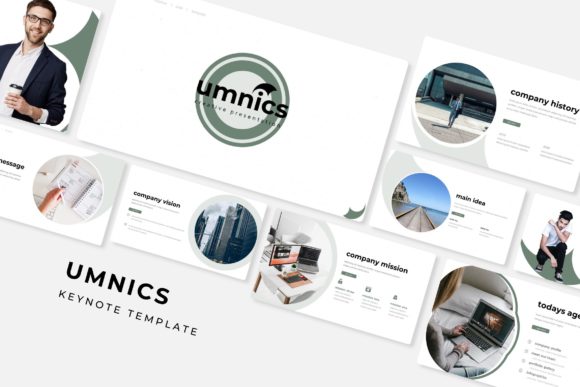
At its core, the Umnics Keynote Template is a comprehensive presentation toolkit. Its most immediate feature is scale: 150+ total slides organized across 5 premade color themes. This isn't just about having more options; it's about strategic flexibility. Each of the 5 color variations offers 30 unique slides, allowing you to select a palette that aligns with your brand identity from the outset. Whether you're presenting a sleek tech startup, a warm artisan brand, or a bold creative agency, one of the five curated color stories likely fits the mood you need to convey.
The true value, however, lies in the internal architecture. Built on master slides, every element is resizable and editable. This means you're not locked into a rigid layout. Need to extend a text box? Resize a graphic? Swap an image? The template is designed for this kind of intuitive manipulation. The drag-and-drop picture placeholders are a practical time-saver, especially when you're working with a library of project photos or client assets. You simply drag your image into the designated area, and it scales to fit perfectly within the designed frame.
Practical Applications for the Busy Professional
For entrepreneurs and small business owners, a presentation is often a pitch, a sales tool, or a client update. The included handcrafted infographics and section break slides within the Umnics template transform complex information into digestible visuals. Instead of describing your quarterly growth in a dense paragraph, you can use a clean, pre-designed chart or timeline slide. The gallery and portfolio slides are particularly useful for creatives—photographers, designers, architects—showcasing work in a structured, visually appealing format that feels curated rather than cluttered.
Consider how this extends beyond a standard boardroom meeting. The same system can be adapted for:
- Webinar and Workshop Decks: Create engaging, on-brand content for online education.
- Sales Proposals: Structure your value proposition, case studies, and pricing clearly.
- Internal Training: Develop consistent, professional materials for onboarding new team members.
- Investor Pitches: Communicate your business model and vision with pixel-perfect illustrations and a logical flow.
The emphasis on "pixel-perfect illustrations" addresses a common frustration with lesser templates: blurry or poorly rendered graphics. High-quality visuals are non-negotiable for maintaining a professional image, and having these included removes a significant hurdle from the design process.
Integrating with Your Broader Brand Identity
A presentation rarely exists in a vacuum. It's one touchpoint in your broader brand ecosystem. The visual language of your slides should feel harmonious with your logo, your website, and your social media graphics. This is where thinking about typography and color becomes critical. While the Umnics template provides a strong visual framework, its effectiveness multiplies when you consciously align it with your existing brand assets.
For instance, if your brand uses a specific sans serif font for body text and a display font for headlines, you should replace the template's default fonts with your own. The readme file included in the package, with its free font download link, is a starting point, but the template's master slide structure makes global font changes straightforward. This ensures your presentation reinforces brand recognition rather than diluting it.
Similarly, while the five color schemes are a great starting point, you can—and often should—adjust them to match your exact brand hex codes. This level of customization is what elevates a template from a convenient shortcut to a genuine extension of your brand identity. It ensures that whether someone is viewing your website, your Instagram feed, or your keynote, the visual experience feels cohesive and intentional.
Making Smart Design Choices Under Pressure
Not everyone has a background in design, and that's okay. Templates like Umnics serve as a bridge, providing professional structure while you focus on content. Here are a few practical tips for getting the most out of it:
- Start with Your Content, Not the Slides. Outline your key messages first. Then, choose the slide layouts that best serve each point. Don't force content into a visually complex slide if a simpler one tells the story better.
- Embrace White Space. The template likely uses it well. Resist the urge to fill every corner. White space gives your content room to breathe and improves readability for your audience.
- Test on the Actual Display. Always preview your slides on the projector or screen you'll be using. Colors can look different, and text that seems large on your laptop may be unreadable from the back of a room.
- Use the Section Breaks. Those dedicated slides aren't just decorative. They provide a visual pause, helping your audience mentally digest the previous section and prepare for the next topic. This improves information retention.
Remember, the goal of any design asset is to serve communication. The Umnics Keynote Template, with its extensive slide library and editable components, provides the means to present your ideas with clarity and visual polish. It handles the heavy lifting of layout and aesthetics, freeing you to concentrate on delivering a compelling narrative. In a world where attention is scarce, that combination of professionalism and efficiency is a practical advantage for anyone who needs to inform, persuade, or inspire.