Carira Google Slide Template: Build Polished Presentations Fast
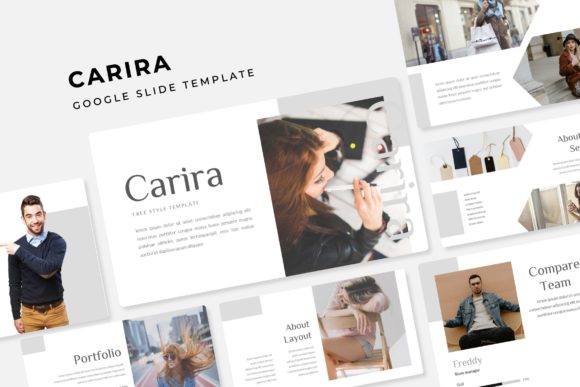
Let’s be honest, building a presentation from scratch is a massive time sink. You spend hours fiddling with text boxes, aligning images, and trying to make a default template look like it wasn’t made in 2008. The Carira Google Slide Template is designed to kill that struggle. It’s not just a collection of pretty slides; it is a comprehensive visual system built for professionals who need to get their point across clearly and stylishly without losing a weekend to formatting.
A Visual System That Actually Works
What makes Carira stand out in a sea of generic templates? It starts with volume and variety. We are looking at over 150 total slides here. That is a massive library of content to pull from. But quantity means nothing without quality. The designers behind this template have organized these slides into five distinct premade color themes. Each theme contains 30 unique slides, giving you a cohesive aesthetic right out of the box. Whether you are a fan of bold, high-contrast palettes or softer, muted tones, you have options without needing to touch a color wheel.
The real magic, however, lies in the details. The template features handcrafted infographics. We have all seen those generic, uninspired bar graphs that come with standard software. Carira takes a different approach. The data visualization elements are designed to be engaging and easy to read, turning dry statistics into a visual story. This is crucial for marketers and business owners who need to present quarterly results or pitch decks that hold attention.
Practical Design for Real-World Projects
A template is only as good as its usability. If you can’t customize it quickly, it’s just a pretty picture. Carira is built entirely on Master Slides. For those who aren’t deep in the design weeds, this means the underlying structure is solid. You make a change to the master, and it ripples through the presentation. This ensures your fonts, colors, and logos remain consistent across 150 slides without you having to manually edit each one.
Furthermore, the graphics are resizable and editable. This is a massive plus for anyone working with specific brand guidelines. You aren't locked into a specific layout. If you need to move a chart or resize an image placeholder, the vector elements scale perfectly without pixelation. The drag-and-drop picture placeholders are another highlight. Instead of fighting with cropping tools, you simply drag your image into the shape provided, and it snaps into place. This pixel-perfect approach saves a significant amount of time, which is money for freelancers and entrepreneurs.
Beyond the Boardroom: Creative Applications
While the name suggests a standard business tool, the versatility of the Carira Google Slide Template extends far beyond corporate presentations. Because of the high-end aesthetic and the inclusion of section break slides and portfolio layouts, it functions as a multi-purpose design asset.
Consider these practical uses for the template structure:
- Brand Guidelines: Use the slides to create a comprehensive brand book for your clients or your own business. The clean layouts are perfect for displaying typography choices, color codes, and logo usage rules.
- Lookbooks and Portfolios: The gallery and portfolio slides are specifically designed to showcase high-resolution imagery. Photographers, interior designers, and artists can use this to present their work to potential clients in a sophisticated manner.
- Digital Products: If you are selling an ebook or an online course, you can adapt the content slides to create a visually rich digital catalog or course outline.
- Social Media Strategy: Marketing managers can use the timeline and infographic slides to map out content calendars or campaign strategies for clients.
Typography and Brand Consistency
One of the unsung heroes of a good presentation is the typography. Carira comes with a "Readme First" file that includes links to free fonts used in the design. This is a detail often overlooked by other template creators. Nothing is worse than buying a template only to find out you need to purchase a $200 font family to make it look right. By using free, accessible fonts, the template ensures that your presentation looks the same on your laptop as it does on a client’s computer.
Using a premium font style effectively can drastically improve readability. When your audience isn't squinting to read bullet points or distracted by clashing typefaces, they focus on your message. The Carira template balances display fonts for headers with clean, legible fonts for body text. This hierarchy guides the viewer's eye naturally through the content, improving audience engagement. For those building a brand identity, this consistency is key. It reinforces professionalism and builds trust before you even speak a word.
Optimizing Your Workflow
To get the most out of the Carira Google Slide Template, you need to approach it with a strategy. Don't just use it as a crutch for bad content; use it as an amplifier for good ideas. Start by selecting the color variation that best matches your current brand assets. If you don't have strict brand colors, look at the psychology of the five included palettes. Do you want to convey energy and urgency? Go for the bolder theme. Trying to build trust and calm? Opt for the softer tones.
Next, focus on the "Section Break" slides. These are visual palate cleansers. In a long presentation, they give the audience a mental break and signal a shift in topic. Use them to reinforce key takeaways. Don't clutter these slides with text. Let the design breathe.
Finally, leverage the drag-and-drop functionality to your advantage. If you are presenting a portfolio, swap out the placeholder images with your own high-quality work. If you are a blogger creating a media kit, replace generic stock photos with personal headshots or product shots. The goal is to make the template feel like you. It is a foundation, not a finished house.
Final Thoughts on Visual Communication
In a world where attention spans are shrinking, visual communication is more important than ever. Whether you are pitching a startup, teaching a workshop, or presenting a marketing plan, the Carira Google Slide Template provides a robust framework. It combines the flexibility of modern design with the structure needed for professional communication. With 150+ slides, multiple color variations, and fully editable vector graphics, it equips you with the tools to look polished and prepared, no matter the occasion.