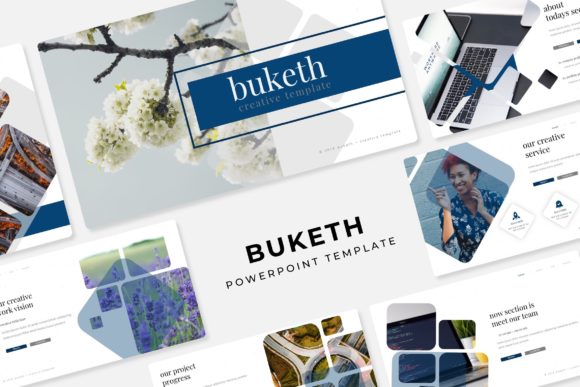
Buketh Power Point Template: Streamline Your Brand's Visual Story
Imagine you've just been handed the task of presenting your quarterly brand strategy to a key stakeholder. You have the data, the insights, and a solid plan, but you open your slide deck to a blank, white canvas. The pressure is on. You need a presentation that not only conveys information but also reflects the professionalism and creative energy of your brand. This is where a thoughtfully designed asset like the Buketh Power Point Template moves from being a simple download to a strategic tool, saving you hours of design work while ensuring your message lands with visual impact.
At its core, the Buketh template is more than just a collection of slides; it's a visual system built for clarity and cohesion. With over 150 total slides, it provides a vast library of layouts for every conceivable presentation need—from detailed data breakdowns and team bios to project timelines and portfolio showcases. The true strength, however, lies in its structured flexibility. Five premade color palettes, each containing 30 meticulously crafted slides, allow you to instantly align the entire presentation with your specific brand identity. Whether your brand calls for a bold, energetic vibe or a calm, sophisticated tone, you can select a color scheme that feels inherently "you," eliminating the guesswork and ensuring consistency from the first slide to the last.
Beyond Bullet Points: Crafting a Cohesive Visual Narrative
A common pitfall in presentations is relying solely on text and generic bullet points. The Buketh template encourages a more engaging approach through its handcrafted infographics and dedicated section break slides. Instead of describing a complex process in a paragraph, you can illustrate it with a clean, custom infographic that makes the information digestible in seconds. The section break slides act as visual "chapter dividers," helping to structure your talk and give your audience a moment to mentally prepare for the next topic. This thoughtful pacing is crucial for maintaining attention and ensuring your key messages aren't lost in a wall of text.
For designers, marketers, and entrepreneurs, the practical applications extend far beyond a standard boardroom meeting. Consider using the template's gallery and portfolio slides to pitch a new client, showcasing your best work in a dynamic, professional format. A small business owner could leverage the timeline slides to outline a product launch roadmap for investors. Content creators and bloggers might use the visually rich layouts to plan a content calendar or present a media kit to potential sponsors. The template becomes a versatile canvas for any visual communication need, from internal reports to external marketing proposals.
Practical Design: Efficiency Meets Professional Polish
One of the most significant time-savers in the Buketh package is its user-friendly design architecture. Every slide is built on master slides, which means you can make global changes—like updating a logo, changing a font style, or adjusting the color scheme—across all 150+ slides with just a few clicks. The graphics are fully resizable and editable, allowing you to tailor every element without losing quality. The drag-and-drop picture placeholder functionality is a game-changer; you can simply drag your own images into pre-formatted boxes, and they automatically crop and scale to fit perfectly, maintaining the design's pixel-perfect integrity.
This level of detail matters when you're building a brand identity. Visual consistency is what makes a brand recognizable and trustworthy. Using the same color palette, typography, and design style across all your materials—from your website to your social media graphics to your client presentations—reinforces your brand's personality. The Buketh template, with its cohesive set of assets, acts as a foundational piece of your design toolkit, helping you maintain that critical consistency without needing to be a graphic design expert.
Integrating the Template into Your Creative Workflow
Getting the most out of a resource like this involves a bit of strategy. Before diving in, take a moment to define the goal of your presentation. Is it to inform, persuade, or inspire? Let that objective guide your slide selection. Don't feel obligated to use every single slide; curate the ones that best serve your story. Experiment with the font pairings suggested in the included Readme file. Pairing a clean sans serif for body text with a more distinctive display font for headlines can create a beautiful hierarchy that guides the viewer's eye.
Remember, the photographs used in the preview are for illustration, but the placeholder system makes it easy to insert your own high-quality images, which will always resonate more authentically with your audience than generic stock photos. When you download the package, you'll find five PPTX files, each corresponding to a different color variation, along with information on the free fonts used. This is particularly important for commercial projects—always verify the licensing for any asset you use. The included fonts are free for commercial use, which removes a significant hurdle for entrepreneurs and small businesses.
Ultimately, a tool is only as good as the person using it. The Buketh Power Point Template provides a robust, professional framework that handles the heavy lifting of design, freeing you to focus on what truly matters: your message, your story, and your connection with the audience. It’s about presenting your ideas with the clarity and visual polish they deserve, whether you're a startup founder seeking funding, a marketer rolling out a new campaign, or a creative professional showcasing your portfolio.