Masano Power Point Template: Streamline Your Next Presentation
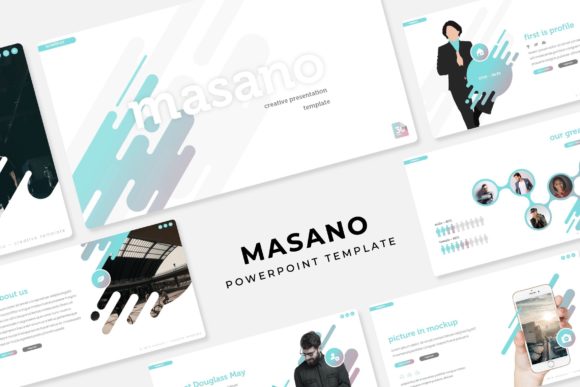
Let’s be honest: building a slide deck from scratch is usually the least favorite part of the creative process. You have the data, the strategy, and the ideas, but spending hours aligning text boxes and choosing color palettes can drain your energy before you even start rehearsing. If you are an entrepreneur, marketer, or designer trying to pitch a client or share a quarterly update, you need a tool that handles the heavy lifting of design so you can focus on the message. That is where a robust asset like the Masano Power Point Template comes into play. It offers a comprehensive suite of over 150 slides designed to make your presentations look polished, professional, and visually engaging without requiring a degree in graphic design.
Why Structure Matters in Modern Presentations
Visual communication is about more than just pretty pictures; it is about hierarchy and flow. When you are presenting complex information—whether it is a marketing strategy, a portfolio review, or a product launch—your audience needs a clear path to follow. The Masano template is built on a foundation of master slides, which ensures that every element on the screen is consistent. This pixel-perfect approach helps maintain your brand identity throughout the presentation. You won't have to worry about font sizes jumping around or colors shifting between slides because the underlying structure is already locked in.
One of the standout features here is the inclusion of handcrafted infographics. We have all seen those generic, clip-art style charts that make a presentation look dated. Instead, these are custom-designed to visualize data in a way that feels modern and intuitive. For a small business owner pitching to investors, this is crucial. A well-designed graph doesn't just show numbers; it tells a story about growth and potential. By utilizing these pre-made visual elements, you ensure that your data supports your narrative rather than distracting from it.
Practical Applications: Beyond the Boardroom
While the primary function is clearly for business pitches and internal reports, the versatility of a template with 150+ total slides extends much further. Think about the needs of a content creator or a blogger. If you are hosting a webinar, you need a slide deck that functions almost like a set design. The gallery and portfolio slides included in this pack are perfect for showcasing high-resolution photography or past work. Because the graphics are resizable and editable, you can adapt the layout to fit different aspect ratios of images without breaking the design.
For those involved in branding and packaging design, the template offers a clean canvas to present mockups. Imagine walking a client through a new logo concept or a packaging line. Instead of sending a static PDF, you can use the picture placeholders to drag and drop your designs directly into a dynamic flow. This feature alone saves a significant amount of time. You simply drag your image file over the placeholder, and it automatically crops to fit the designated space. It removes the technical friction and lets you focus on the creative feedback loop with your client.
Maximizing the "Masano" Features
The utility of the Masano Power Point Template lies in its flexibility. It comes with 5 premade color schemes, giving you 30 slides for each variation. This is particularly useful if you are working with clients who have strict brand guidelines. If the default blue doesn't fit their palette, you can switch to a different pre-designed color profile or manually adjust the master slide colors to match their hex codes. This adaptability makes it a valuable tool for freelancers who work with multiple brands.
Furthermore, the section break slides are a subtle but powerful tool for pacing. They allow you to pause the information flow and signal to the audience that you are moving to a new topic. This helps with information retention. Whether you are giving a workshop on social media graphics or outlining a web design proposal, these breaks keep the presentation structured and easy to digest.
Technical Ease and Asset Management
Nothing kills the momentum of preparation like technical glitches. The Masano template is optimized for ease of use. It is based on a drag-and-drop interface, meaning you do not need to be a PowerPoint wizard to make it look good. The pixel-perfect illustrations are vector-based, so they remain sharp whether you are projecting on a large screen or sharing the file digitally. This is essential for maintaining a professional image.
It is also worth noting what is included to get you started. The package comes with 5 PPTX files (standard) and 5 PPTX Widescreen versions. This distinction is important because aspect ratios vary depending on the venue. A conference center might use a wide 16:9 screen, while a meeting room might still have an older 4:3 projector. Having both versions ready ensures you are prepared for any environment. Additionally, the inclusion of a Readme First file and links to free fonts ensures that you can replicate the exact look of the preview immediately.
Elevating Your Visual Identity
Ultimately, the goal of using a high-quality asset like this is to elevate your brand's perception. Consistency is key in brand recognition. When your pitch decks, internal training materials, and client proposals all share a cohesive visual language, it signals competence and attention to detail. The Masano template provides the tools to achieve that consistency effortlessly.
Whether you are a hobbyist putting together a community presentation, a marketing professional outlining a campaign, or a creative entrepreneur pitching your next big idea, having a reliable set of slides in your toolkit changes how you approach the task. It shifts the focus from "designing slides" to "crafting a story." With its extensive library of layouts and easy-to-use features, this template serves as a strong foundation for anyone looking to communicate their ideas effectively and beautifully. Note that while the template provides the structure and graphics, the photographs used in previews are for illustration purposes, allowing you to insert your own unique imagery to complete the look.