Glop Keynote Template: A Deep Dive into Its 150+ Slides and 5 Colors
You’ve got a brilliant idea. Maybe it's a new business pitch, a quarterly report that needs to pop, or a portfolio that finally does justice to your work. You open your presentation software, stare at the default slides, and the inspiration evaporates. We've all been there. The gap between a great idea and a visually compelling presentation often feels wide, especially when you're not a full-time designer. This is where a thoughtfully crafted asset like the Glop Keynote Template steps in, not as a magic wand, but as a solid foundation to build upon.
Beyond the Basics: What 150+ Slides Actually Mean for Your Workflow
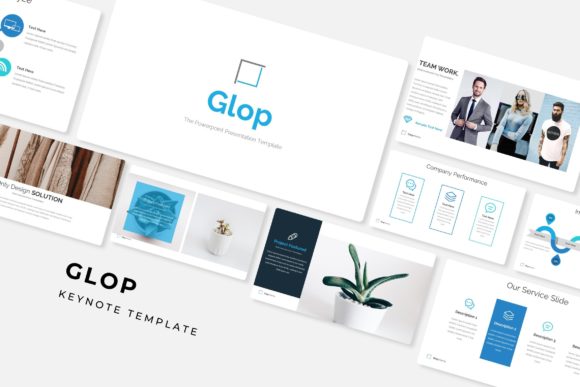
The headline feature—150+ total slides spread across five premade color variations—sounds impressive, but its real value is practical. Think of it as having a comprehensive design system at your fingertips. You're not just getting a handful of layouts; you're getting a versatile library. Each of the five color templates includes 30 meticulously designed slides. This means whether you're presenting data, telling a brand story, or showcasing a gallery, there’s likely a slide structure ready to be adapted. This depth saves you from the tedious work of building layouts from scratch, letting you focus on your content and narrative.
The five premade color schemes are more than just aesthetic choices. They’re a starting point for visual consistency. Imagine you’re a small business owner preparing materials for a trade show. You can choose the color variation that best aligns with your existing brand palette, ensuring your presentation feels cohesive with your brochures, website, and social media. For a freelancer, this variety means you can tailor presentations to different client brands without starting over each time. The included Pixel-perfect illustrations and handcrafted infographics in the PowerPoint section break slides aren't just decorative; they help break up information, making complex data digestible and maintaining audience engagement.
Practical Design Features for Real-World Projects
Let’s talk about the features that impact your day-to-day design work. The resizable and editable graphic picture placeholders are a game-changer for efficiency. Instead of wrestling with image sizing and positioning, you can simply drag and drop your photos into a pre-defined space. This is particularly useful for creating portfolio slides or product galleries quickly. The fact that the entire template is based on Master Slides is a professional touch. It means you can make a change to a font, color, or logo on one master slide, and it will automatically update across dozens of others, ensuring visual consistency and saving you from manual, error-prone edits.
This template system is built for adaptability. The gallery and portfolio slide layouts are perfect for creatives—photographers, designers, artists—who need to present their work in a clean, impactful way. For marketers, the infographic slides can transform campaign results or audience demographics into compelling visual stories. The section break slides help structure your presentation logically, guiding your audience from one point to the next, which is crucial for maintaining clarity and flow during a pitch or webinar.
Matching the Template to Your Brand Identity
Choosing a presentation template is a branding decision. The modern, clean aesthetic of Glop lends itself well to a variety of fields—from tech startups and digital agencies to lifestyle brands and educational content. Its visual style supports clarity and professionalism, which are foundational to strong brand recognition. When your presentation looks polished, it elevates your perceived credibility before you even speak a word.
Consider how this asset fits into your broader design assets toolkit. A consistent visual language across your presentations, social media graphics, and marketing materials builds trust. The five color variations allow you to experiment with different moods while staying within a cohesive framework. For instance, a deep blue variation might convey trust and stability for a financial consultant, while a vibrant coral could energize a creative workshop pitch. The key is to select the variation that best communicates your core message and resonates with your target audience.
Getting Started and Making It Your Own
The package includes everything you need to begin: the five PPTX files, a widescreen format, and clear instructions via the Readme First file. The note about the font used (free font download link included) is important—typography is a critical component of design. Take a moment to download and install the suggested font to ensure everything displays as intended. However, don't be afraid to experiment with your own font pairing choices once you're comfortable. Pairing the template's clean sans-serif with a contrasting display font for headlines can add a unique personality that's truly yours.
Remember, the photographs in the preview are placeholders. This is your cue to inject your own brand imagery. Swap them out for high-quality photos of your team, your products, or your projects. This simple act transforms a generic template into a personalized storytelling tool. The drag & drop functionality makes this process intuitive, but take the time to choose images that are well-lit, high-resolution, and emotionally aligned with your content.
Ultimately, a tool like the Glop Keynote Template is a facilitator. It handles the heavy lifting of layout and visual structure, freeing you to concentrate on what you do best: crafting a compelling message, telling a persuasive story, and connecting with your audience. Whether you're a designer looking for a efficient base to customize, a small business owner aiming to present more professionally, or a content creator needing to visualize data beautifully, this system provides a robust and flexible starting point. The value lies not just in the number of slides, but in the thoughtful organization and adaptability that can genuinely streamline your creative process.