Barince Power Point Template: A Deep Dive into Its 150+ Slides
You've been there. It's 11 PM, the coffee is cold, and you're staring at a blank PowerPoint slide, willing inspiration to strike. The presentation is for a crucial client pitch, a quarterly review, or maybe the launch of your new side hustle. The content is there, in your head, but the visual execution feels impossible. You need something professional, cohesive, and impressive, but you don't have the time or budget to hire a designer. This is where a resource like the Barince Power Point Template moves from being a nice-to-have to an absolute lifesaver. It's not just a collection of slides; it's a structured system designed to transform your raw ideas into a polished, compelling narrative.
More Than Just Slides: A Visual Communication System
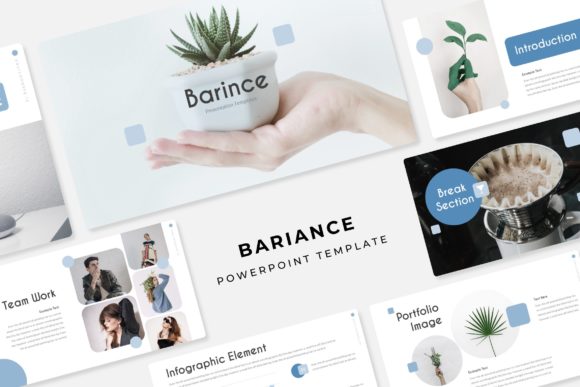
At first glance, the numbers are impressive: 150+ total slides, spread across 5 premade color themes, with 30 slides dedicated to each template variation. But the real value of the Barince presentation lies in its thoughtful architecture. It understands that a great presentation is a story. The included section break slides act as chapter dividers, giving your audience clear visual cues and allowing you to pause and transition smoothly between key points. This structure is invaluable for maintaining flow and keeping viewers engaged, whether you're walking a boardroom through a financial forecast or explaining a new marketing strategy to your team.
The design philosophy centers on clarity and modern professionalism. The pixel-perfect illustrations and handcrafted infographics are not generic clipart. They are custom-designed assets meant to simplify complex data. Instead of forcing you to build charts from scratch, the template provides editable frameworks where you can plug in your numbers and let the visual do the talking. This directly addresses a common pain point: the struggle to make data digestible. A well-designed infographic from the Barince suite can turn a dense spreadsheet into an insightful, at-a-glance understanding for your audience.
Practicality for the Busy Professional
What truly sets a usable template apart is its ease of use. The Barince template is built based on master slides, which is the backbone of PowerPoint efficiency. This means global changes—like adjusting a font or color scheme—happen in one place and cascade throughout the entire deck. You're not hunting down every single text box to make an update.
Furthermore, the resizable and editable graphics with picture placeholders are a game-changer. Need to swap out a team photo? Simply drag and drop your image into the designated area, and it automatically crops to fit the design perfectly. This eliminates the fiddly, time-consuming process of manually resizing and cropping images, ensuring every photo looks intentional and professional. For small business owners or content creators wearing multiple hats, this kind of intuitive design feature saves hours of frustration.
The inclusion of gallery and portfolio slides is another thoughtful touch. Creatives—photographers, designers, consultants—can showcase their work in a clean, grid-based layout that feels curated, not cluttered. It turns a presentation into a portable portfolio, perfect for client meetings or networking events. You're not just telling a potential client what you can do; you're showing them in a format that's as polished as the work itself.
From Pitch Decks to Brand Guides: Real-World Applications
The versatility of the Barince template extends far beyond a standard sales pitch. Consider these applications:
- Brand Identity Presentations: Use the structured slides to present a full brand identity to a client, from logo concepts and color palettes to typography guidelines and application mockups. The consistent, professional backdrop makes your work look even more credible.
- Marketing Campaign Briefs: Outline a campaign strategy using the infographic slides to map out timelines, target audience demographics, and budget allocations. The visual clarity helps get all stakeholders on the same page quickly.
- Investor Decks: For startups and entrepreneurs, the clean, modern aesthetic and logical flow are ideal for conveying complex business models, market opportunities, and financial projections with confidence.
- Educational Workshops & Webinars: Teachers, coaches, and trainers can create engaging educational materials. The section breaks help organize modules, and the infographics can explain processes or concepts effectively.
- Internal Reports & Updates: Transform mundane quarterly reports into engaging narratives. Use the portfolio slides to highlight team achievements or project milestones visually.
Maximizing Your Investment: Tips for Using the Template
To get the most out of a resource like this, a little strategy goes a long way. First, choose your color theme intentionally. The five premade options are a starting point. Select the one that best aligns with your brand or the tone of your presentation—a darker theme might feel more corporate, while a brighter one could be more energetic. Remember, you can often tweak these colors further to match your exact brand hex codes.
Second, resist the urge to use every single slide. A 150-slide library is a toolkit, not a mandate. Curate your deck ruthlessly. Select only the layouts that serve your specific story. A strong 20-slide presentation is infinitely more powerful than a rambling 50-slide one. The template's variety gives you options, not obligations.
Finally, pay attention to the typography. The Barince package includes a readme first file and font used (free font download link included). This is critical. Install the recommended fonts before you begin editing to preserve the design's integrity. If you decide to use your own brand fonts, test them thoroughly. Ensure they maintain the same readability and visual weight as the originals. The pairing of a clean sans-serif for body text with a distinctive serif or display font for headings, as likely intended by the template designers, is a classic formula for a reason—it works.
In the end, the Barince Power Point Template is more than a collection of design assets. It's a framework for clear communication. It provides the professional polish and structural logic that allows your content to shine, helping you build brand recognition, ensure visual consistency, and ultimately, connect with your audience more effectively. It’s about presenting your ideas with the confidence they deserve.