Numelo PowerPoint Template: A Deep Dive into Its 150+ Slides
Every professional has been there. You’re staring at a blank PowerPoint slide, the cursor blinking mockingly, as you try to distill a complex business strategy, a creative portfolio, or a crucial marketing pitch into a compelling visual story. The pressure is on to not only convey information but to do so with polish, consistency, and visual appeal. This is where the difference between a mediocre presentation and a memorable one often lies—not just in the content, but in its execution. A tool that understands this balance can transform your workflow and your results.
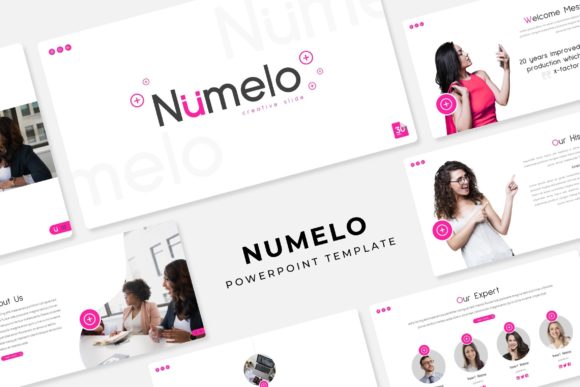
Enter the Numelo PowerPoint Template, a presentation toolkit designed for those who value both aesthetics and efficiency. At its core, it’s a comprehensive system built to eliminate the design guesswork. With over 150 total slides organized into five distinct, premade color palettes, it offers a structured yet flexible foundation. Each color theme provides 30 meticulously crafted slides, ensuring your brand’s visual language remains consistent from the opening title to the closing call-to-action. This isn’t just a collection of pretty layouts; it’s a framework for professional visual communication.
Beyond Aesthetics: The Practical Engine for Modern Brands
For the entrepreneur, marketer, or designer, time is a non-renewable resource. The true value of a resource like the Numelo template lies in how it streamlines the creation process without sacrificing quality. The slides are built upon Master Slides, the backbone of any efficient PowerPoint workflow. This means global changes to fonts, colors, or logos can be implemented in seconds across the entire deck. Combined with pixel-perfect illustrations and handcrafted infographics, you’re equipped to present data and concepts with clarity and style, whether you’re explaining quarterly growth to stakeholders or outlining a new service to potential clients.
Consider the practical applications. A small business owner can use the Gallery and Portfolio slides to showcase products or past work with stunning, drag-and-drop picture placeholders. A content creator can leverage the Section Break Slides to structure a webinar or online course into digestible, visually distinct modules. The resizable and editable graphics mean you’re never stuck with a static element. Need to adjust a chart, change an icon, or resize an illustration to fit your layout? The flexibility is built in, empowering you to tailor every slide to your exact message.
Crafting Visual Consistency and Brand Recognition
In a crowded digital landscape, brand recognition is built on repetition and consistency. Using a disjointed set of templates or default PowerPoint themes can undermine your professional image. The Numelo system, with its 5 premade color variations, acts as a guardrail for your brand identity. You select the color palette that best aligns with your existing branding—be it a corporate blue, an energetic coral, or an elegant earth tone—and the entire presentation architecture adapts. This ensures that every slide you produce, from a sales pitch to an internal report, reinforces the same visual cues, strengthening audience recall.
The inclusion of 5 PPTX Widescreen files underscores its readiness for modern displays. Presentations are no longer confined to a 4:3 projector screen; they’re viewed on laptops, tablets, and conference room monitors. A widescreen format provides a more cinematic and engaging canvas, allowing for more creative layouts and better use of space for visuals and text. The practical “Readme First” document and the free font download link included are thoughtful touches that demonstrate an understanding of the user’s journey, smoothing out the initial setup process so you can focus on your content.
From Marketing Assets to Editorial Layouts: Unlocking Potential
The versatility of a well-designed template system like this extends far beyond the conference room. Think of the Numelo PowerPoint Template as a launchpad for a variety of marketing assets. The clean, modern layouts are perfect for creating cohesive social media graphics or storyboards. The infographic slides can be repurposed into standalone visuals for blog posts or email newsletters. For those in editorial design or publishing, the template offers a structured way to plan magazine layouts, book chapters, or visual reports, using the slide sorter view as a dynamic mood board.
For freelancers and agencies, it becomes a valuable client-facing tool. Use the portfolio slides to present design concepts, the infographic sections to visualize campaign results, and the clean text layouts to outline project proposals. The professional aesthetic instantly elevates your perceived value. Even for personal projects—like planning a wedding, organizing a community event, or creating a family photo book—the system provides a beautiful, easy-to-navigate structure that turns a simple slideshow into a polished keepsake.
Maximizing Your Toolkit: Tips for Effective Use
To get the most out of a resource like the Numelo template, a strategic approach is key. Start by choosing the right color theme that resonates with your project’s tone and your brand’s personality. Before adding content, spend time familiarizing yourself with the slide types available. Map out your presentation’s narrative arc: which slides will serve as introductions, which will highlight key data, and which will drive your conclusion?
Don’t be afraid to mix and match elements across the 30 slides within a single color theme. A chart from one slide might pair perfectly with the layout of another. Use the Master Slides to your advantage—edit the master to add your company logo to the footer of every slide or change the default font to one that’s central to your brand identity. Finally, remember the note about photographs. While the template provides stunning placeholders, your own high-quality images are what will make the presentation uniquely yours. Source images that align with your message and brand style to create a truly authentic and powerful visual story.