Roaste PowerPoint Template: Modern Slides for Visual Storytelling
There’s a particular kind of frustration that hits when you open a blank slide deck with a looming deadline. The cursor blinks expectantly, but your creative energy is already spent before the first text box appears. What you need isn’t just a template—it’s a visual system that works with your ideas rather than against them. That’s where thoughtfully designed presentation templates enter the picture, transforming the chore of slide design into something closer to visual conversation.
Why This Template Feels Different
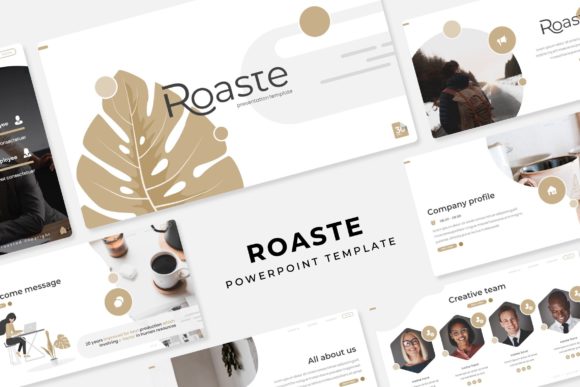
The Roaste PowerPoint Template stands out because it approaches presentations as cohesive visual narratives rather than isolated slides. With over 150 total slides spread across five premade color variations, you’re getting thirty distinct layouts for each color scheme. This isn’t just about changing accent colors—it’s about having five complete visual identities ready to match different brand personalities or project moods. The warm terracotta might suit a boutique bakery’s brand pitch, while the crisp navy could frame a tech startup’s investor presentation perfectly.
What makes these slides genuinely useful is their balance between structure and flexibility. Each layout follows a clear visual hierarchy that guides your audience’s attention naturally. The section break slides create breathing room in longer presentations, while the gallery and portfolio layouts give visual work the space it deserves. You’ll find slides designed specifically for infographics, timelines, process flows, and data visualization—all handcrafted with consistent visual language rather than generic placeholder shapes.
Beyond the Corporate Boardroom
While presentation templates often scream “quarterly reports,” the Roaste template’s aesthetic versatility makes it surprisingly adaptable. That clean, modern typography paired with ample white space works beautifully for creative pitches, workshop materials, or educational content. The pixel-perfect illustrations maintain their sharpness whether you’re projecting on a conference room screen or viewing on a laptop during a video call.
Consider how these slides might serve different professionals. A freelance photographer could use the gallery layouts to showcase recent work during client meetings. A craft workshop instructor might build visual guides with the process flow slides. A small business owner preparing for a trade show could create a looping presentation that tells their brand story through the carefully structured narrative slides. The template becomes less about “presenting” and more about visual communication in its broadest sense.
Practical Design That Saves Real Time
The true value of any design asset lies in how it performs under real working conditions. The Roaste template’s master slide architecture means that changing a font, adjusting a color, or modifying a layout element updates consistently across all related slides. This isn’t just convenient—it’s essential for maintaining visual coherence when you’re tweaking a presentation at the eleventh hour before a big meeting.
The drag-and-drop picture placeholders deserve special mention. Rather than wrestling with awkward cropping or alignment, you can simply drop your images into precisely sized frames that maintain their proportions. For anyone who’s spent twenty minutes trying to get three product images to line up perfectly, this feature alone justifies the investment. The resizable graphics scale without losing clarity, whether you need a small icon or a full-bleed background image.
Building Visual Consistency Across Projects
One of the most overlooked aspects of professional presentations is their role in brand consistency. When your pitch deck, workshop materials, and internal reports all share visual DNA, you’re reinforcing brand recognition with every document. The Roaste template’s five color variations give you enough flexibility to adapt to different contexts while maintaining that underlying consistency.
Think about how this plays out practically. A marketing consultant might use the coral variation for creative pitches and the charcoal version for analytical reports, but both maintain the same typographic rhythm and layout logic. This consistency builds subconscious trust with audiences who encounter your materials repeatedly. The included font pairing suggestions help you maintain that visual harmony even when customizing the template extensively.
Making the Template Your Own
Customization should enhance rather than complicate the design process. Start by selecting the color variation that best matches your current project’s mood or your existing brand palette. Then examine the slide master layouts—understanding how they’re organized will save you time when you need to modify elements globally rather than slide by slide.
When adapting the template for different projects, resist the urge to overhaul everything at once. Sometimes simply swapping the accent color or changing the headline font creates enough visual distinction for a new context. The template’s strength lies in its balanced compositions, so major structural changes often weaken rather than improve the visual flow. Instead, focus on making strategic adjustments that serve your specific content.
Pairing Typography with Visual Content
The included fonts—available through the provided download links—were selected to complement the template’s modern aesthetic. These aren’t decorative display fonts that sacrifice readability for style. They’re workhorse typefaces that maintain clarity across different sizes and applications, from bold section headers to detailed data labels.
When customizing typography, consider how different weights and styles create visual rhythm. A presentation might use the bold sans-serif for main headings, the regular weight for body text, and perhaps a contrasting serif for pull quotes or special callouts. This typographic variety guides readers through your content hierarchy naturally, making complex information more digestible. Always test your font choices at the actual presentation size—what looks elegant on your design screen might become illegible when projected in a bright room.
The Practical Details That Matter
Every presentation template lives or dies by its technical execution. The Roaste template delivers widescreen PPTX files optimized for modern displays, with consistent margins and safe zones that prevent content from getting cut off during projection. The file organization—with separate files for each color variation—makes it easy to maintain multiple versions without confusion.
One practical note about included assets: while the template provides the structural framework and typographic system, the photographs shown in previews are for demonstration only. This is actually preferable, as it encourages you to use your own authentic imagery rather than generic stock photos. Your own team photos, product shots, or custom illustrations will always resonate more powerfully with your audience than polished but impersonal stock imagery.
Choosing When and Where to Use It
Not every communication needs a full presentation template. The Roaste system shines when you need to convey complex information visually over multiple slides—think client pitches, educational workshops, detailed reports, or portfolio presentations. For quick updates or simple announcements, a single-page document or email might serve better.
Consider your audience’s expectations and viewing context. A formal investor meeting might call for the more conservative color variations, while a creative brainstorm could benefit from the warmer, more vibrant options. The template’s flexibility allows you to adapt to these different contexts while maintaining professional standards. The section breaks and gallery layouts particularly shine when you need to guide audiences through sequential information or visual comparisons.
Ultimately, the best presentation template is one that disappears into your workflow, supporting your content without demanding attention to itself. The Roaste PowerPoint Template achieves this balance through thoughtful design choices that prioritize clarity, consistency, and practical functionality. It provides enough structure to prevent design paralysis while offering sufficient flexibility to accommodate diverse professional needs—from corporate presentations to creative portfolios to educational materials.