Barax Power Point Template: A Comprehensive Review
You know the feeling. You open PowerPoint, faced with that default, sterile white slide and the blinking cursor, and your creative energy just drains away. You have a brilliant idea, a business proposal, or a portfolio to showcase, but the tool feels like a barrier. This is where a thoughtfully designed template changes the game. The Barax Power Point Template isn't just a collection of slides; it's a structured system for visual communication that lets you focus on your message, not on wrestling with formatting.
More Than Slides: A Visual Communication Toolkit
At its core, Barax is built on a foundation of modern typography and clean design principles. The standout feature is its use of a premium, versatile typeface that ensures your content is not only readable but also carries a distinct personality. Whether you're presenting financial data, a brand story, or a creative portfolio, the right font pairing within the template guides the viewer's eye and reinforces your professional credibility. The included font files, with free download links, mean you can maintain this visual consistency beyond the presentation itself, using it across your brand materials.
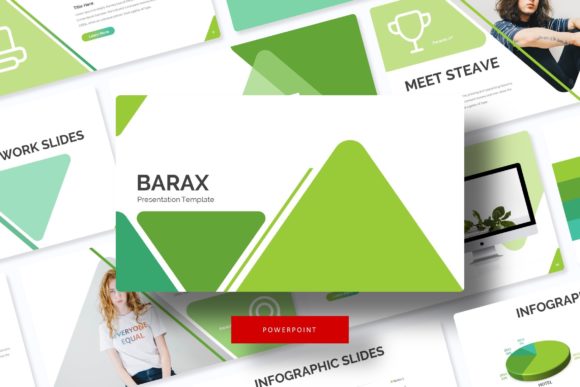
The real power lies in its structure. With over 150 total slides organized into five premade color themes, you get 30 meticulously crafted slides for each variation. This isn't about having endless, repetitive layouts. It's about having the right slide for every need: a clean section break to divide your narrative, a gallery slide to let your product images shine, a data-driven infographic to simplify complex numbers, and portfolio slides that frame your work beautifully. Each element is designed on master slides, meaning a single edit can cascade throughout your entire deck, saving you hours of tedious adjustments.
Practical Applications for Real-World Projects
Think of the Barax template as a launchpad for numerous professional scenarios. For the entrepreneur crafting a pitch deck, the structured slides help build a compelling story arc, from problem to solution to financial ask. The picture placeholders are a godsend—simply drag and drop your product photos or team headshots, and they resize perfectly, maintaining that pixel-perfect clarity.
For designers and agencies, it becomes a dynamic tool for client presentations. The handcrafted infographics can be customized to represent a client's unique metrics, while the consistent color themes allow you to swiftly apply their brand palette. It’s equally effective for internal use, like creating polished training materials, quarterly reports, or marketing strategy plans that align everyone visually.
Beyond the boardroom, consider its use for:
- Digital Products & Courses: Create visually cohesive lesson modules and workshop materials that enhance the learning experience.
- Social Media & Content Marketing: Export individual slides as high-resolution graphics for Instagram carousels, LinkedIn posts, or blog headers, ensuring your visual brand remains consistent across platforms.
- Event Planning: Design sleek event agendas, speaker bios, and venue maps for conferences or webinars.
- Portfolio Showcases: The dedicated gallery slides provide an elegant, minimalist frame for photographers, architects, or artists to present their work without distraction.
The "editable graphic" feature is particularly valuable. Icons, shapes, and charts aren't locked images; they are fully editable vectors within PowerPoint. This means you can change colors to match your brand, adjust sizes, or even repurpose elements to create custom graphics for other materials like posters or simple packaging mockups.
Integrating Barax into Your Brand Workflow
Adopting a template like this is an exercise in brand discipline. The five premade color palettes offer a starting point, but the true magic happens when you customize them. Establish your brand's primary and secondary colors, then apply them across the master slides. This one-time setup guarantees that every future presentation automatically reflects your brand identity, strengthening recognition and professionalism.
The typography is your silent ambassador. The included serif and sans-serif font pairings are chosen for their balance of character and clarity. Use the bolder display styles for headlines to grab attention, and the cleaner variants for body text to ensure readability, even from the back of a room. Before finalizing, always test your slides in presenter mode. Check the contrast between text and background, and ensure your chosen font size is legible on various screens.
Remember, the template is a framework. While it provides 150+ slides, you don't need to use them all. Curate the slides that serve your specific narrative. A strong 15-slide presentation that tells a focused story is infinitely more powerful than a 50-slide deck that meanders. Use the section breaks to give your audience visual and mental pauses, and let the portfolio slides do the heavy lifting when showcasing visual work.
Key Considerations Before You Download
First, note the practical inclusions. You receive five PPTX files for standard and widescreen formats, the five color themes, and the crucial readme file with font links. Install the fonts first to avoid missing font errors. The template is designed for Microsoft PowerPoint, and while some features may work in other software, full functionality and ease of editing are guaranteed in its native environment.
A critical detail: the preview images use photographs that are not included. This is standard practice, as licensing for stock photos is separate. You will need to supply your own high-quality imagery. This is actually an advantage—it forces you to use your own authentic photos, which strengthens your brand's uniqueness and avoids generic stock imagery.
Finally, understand the licensing. The template and its included fonts are provided for use in your projects, both personal and commercial. However, you cannot redistribute the raw template files themselves as a product. This protects the designer's work while giving you immense creative freedom.
Investing in a tool like the Barax Power Point Template is ultimately an investment in clarity and professionalism. It removes the friction from the design process, allowing your ideas and your content to take center stage with the visual polish they deserve. It’s about presenting yourself, your business, or your work with the confidence that comes from a cohesive, well-designed visual language.