Cabrion Keynote Template: A Flexible Presentation Kit
Imagine this: you have a groundbreaking idea, a business update that could change your trajectory, or a portfolio piece that needs to shine. You sit down to build the presentation, and then it happens. You spend the first three hours hunting for a color palette, the next two trying to align text boxes, and by the time you’re done, the slides look disjointed and amateurish. We have all been there. The gap between a great idea and a polished presentation often comes down to the toolkit you have at your disposal. This is where a robust design asset becomes less of a luxury and more of a necessity for professionals who value their time and their brand image.
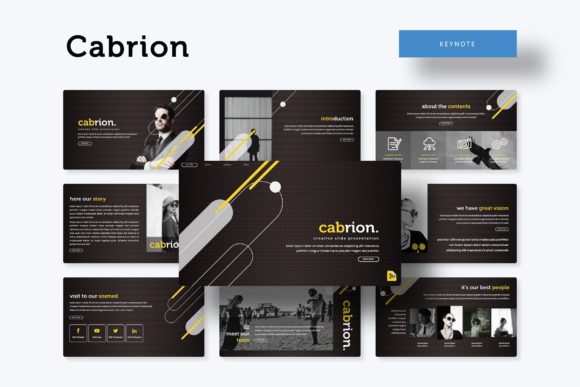
When you are building a brand identity, whether it is for a startup, a freelance career, or a marketing agency, visual consistency is the glue that holds your reputation together. You need assets that work hard for you. The Cabrion Keynote Template is designed to bridge that gap between concept and execution. It is not merely a collection of slides; it is a comprehensive framework for visual communication. With over 150 total slides spread across five premade color variations, this kit offers a depth that allows you to tailor your message to specific audiences without ever leaving the Keynote ecosystem.
Building Visual Consistency Across 150+ Slides
One of the biggest challenges in visual communication is maintaining a cohesive look across different types of content. You might have data-heavy slides, image-centric portfolio pages, and text-heavy section breaks all in one deck. The Cabrion template addresses this by offering 30 unique slide designs for each of the five color themes. This structure ensures that whether you are presenting financial data or showcasing a photography project, the typography, spacing, and visual rhythm remain consistent.
For those involved in branding and marketing, this consistency is vital. When you are pitching to investors or onboarding new clients, a pixel-perfect presentation signals professionalism. It shows that you care about the details. The template includes section break slides that act as visual palate cleansers, allowing your audience to reset before diving into the next phase of your narrative. This is particularly useful for small business owners and entrepreneurs who often need to cover a wide range of topics—from company history to product features—in a single meeting.
Practical Applications for Modern Professionals
The utility of a high-quality presentation template extends far beyond the boardroom. Think about how you can leverage the Cabrion Keynote Template for various aspects of your professional life. If you are a content creator or blogger, you can use the gallery and portfolio slides to create media kits. Instead of sending a static PDF, imagine sending a dynamic, interactive Keynote file that showcases your best work, complete with handcrafted infographics that break down your engagement metrics.
For designers and creative entrepreneurs, the template serves as a canvas for client mockups. The resizable and editable graphics mean you can drop in your own designs to show clients how their new logo might look on merchandise or packaging. The picture placeholders are designed for drag-and-drop functionality, which streamlines the workflow significantly. You don’t need to be a master of Keynote to make these slides look professional; the master slides architecture ensures that your formatting stays intact as you customize the content.
Here are a few specific ways to integrate this template into your workflow:
- Investor Pitch Decks: Use the clean layouts to present complex data without overwhelming your audience. The structured grids help maintain readability.
- Brand Guidelines: Create a living document that outlines your brand’s voice and visual style. The widescreen format is perfect for displaying typography pairings and color codes.
- Social Media Strategy: Map out your content calendar visually. Use the slides to plan Instagram grids or Pinterest boards, giving you a macro view of your visual strategy.
- Educational Workshops: If you teach online courses or run workshops, the variety of slide types allows you to mix text explanations with graphical demonstrations effectively.
The Power of Editable Graphics and Infographics
Data visualization is often where presentations fail. A generic chart can make even the most impressive growth look boring. Cabrion includes handcrafted infographics that are fully editable. This means you can change colors, resize elements, and adjust text to match your specific data points. Whether you are showing a timeline of your company’s history or a comparative analysis of market trends, these graphics add a layer of sophistication that standard Keynote charts simply cannot match.
The ability to resize these graphics without loss of quality is a significant advantage for print materials and digital products. You might find that a specific graphic works perfectly for a slide, but you also want to use it as a standalone element on your website or within a PDF brochure. Because the vector elements are editable, you have the flexibility to repurpose these assets across your entire design ecosystem. This approach to design assets—buying once and using everywhere—is a smart strategy for managing budgets while maintaining high production values.
Customization: Making the Template Your Own
While the template comes with five distinct color palettes, the real value lies in its adaptability. The master slides feature is the engine under the hood. By editing the master slide, you can instantly update fonts, logos, and color schemes across the entire presentation. This is a lifesaver for marketers and agencies who work with multiple clients. You can load the template, switch out the master branding elements, and have a client-ready presentation in minutes rather than hours.
Typography plays a huge role in this customization. The included readme first file points you to the free font download links. Using the recommended typefaces ensures that the text aligns perfectly with the spacing and layout of the slides. However, the design is robust enough to handle premium fonts or custom typefaces that you might already use for your brand. Whether you prefer a sans serif font for a modern, clean look or a serif font for a more traditional, authoritative feel, the layouts provide ample breathing room for text of various sizes.
Consider the psychology of color when selecting your variation. The five premade colors aren't just random hues; they represent different moods and industries. One might be energetic and vibrant, suitable for a lifestyle brand or social media graphics. Another might be deep and muted, perfect for a financial institution or law firm. By understanding the visual characteristics of each theme, you can select the one that best resonates with your target audience.
Technical Reliability and User Experience
Nothing derails a presentation faster than technical glitches. The Cabrion template is built on a pixel-perfect grid system. This attention to detail means that alignment is precise, ensuring that your slides look sharp on high-resolution displays. The widescreen format (16:9) is the standard for modern projectors and monitors, ensuring that your content fills the screen without awkward black bars or stretching.
For those who are not graphic design experts, the user experience of the template is intuitive. The drag & drop picture placeholders are clearly marked, making it easy to insert your own photography or stock images. While the preview images in the template store are for illustration, the placeholders are sized to accommodate high-quality photos. This ease of use is crucial for hobbyists or solopreneurs who may not have a dedicated design team but still want to present a polished image to the world.
Ultimately, the Cabrion Keynote Template is more than just a set of slides; it is a tool for better storytelling. It removes the friction of design so you can focus on your message. Whether you are closing a sale, teaching a class, or pitching a creative concept, having a reliable, visually stunning foundation allows your ideas to take center stage. It is an investment in your professional image that pays dividends every time you click "present."