Oqu Keynote Template: A Complete Presentation Toolkit
Building a presentation from scratch often feels like reinventing the wheel. You spend hours aligning text boxes, resizing images, and tweaking color palettes, only to end up with a slide deck that looks inconsistent or amateurish. If you are an entrepreneur, designer, or marketer who frequently needs to pitch ideas, the Oqu Keynote Template offers a solution that bridges the gap between efficiency and high-end design. It is not just a set of slides; it is a comprehensive visual ecosystem designed to ensure your message lands with clarity and impact.
Visual Appeal and Structural Integrity
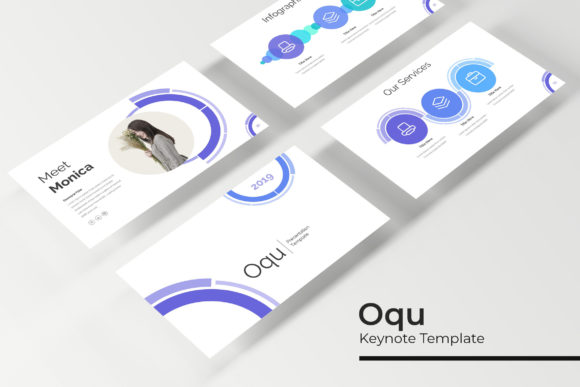
The primary strength of this template lies in its sheer volume and variety. With 150+ total slides included, you are equipped to handle almost any presentation scenario without running out of layouts. The design philosophy centers on "pixel-perfect illustrations," meaning the graphical elements are sharp, modern, and crafted with precision. Unlike generic templates where icons look fuzzy or gradients appear banded, Oqu ensures that every visual element maintains its integrity, even on high-resolution projectors or Retina displays.
One of the standout features is the inclusion of 5 premade colors. Each color scheme is distinct, offering 30 unique slides per variation. This allows you to select a palette that aligns perfectly with your existing brand identity. Whether you prefer a muted, corporate aesthetic or a vibrant, energetic look, the variation system ensures you don't have to manually recolor every object in the deck. The structure is based on Master Slides, which is a critical feature for maintaining visual consistency. By editing the master, you can globally change fonts or layout elements, saving you from the tedious process of updating each slide individually.
Practical Applications for Branding and Marketing
For small business owners and content creators, a presentation is often more than just a slideshow—it is a key marketing asset. The Oqu Keynote Template is versatile enough to serve multiple functions in your visual communication strategy.
Consider the following real-world uses:
- Pitch Decks and Proposals: Use the Gallery and Portfolio slides to showcase past work. The resizable and editable graphic picture placeholders allow you to simply drag and drop your images into pre-defined shapes, ensuring your portfolio looks polished without manual cropping.
- Brand Guidelines: If you are a designer handing off assets to a client, you can use the section break slides to delineate different aspects of a brand identity system, such as logo usage, typography, and color theory.
- Social Media Content: Many influencers and marketers repurpose slide content for Instagram carousels or LinkedIn posts. The handcrafted infographics included in the package are particularly useful here, as they can be exported as images to explain complex data or processes to your audience.
- Educational Workshops: The clean layout makes it ideal for webinars or online courses. The "Section Break" slides help students mentally transition between topics, improving information retention.
Streamlining the Design Process
Efficiency is a currency in the professional world. The Oqu Keynote Template is built to minimize friction in your workflow. The drag and drop functionality is not just a buzzword; it means the placeholders are sized and positioned according to professional design standards. When you drop a photo into a placeholder, the aspect ratio is automatically adjusted, preventing the stretching or squashing that often plagues amateur presentations.
Furthermore, the inclusion of handcrafted infographics addresses a common pain point: data visualization. Instead of struggling to create charts from scratch or using generic Excel graphics, you have access to pre-designed visual metaphors for statistics, timelines, and processes. This elevates the professionalism of your report instantly.
It is also worth noting the accessibility of the package. The readme first file included in the download ensures you know exactly how to get started, and the links to free fonts mean you won't need to purchase expensive typography licenses just to make the slides look like the preview. This attention to user experience demonstrates an understanding of the end-user's budget constraints.
Technical Flexibility and File Compatibility
The package comes with 5 PPTX Files in a PPTX Widescreen (16:9) format. This widescreen aspect ratio is the modern standard for most screens, from laptops to conference room displays, ensuring your content fills the screen without black bars.
Because the graphics are resizable and editable, you have full control over the visual hierarchy. If a specific icon is too large or a shape is obscuring your text, you can adjust it. This flexibility is crucial for branding. For example, if your brand uses a specific shade of blue that isn't in the premade colors, you can manually adjust the elements to match your exact hex codes. The template acts as a robust framework that you can customize to fit your specific needs, rather than a rigid container that forces you to change your content to fit the design.
Key Features Checklist
When evaluating this template, it helps to look at the specific deliverables included in the package. These assets are designed to work together to create a cohesive presentation experience:
- Total Volume: Over 150 slides provide ample variety for long-form presentations.
- Color Variations: 5 distinct premade color themes (30 slides each) allow for quick rebranding.
- Visual Assets: Includes Section Break Slides, Gallery/Portfolio layouts, and Infographics.
- Technical Specs: Built on Master Slides for easy global editing; widescreen format.
- Usability: Drag & drop picture placeholders and editable vector graphics.
- Documentation: Readme file included with font links and setup instructions.
Enhancing Audience Engagement
Ultimately, the goal of any presentation is to communicate effectively. A cluttered or poorly designed slide deck can distract from your message, causing your audience to disengage. By utilizing a premium Keynote template like Oqu, you signal to your audience that you value quality and attention to detail.
The use of section break slides is a subtle but powerful way to manage audience attention. These full-bleed images or bold typographic slides act as mental palate cleansers, signaling a shift in topic and giving the audience a moment to process the information they just received. This pacing is essential for keeping viewers engaged during longer presentations.
Additionally, the handcrafted infographics serve a dual purpose. They simplify complex information, making it digestible, and they add a layer of visual interest that text-heavy slides lack. In a world of short attention spans, visual storytelling is paramount. Whether you are presenting a quarterly business review or a creative portfolio, the visual language provided by Oqu helps bridge the gap between your data and your audience's understanding.
In summary, the Oqu Keynote Template is a practical tool for anyone who needs to create professional presentations quickly. It balances aesthetic appeal with functional design features, offering a flexible foundation for branding, marketing, and education. By handling the heavy lifting of layout and design, it frees you up to focus on what matters most: your content and your message.