Qunota Keynote Template: Streamline Your Next Big Presentation
You have a major pitch, a quarterly review, or a product launch coming up, and the thought of staring at a blank slide deck is already draining your energy. We have all been there—spending hours tweaking margins, adjusting font sizes, and trying to make a generic PowerPoint template look like it was designed by a professional. The reality is that visual communication is just as important as the message itself. If your slides look cluttered, inconsistent, or amateurish, your audience disengages before you even get to your key points. This is where the Qunota Keynote Template steps in to change the game for designers, entrepreneurs, and content creators alike.
A Visual System Built for Modern Professionals
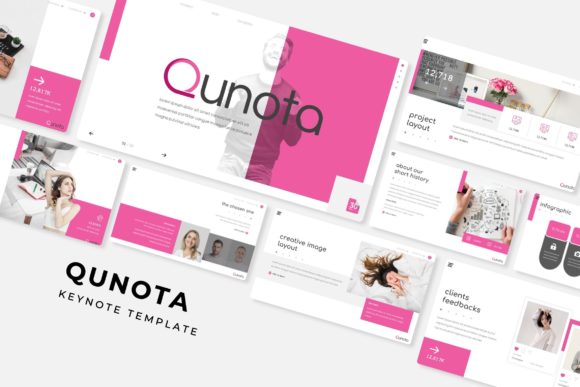
The Qunota Keynote Template is not just a collection of slides; it is a comprehensive visual system designed to handle the heavy lifting of design so you can focus on your narrative. The standout feature here is the sheer volume of options available without the overwhelm. With 150+ total slides organized into 5 premade color schemes, you are looking at a robust toolkit that fits a wide range of brand identities. Whether your brand identity leans towards corporate minimalism, bold creativity, or warm elegance, there is a color variation that likely matches your vision right out of the box.
One of the most practical aspects of this package is the structure. Each of the five templates provides 30 distinct slides, ensuring you have enough variety to keep your audience engaged throughout a long presentation without repeating layouts. The inclusion of Section Break Slides is a subtle but powerful feature. It allows you to pause, reset the audience's attention, and clearly demarcate different chapters of your story. This is particularly useful for startup founders pitching to investors or marketers presenting a multi-channel strategy.
Practicality Meets Professional Polish
For many professionals, the gap between a "good idea" and a "good presentation" is technical execution. The Qunota template bridges this gap through its Master Slide architecture. If you have ever struggled with formatting errors when moving elements around, you will appreciate the pixel-perfect illustrations and the drag-and-drop functionality. Because the graphics are based on Master Slides, you can make global changes efficiently, ensuring that your typography and layout remain consistent from the first slide to the last.
Visual consistency is the bedrock of brand recognition. When you are creating marketing assets or presenting a new digital product, every pixel matters. The Resizable and Editable Graphic Picture Placeholders are a massive time-saver. Instead of fiddling with image cropping and aspect ratios, you simply drop your high-resolution images into the designated areas. This ensures your imagery looks crisp and professional, maintaining the readability of the surrounding text. It is a practical solution for busy content creators who need to swap out images quickly for different clients or campaigns.
Infographics and Data Visualization
Data can be dry, but it doesn't have to be boring. One of the highlights of the Qunota package is the Handcrafted Infographic section. In the world of digital marketing and business strategy, the ability to visualize complex data is a superpower. Whether you are breaking down a sales funnel, explaining a workflow, or showcasing market growth, these infographics provide a pre-designed canvas.
For a small business owner or a startup founder, this feature alone is worth the investment. Creating custom infographics from scratch in software like Adobe Illustrator can take hours. Here, you have access to editable vector shapes that you can resize without losing quality. This allows you to present your data with clarity, making it easier for your audience to grasp difficult concepts. It is an essential tool for anyone looking to improve audience engagement through better visual storytelling.
Versatility Across Creative Projects
While this is marketed as a presentation template, its utility extends far beyond the conference room. Think about the various touchpoints your brand has with the public. The design principles used in the Qunota Keynote Template—clean layouts, balanced whitespace, and strong typography—are the same principles that drive success in other areas of design.
Consider how you might use elements of this template for broader branding efforts. The Gallery and Portfolio slides are perfect for web design case studies or editorial layouts. If you are a photographer, designer, or architect, you can adapt these slides to create a stunning digital lookbook or a PDF portfolio to send to prospective clients. The visual language is adaptable enough to be repurposed for social media graphics or packaging design mood boards.
Furthermore, the pixel-perfect illustrations included in the deck can serve as inspiration or direct assets for other print materials. If you are designing a poster for an event or a flyer for a local market, the clean aesthetic of these slides can translate beautifully into static media. The key is to view the template not just as a slideshow tool, but as a library of design assets that can be deconstructed and reassembled to fit your specific creative needs.
Technical Details and Workflow Efficiency
Nothing kills a creative flow faster than technical friction. The Qunota Keynote Template is built for a smooth workflow. It is fully editable in PowerPoint (PPTX), making it accessible to the vast majority of users who may not have access to more niche design software. The package includes 5 PPTX Widescreen files, ensuring your presentation looks sharp on modern monitors and projectors.
Attention to detail is evident in the inclusion of a Readme First file and the Font used information. Typography is a critical component of design, and using the intended typeface ensures the layouts look exactly as the designer intended. The fact that a free font download link is included removes a common barrier to entry, allowing you to maintain the integrity of the design without purchasing expensive premium fonts separately.
However, it is important to note the licensing and usage terms. As with any design assets, you must read the fine print. The preview images are for illustration purposes only, meaning the high-end stock photos you see in the demo won't be in the download. You will need to source your own imagery, which is actually a benefit—it ensures your presentation looks unique to your brand and avoids generic stock photo fatigue.
Maximizing Impact with Minimal Effort
The ultimate goal of any premium template is to save you time while elevating your output. For the entrepreneur juggling multiple roles, or the designer working against a tight deadline, the Qunota Keynote Template offers a high return on investment. It provides a modern typography framework and a structured layout system that forces good design habits. It prevents you from overcrowding slides and encourages you to let your content breathe.
When you sit down to build your next pitch deck, training module, or creative portfolio, consider the message you are sending with your design choices. A cohesive, well-structured presentation signals professionalism and competence. By utilizing a resource like Qunota, you are not just buying slides; you are buying peace of mind and a polished visual identity that commands respect. It is a practical, stylish, and efficient solution for anyone serious about visual communication.