Maleco Keynote Template: Crafting a Polished Presentation
There’s a specific kind of frustration that hits about thirty minutes into building a presentation from scratch. You’re staring at a blank slide, the cursor is blinking mockingly, and you’re trying to figure out if that shade of blue looks professional or just depressing. For entrepreneurs, marketers, and creative professionals, time is the one resource we can’t manufacture, yet we spend hours wrestling with alignment tools and color palettes. This is exactly why a well-structured design asset becomes more than just a convenience—it becomes a necessity for survival.
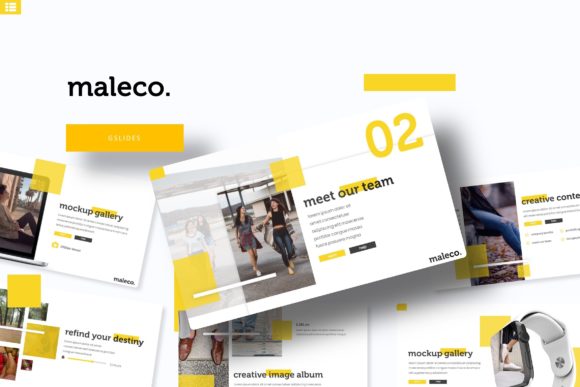
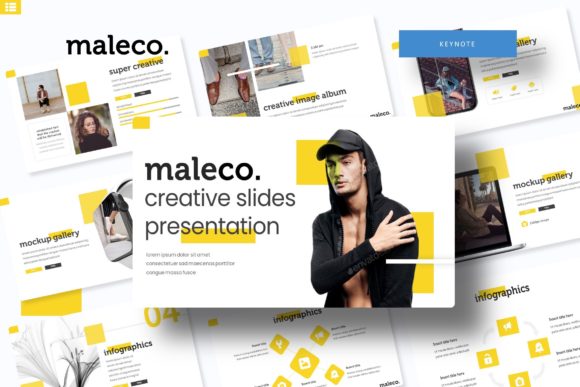
When you open the Maleco Keynote Template, the immediate relief is tangible. It isn't just a collection of empty boxes waiting for text; it is a comprehensive visual system designed to handle the heavy lifting of design theory so you can focus on the message. With a staggering 150+ total slides included, the sheer volume of options means you aren't being forced into a rigid mold. Instead, you are being handed a toolkit that adapts to your specific narrative, whether you are pitching a new brand identity, breaking down complex data, or showcasing a portfolio of creative work.
Visual Flexibility and Color Psychology
One of the standout features of this package is the inclusion of five distinct premade color schemes, each containing 30 unique slides. In the world of branding and visual communication, color is rarely arbitrary. It is a psychological trigger. A pitch deck for a fintech startup will demand a different emotional response than a proposal for a lifestyle blog or a high-fashion portfolio. By providing five separate color variations, the Maleco template acknowledges that a "one size fits all" approach rarely works in professional settings.
These aren't just five random hues swapped out in the theme settings. They represent different moods and industries. This allows a user to select the variation that best aligns with their existing brand identity without needing to dive into the color picker tool. For those who do want to customize further, the master slide architecture ensures that any changes you make ripple through the entire document instantly. It’s a balance of structure and creative freedom that is often missing in standard Keynote offerings.
The Power of Structure: Infographics and Section Breaks
Data visualization is often the stumbling block for non-designers. We all know we should "show, not tell," but creating a bar chart or a process diagram from scratch usually results in something that looks amateurish. The Maleco Keynote Template solves this with handcrafted infographics. These aren't generic clip-art charts; they are designed to make complex information digestible and visually engaging.
Imagine you are a marketing professional explaining a multi-channel strategy. Instead of bullet points, you can use a visual flow that guides the client’s eye from awareness to conversion. Or perhaps you are a small business owner presenting quarterly growth; the pre-built data slides allow you to plug in numbers and immediately look like a Fortune 500 company. Furthermore, the inclusion of section break slides is a subtle but powerful tool. These slides act as visual pauses, helping your audience reset their attention span before diving into the next topic. They prevent "slide fatigue" and keep the pacing of your presentation professional and engaging.
Practicality Meets Pixel-Perfection
Functionality is just as important as aesthetics. The Maleco template is built on a drag-and-drop system with picture placeholders, which is a game-changer for efficiency. You don't need to be a wizard with Keynote’s arrangement tools. If you have a headshot, a product photo, or a landscape image, you simply drag it into the designated area, and the template crops and resizes it to fit perfectly within the design grid.
This pixel-perfect approach ensures that your presentation looks sharp on any screen, from a laptop monitor to a high-definition projector. The resizable and editable graphics are another major win. If you are a designer creating a template for a client, or a business owner who needs to tweak icons to match a specific brand guideline, you have full control. This level of editability transforms the file from a static document into a living design asset. It’s about giving you the tools to maintain visual consistency across every single slide, reinforcing your brand recognition through repetition and quality.
Real-World Applications for Modern Professionals
The versatility of the Maleco Keynote Template extends far beyond the boardroom. While it excels at corporate pitches and business proposals, its utility spans across various creative industries.
For the Creative Entrepreneur: If you are a photographer, interior designer, or artist, this template serves as a stunning portfolio showcase. The gallery slides are designed to let your work breathe, using whitespace effectively to draw attention to the imagery rather than cluttering the screen with text.
For Marketers and Content Creators: Social media managers often need to present campaign strategies. The clean layout allows for the integration of mockups and social media graphics, helping clients visualize the final product before it goes live.
For Educators and Speakers: If you are hosting a webinar or a workshop, the section breaks and infographic slides help structure your curriculum. It keeps the audience engaged and helps them follow along with complex topics.
For Packaging and Branding: When presenting a new brand identity, you need to show how the logo, typography, and color palette work together. The template provides the perfect neutral canvas to display these elements without competing for attention.
Technical Details and Setup
Getting started is designed to be frictionless. The package includes 5 PPTX files (standard) and 5 PPTX Widescreen files, ensuring that your presentation looks correct regardless of the aspect ratio of the venue’s projector or your colleague’s monitor. Widescreen (16:9) is the modern standard, but having the standard (4:3) option is a thoughtful inclusion for legacy systems or specific video platforms.
Typography is the backbone of any design asset, and the Maleco template utilizes free fonts. This is a crucial detail for small business owners and freelancers. There is nothing worse than buying a template only to find out you need to purchase an expensive commercial license for the font just to make it work. The inclusion of a "Readme First" file with download links for the fonts ensures that you can replicate the exact look of the preview instantly. It removes the guesswork and potential roadblocks that usually occur when opening a new file.
Maximizing Your Investment
When you download the Maleco Keynote Template, you are investing in a system that saves you time and elevates your professional image. To get the most out of it, consider these practical tips:
- Review All Slides First: Before you start deleting slides, scroll through the entire deck. You might find a unique layout for a "Meet the Team" section or a quote slide that you hadn't considered.
- Use High-Quality Images: The design is pixel-perfect, so your images need to be too. Blurry photos will undermine the professional aesthetic of the template.
- Maintain Consistency: Stick to the color palette provided in your chosen variation. If you start introducing random colors, you risk breaking the visual harmony established by the designers.
- Leverage the Infographics: Don't just default to text slides. Force yourself to find a way to visualize at least 30% of your content. It increases retention and makes your presentation more dynamic.
Ultimately, a presentation is a storytelling medium. The Maleco Keynote Template provides the stage, the lighting, and the props. It handles the technical aspects of design—alignment, hierarchy, and color theory—so that you can step into the spotlight and focus entirely on delivering your message with confidence and clarity. Whether you are closing a deal, teaching a concept, or showcasing a masterpiece, this tool ensures you look the part.