Design Stunning Presentations with the Lovebook Google Slide Template
Every project has a story to tell, and how you present that story can make all the difference. Whether you're pitching a new business idea, showcasing a portfolio, or creating marketing materials, the visual framework you choose sets the tone for your entire message. A cluttered or generic slide deck can undermine even the most compelling content, while a thoughtfully designed template elevates your ideas and captures attention from the first click.
What Makes This Template Stand Out
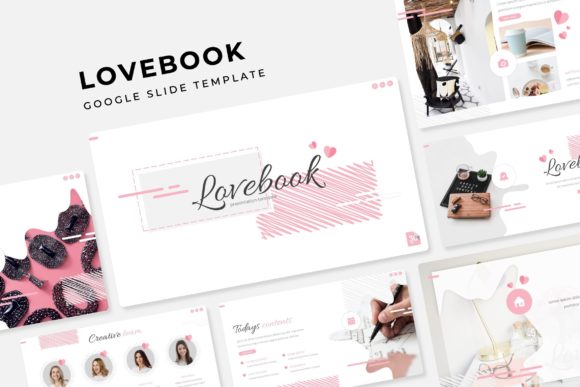
The Lovebook Google Slide Template isn't just another set of slides—it's a comprehensive design system built for professionals who need versatility without sacrificing quality. With over 150 total slides organized across five premade color themes, you get 30 distinct layouts for each color variation. That means whether you're working on a warm, romantic palette for a wedding business or a sleek, professional scheme for a corporate presentation, there's already a foundation waiting for you.
What really sets this apart is the attention to detail in every element. The handcrafted infographics feel custom-made rather than pulled from a generic clipart library. Section break slides give your presentation natural breathing room, while gallery and portfolio slides let your work speak for itself without awkward formatting hacks. You can tell someone actually thought about how real people use presentations—not just how they look in a preview image.
Practical Applications for Real Projects
Think about the last time you had to pull together a presentation under a tight deadline. Maybe it was a client pitch, a workshop for your community, or a social media content calendar you needed to share with your team. The Lovebook template handles all of these scenarios because the designers built it with actual use cases in mind.
For small business owners, this template works beautifully for investor pitches, product launches, and quarterly reviews. The gallery slides are perfect for showcasing product photography, while the infographic layouts help you present data in a way that actually makes sense to your audience. If you run an online shop, you could use the portfolio sections to display customer testimonials alongside product images.
Content creators and bloggers will find the template especially useful for creating media kits, collaboration proposals, and course materials. The drag-and-drop picture placeholders mean you can swap out images without wrestling with alignment tools, and the master slide system ensures your branding stays consistent across every page.
For those working in branding and marketing, the five color variations give you enough flexibility to match different client identities or campaign themes. You're not locked into a single aesthetic—you can adapt the same structural foundation to suit a playful startup or a sophisticated luxury brand.
Features That Save You Time
One of the biggest frustrations with template packs is discovering that everything looks great in the preview but falls apart the moment you try to customize it. Resizable and editable graphics solve this problem entirely. Need to make an icon larger for a title slide? Done. Want to adjust the color of an infographic element to match your brand guidelines? Simple.
The pixel-perfect illustrations deserve special mention. These aren't blurry or generic vector shapes—they're carefully crafted visuals that maintain their quality whether you're presenting on a laptop screen or projecting onto a conference room wall. Combined with the master slide architecture, you get a system that's both flexible and structurally sound.
Here's what's actually included in your download:
- 5 PPTX files in standard format
- 5 PPTX widescreen files for modern displays
- 5 premade color themes with 30 slides each
- A Readme First file to get you started quickly
- Font information with free download links
The fact that the fonts are free to download eliminates one of the most common headaches with premium templates—discovering that you need to purchase an expensive typeface just to make the design work as intended.
Matching Design to Your Goals
Before diving into customization, take a moment to consider what your presentation needs to accomplish. Are you trying to build trust with potential investors? The clean, professional layouts with structured data visualizations will serve you well. Are you creating a mood board for a creative project? The gallery and portfolio slides let imagery take center stage.
Think about your audience's expectations too. A presentation for a tech startup should feel different from one for a boutique bakery, even if both use the same template system. The five color themes give you a starting point, but the real magic happens when you align those choices with your existing brand identity—your logo colors, your website palette, the overall vibe of your social media presence.
Font pairing is another consideration worth your attention. While the included fonts are designed to work harmoniously with the template, you might want to experiment with alternatives that better reflect your brand personality. A handwritten script font could add warmth to a personal brand presentation, while a clean sans serif keeps things modern and approachable for a corporate audience.
Getting the Most from Your Investment
The best templates become part of your ongoing workflow rather than a one-time download that collects digital dust. Consider creating a few master versions of the Lovebook template tailored to your most common needs—a client pitch version, an internal team update version, and a social media content version. This way, you're always starting from a polished foundation rather than building from scratch.
Pay attention to the section break slides especially. These transitional moments in a presentation are often overlooked, but they create rhythm and help your audience process information. Use them strategically to shift between topics or to build anticipation before a big reveal.
The widescreen format files are worth noting as well. As more meetings happen virtually and more content gets shared on platforms that favor wider aspect ratios, having both standard and widescreen options means your presentations will look right whether they're displayed on a traditional projector or shared in a video call.
One practical tip: keep the original template files untouched as your source material. When you start a new project, duplicate the file and work from the copy. This preserves your clean starting point and prevents the frustration of accidentally overwriting your base template with customized content from a previous project.
The Lovebook Google Slide Template ultimately gives you a professional design system that adapts to your needs rather than forcing you to adapt to it. With thoughtful customization and strategic use of its features, it becomes less of a template and more of a creative partner for your visual communication.