Design Stunning Decks with the Hrdsv Google Slide Template
We have all been there: staring at a blank slide deck at 10 PM, trying to align text boxes and hunt for a color palette that doesn't look like it was designed in 1998. For entrepreneurs, marketers, and designers, presentation creation is often the most tedious part of the workflow. You know the content is strong, but if the delivery looks amateurish, your audience checks out immediately. This is where a robust design asset becomes not just a luxury, but a necessity. The Hrdsv Google Slide Template is engineered to bridge the gap between a brilliant idea and a polished, professional presentation, offering a comprehensive toolkit that saves time while elevating your visual identity.
More Than Just Slides: A Comprehensive Design Ecosystem
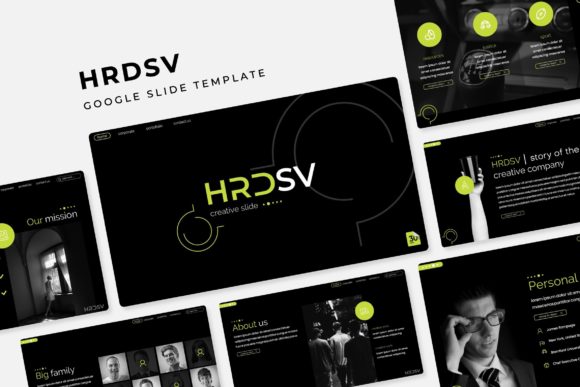
When you download a standard template, you usually get a handful of generic layouts that require heavy customization. The Hrdsv - Google Slide Template takes a different approach, functioning almost like a design system rather than a simple file. With over 150 total slides included, it provides the volume needed to handle complex projects without repeating layouts. What makes this package particularly distinct is the inclusion of 5 premade color variations. You aren't just getting one look; you are getting five unique aesthetic directions, with 30 slides dedicated to each color scheme. This structure allows you to instantly switch the entire mood of your presentation to match specific brand guidelines or client preferences.
For those who value precision, the "Pixel-perfect illustrations" and "Handcrafted Infographic" elements are game changers. We have all suffered through generic stock icons that don't align properly or look blurry on high-resolution screens. These assets are designed to scale perfectly, ensuring your data visualization remains crisp and legible whether you are projecting on a conference room screen or sharing a PDF on mobile devices.
Streamlining the Creative Workflow
One of the biggest hurdles in presentation design is the "drag and drop" reality versus the promise. Often, templates claim to be editable but break the moment you try to insert your own imagery. The Hrdsv template solves this with dedicated Picture Placeholder functionality built directly into the master slides. This means you can simply click an icon to upload your own photos, and the design automatically crops and resizes them to fit the frame perfectly. There is no need to manually adjust aspect ratios or worry about your images looking stretched.
Furthermore, the template includes specific Section Break Slides. This is a critical feature for storytelling. Instead of abruptly jumping from a financial overview to a marketing strategy, you can use these dedicated slides to pause, reset the audience’s attention, and introduce the next chapter of your narrative. Paired with Gallery and Portfolio slides, this makes the asset ideal for creatives who need to showcase visual work—such as photographers, interior designers, or architects—without cluttering the screen with too many images at once.
Practical Applications for Modern Branding
While the file format is Google Slides (and PowerPoint), the utility of the Hrdsv template extends far beyond internal team meetings. Consider how this asset integrates into your broader brand identity workflow. For a small business owner, consistency is key. You can use the resizable and editable graphics to create social media assets. For example, a single slide layout designed for a "Team Member" bio can be exported as an image and posted to LinkedIn or Instagram, ensuring your digital footprint matches your internal presentations.
Marketing professionals will find the infographic slides particularly useful for content marketing. Instead of writing a dense blog post, you can repurpose data into a visual summary using the handcrafted infographics. This not only improves readability but also increases the likelihood of the content being shared. The template effectively acts as a hub for visual communication, allowing you to maintain visual consistency across different platforms without hiring a graphic designer for every small task.
Moreover, the clean, modern typography included in the design supports brand recognition. When your audience sees a specific style of headers, bullet points, and color blocking repeatedly, they begin to associate that visual language with your expertise. Whether you are pitching to investors, onboarding new employees, or presenting a quarterly review, the professional presentation style signals that you take your business seriously.
Technical Details and Usability
For the technical user, the package includes 5 PPTX files (widescreen format), ensuring compatibility across different operating systems. The "Readme First" file is a thoughtful inclusion, guiding you through font installations so you don't open the file to missing typefaces. Since the template relies on free fonts, you avoid the headache of licensing issues that often plague premium design assets.
The reliance on Master Slides is perhaps the most powerful technical feature for efficiency. By editing the master, you can globally change fonts, colors, or logo placements across all 150+ slides in seconds. This is invaluable for agencies or freelancers who need to "white label" the presentation for different clients. You are essentially buying a framework that can be adapted to infinite brand styles. It transforms the design process from a manual, slide-by-slide chore into a strategic, top-down configuration.
Final Thoughts on Value
In a digital landscape saturated with mediocre visuals, the Hrdsv Google Slide Template offers a significant competitive edge. It removes the friction from the design process, allowing you to focus on your message. Whether you are a content creator building a media kit, a small business owner refining your pitch deck, or a marketer compiling a campaign report, the flexibility of this template adapts to your needs. It is not just about making slides; it is about communicating ideas with clarity, style, and confidence.