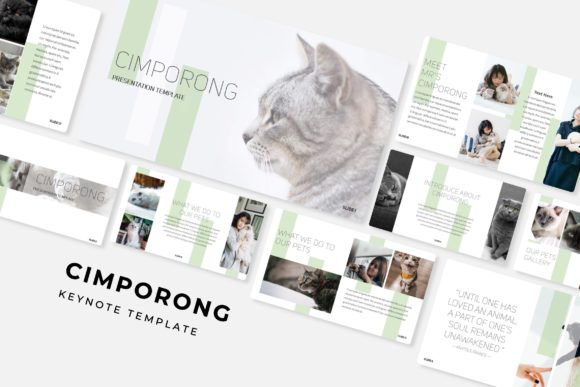
Cimporong Keynote Template: A Complete Design Toolkit
Let's be honest: creating a presentation from scratch can feel like an uphill battle. You open a blank slide deck, stare at the blinking cursor, and wonder how to make your data, story, or pitch look polished and professional without spending hours fiddling with layouts. That's where a robust, pre-designed toolkit like the Cimporong Keynote Template comes into play. It's not just a collection of pretty slides; it's a comprehensive system designed to help you communicate visually with clarity and style.
At its core, this template is built for efficiency and visual impact. Imagine having a library of over 150 slides at your fingertips, organized into five distinct color palettes. That's 30 meticulously crafted slides for each color theme, giving you immediate flexibility to match your brand or presentation topic. Whether you're pitching a new business idea, presenting quarterly results, or teaching a workshop, starting with a strong foundation saves you time and ensures a cohesive look from the first slide to the last.
Beyond the Slides: What's Actually Inside the Package
When you download a design asset, you want to know exactly what you're getting. The Cimporong template package is straightforward. It includes five PPTX files formatted for widescreen presentations, each corresponding to one of the five premade color variations. This means you can open the file that best fits your aesthetic and start customizing immediately.
One of the standout features is the inclusion of handcrafted infographics. These aren't generic clip-art charts; they are custom-designed elements that help transform complex information into easy-to-understand visuals. Think of timelines, process flows, comparison tables, and data visualization slides that are ready for your content. The package also includes section break slides to organize your narrative and dedicated gallery and portfolio slides, which are perfect for showcasing work, products, or case studies.
Practicality is key. Every graphic element is resizable and editable, and picture placeholders are designed for drag-and-drop functionality. This means you can swap in your own images, logos, and icons without breaking the slide's structure. Everything is based on master slides, so making a global change to a font or color is a simple task. The pixel-perfect illustrations ensure that your presentation looks sharp on any screen, from a laptop to a large projector display.
Putting the Template to Work: Real-World Applications
A great template is a versatile tool. For entrepreneurs and small business owners, the Cimporong slides can become the backbone of your brand's visual communication. Use the consistent design language to create investor decks, client proposals, and internal team updates that all feel connected. This consistency builds brand recognition; when your materials look professional and unified, people remember you.
Marketers and content creators will find immense value here. The gallery slides are ideal for social media content calendars or campaign performance reviews. The infographic slides can break down blog post statistics or email marketing results for a stakeholder presentation. For those in education or coaching, the template's structure helps organize lessons, workshops, or webinar content in an engaging way that holds an audience's attention.
Think about the last time you saw a presentation that truly captivated you. It likely wasn't just about the words on the screen, but how they were presented. Clean layouts, ample white space, and strategic use of visuals make information digestible. This template provides that framework, allowing you to focus on your message rather than wrestling with alignment and spacing.
Making It Your Own: Practical Tips for Customization
Having a powerful tool is one thing; using it effectively is another. Here are a few practical tips for getting the most out of a presentation template like this one.
- Start with Your Content Outline. Before you dive into editing slides, map out your presentation's story. What is the key message? What are the supporting points? Use the template's structure to support your narrative flow, not dictate it. The section break slides are perfect for signaling a shift to a new topic.
- Embrace the Color Variations. Don't just pick your favorite color. Consider your audience and context. A corporate finance presentation might call for the more subdued, professional palette, while a creative agency pitch could thrive with a bolder, more vibrant option. Test how your logo and brand colors integrate with each theme.
- Leverage the Infographics Wisely. The handcrafted infographics are a major asset, but avoid overloading a single slide. Choose the one that best simplifies your specific data point. A complex process is better explained with a flow diagram than a bullet list. Remember, the goal is clarity, not decoration.
- Utilize the Master Slides. If you need to change the font family or adjust a color accent across all 150+ slides, do it through the master slide view. This ensures uniformity and saves you from manually editing each individual slide, which is a common and frustrating oversight.
For designers, this template can serve as a rapid prototyping tool for client presentations, allowing you to mock up ideas quickly before investing time in a fully custom design. The included "Readme First" file is worth a glance, as it often contains specific instructions or links to download the free fonts used in the template, ensuring your design renders exactly as intended.
A Foundation for Professional Communication
Ultimately, a resource like the Cimporong Keynote Template is about removing barriers. It eliminates the "blank page anxiety" and provides a professional starting point that you can adapt to countless scenarios. It’s a practical design asset for anyone who needs to present ideas clearly and persuasively, whether you're in a boardroom, a classroom, or a virtual meeting.
The value lies in the details: the careful arrangement of elements, the thoughtful use of space, and the provision of multiple formats for different needs. By starting with a strong, pre-built foundation, you free up your creative energy to focus on what truly matters—your message, your data, and your connection with the audience. It’s a tool designed not to replace your creativity, but to channel it more effectively.