Joba Power Point Template: A Complete Design Toolkit for Professionals
There’s a unique kind of frustration that comes with opening a blank PowerPoint slide. Whether you’re pitching to investors, presenting a quarterly report to your team, or launching a new product to potential partners, the pressure to look polished and professional is immense. We’ve all been there—staring at the default white screen, wrestling with misaligned shapes, and spending hours trying to make a simple bar chart look like it wasn’t made in 1998. The reality is that content is only half the battle; the delivery mechanism matters just as much. A cluttered or amateurish presentation can distract from even the most brilliant ideas, while a sleek, cohesive deck can elevate your message instantly.
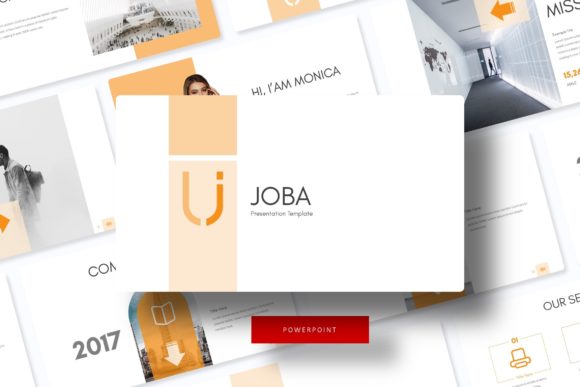
This is where the Joba Power Point Template enters the conversation, offering a solution that bridges the gap between high-end design and practical usability. It isn't just a collection of slides; it is a comprehensive visual system designed to handle the diverse needs of modern professionals. With over 150 total slides included, this package is built for those who need versatility without sacrificing style. It caters to the entrepreneur who needs to switch gears between a social media strategy deck and a financial overview, or the creative director presenting a branding guideline to a client. The sheer volume of content—30 slides for each of the 5 premade color templates—ensures that you aren't just buying a one-time use tool, but a long-term asset for your business communication.
Visual Consistency and the Power of Five
One of the most critical aspects of professional presentation design is visual consistency. When your fonts shift, your color palette wavers, or your graphic styles clash, it creates a subliminal sense of disorder. The Joba template addresses this by offering 5 distinct color variations. This feature is particularly valuable for brand managers and agencies. If you are working with multiple clients or managing a portfolio of sub-brands, having access to five premade color schemes allows you to instantly adapt the template to different visual identities. You can maintain the same structural integrity and layout flow while completely changing the mood and tone of the presentation simply by swapping the color file.
These aren't just random color picks, either. They are curated palettes that align with modern design trends, ensuring that your presentation feels current and relevant. Whether you need a corporate, trustworthy blue, a vibrant and energetic orange, or a sophisticated, minimalist grayscale, the options are there. This flexibility is a massive time-saver for small business owners who often wear multiple hats. Instead of guessing which hex codes work well together, you can rely on pre-selected palettes that are guaranteed to look harmonious across 30 different slide layouts.
Crafting Visual Stories with Handcrafted Infographics
Data visualization is often the weakest link in a presentation. We’ve all seen slides where the text is too small, the graphs are confusing, or the icons look generic. The Joba template includes handcrafted infographics that are designed to transform raw data into compelling visual narratives. These aren't your standard Excel-exported charts; they are custom-designed vector graphics that help your audience digest complex information quickly.
For marketers and content creators, this is a game-changer. Imagine presenting a social media growth strategy not with a list of bullet points, but with a dynamic, editable flow chart that guides the viewer’s eye from strategy to execution. Or, picture a financial forecast that uses custom iconography to represent different revenue streams. Because these graphics are built into the PowerPoint Master Slides, they are fully resizable and editable. You can stretch them, recolor them, and modify the text to fit your specific data points without breaking the layout. This level of customization ensures that your presentation looks bespoke, rather than like a generic template downloaded from the internet.
Streamlining Workflow with Drag-and-Drop Functionality
In the fast-paced world of business, time is a non-renewable resource. The architecture of the Joba template is built around a pixel-perfect, drag-and-drop philosophy. Every element is based on Master Slides, which is the backbone of any professional PowerPoint file. This means that if you want to change a font style, add a logo, or adjust the footer placement, you can do it once in the Master Slide, and the change will ripple across all 150+ slides instantly.
This feature is invaluable for those who need to make quick edits before a big meeting. The Picture Placeholder system is another highlight that simplifies the workflow. Instead of manually cropping and resizing every photograph to fit a specific shape—be it a circle, a rounded rectangle, or a complex mask—you simply drag your image into the designated area. The template does the heavy lifting, ensuring your images are cropped perfectly to fit the design. This is particularly useful for photographers, interior designers, and portfolio-based professionals who rely on high-quality imagery to sell their services. The "Gallery and Portfolio" slide layouts are specifically engineered to showcase your work in the best possible light, allowing the visuals to speak louder than words.
Beyond the Boardroom: Versatile Design Assets
While the primary function of this kit is presentation, the design elements within the Joba package are robust enough to serve as a foundation for broader brand identity work. The clean lines, modern typography, and structured layouts provide a solid starting point for other design assets. For instance, the section break slides included in the package can easily be repurposed as Instagram stories or Pinterest graphics. The portfolio layouts could be exported as high-resolution PDFs to serve as digital lookbooks or print-ready brochures.
The inclusion of free fonts is a thoughtful touch that removes the headache of licensing issues. Often, users download a template only to find that the fonts used are premium and require an extra purchase. The Joba template provides a Readme First guide with direct download links for the typefaces used, ensuring that your presentation looks exactly like the preview the moment you open the file. This attention to detail reflects an understanding of the end-user's experience, prioritizing ease of use and accessibility.
Practical Application for Real-World Scenarios
Let’s look at how this translates into tangible results for different industries. If you are an e-commerce entrepreneur, you can use the specific product showcase slides to highlight new inventory, using the picture placeholders to display high-res product photography. The "Joba Power Point Template" allows you to structure a pitch to investors where you walk them through your supply chain, marketing funnel, and revenue projections using distinct, easy-to-read sections.
For educators and consultants, the section break slides offer a visual pause for the audience, signaling a shift in topic that helps with information retention. The infographic slides can be used to break down complex theories or processes into step-by-step visual guides. Furthermore, because the graphics are vector-based, they remain crisp and clear even when projected on large screens, ensuring that your professionalism is never compromised by pixelation.
Ultimately, the value of a tool like the Joba template lies in its ability to reduce friction in the creative process. It provides a structured canvas that encourages good design habits—alignment, hierarchy, and balance—while offering enough flexibility to express your unique brand voice. Whether you are closing a sale, educating a class, or pitching a vision, having a reliable, visually stunning framework ensures that your ideas are received with the gravity and excitement they deserve. It is more than just a collection of slides; it is a communication partner designed to help you succeed.