Belizeh Power Point Template: A Complete Presentation Toolkit
Creating a presentation that looks polished, professional, and visually consistent can take hours of work — especially when you're starting from a blank slide. The Belizeh Power Point Template solves this problem by giving you a comprehensive design system built around 150+ total slides, organized across five premade color themes. Whether you're pitching a business idea, presenting a portfolio, or building a brand deck, this template provides the visual infrastructure to make your content shine without requiring advanced design skills.
What Makes This Template Visually Stand Out
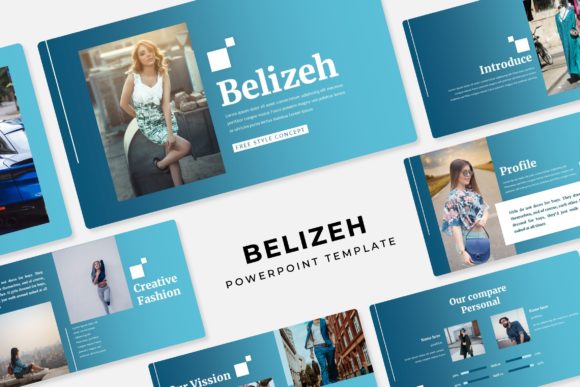
One of the first things you'll notice about the Belizeh Power Point Template is its clean, modern aesthetic. Each of the five color variations feels intentional — not like someone simply changed the accent color and called it a day. The palettes are carefully curated to work across different industries and moods, from corporate presentations to creative pitches. With 30 slides dedicated to each color theme, you get enough variety to build a full-length presentation without repeating layouts or feeling like you're stretching the template thin.
The handcrafted infographics deserve special mention. Rather than relying on generic clip art or overused chart styles, the infographics in this template feel designed with purpose. Data visualization is one of the hardest things to get right in a presentation, and having pre-built elements that are both attractive and functional saves significant time. You can drop in your numbers, adjust the labels, and have a polished chart ready in minutes instead of spending an hour wrestling with PowerPoint's built-in tools.
Practical Features That Save You Time
The template is built on master slides, which means every element follows a consistent design logic. This is more important than most people realize. When you work off master slides, your fonts, spacing, colors, and alignments stay uniform throughout the entire presentation. You avoid the common problem of slides looking like they were pulled from three different decks — something that immediately undermines credibility in a professional setting.
Picture placeholders are another feature that streamlines the workflow. The drag-and-drop functionality means you can swap in your own images without manually cropping, resizing, or repositioning elements. If you've ever tried to fit a photograph into a oddly shaped placeholder and ended up with a stretched or cropped mess, you'll appreciate how this works. The placeholders are designed to maintain aspect ratios and keep images sharp, which is why the template describes itself as pixel-perfect.
Section break slides are included as well — a small detail that makes a big structural difference. These slides act as visual dividers between topics, helping your audience follow the narrative arc of your presentation. Instead of jumping from one content slide to the next with no breathing room, section breaks give people a moment to absorb what they've just seen and prepare for what's coming next.
Who Benefits Most From This Template
Small business owners who need to create investor pitches, client proposals, or internal strategy decks will find the Belizeh Power Point Template particularly useful. The five color variations alone give you enough flexibility to tailor presentations to different audiences without starting from scratch each time. A pitch to a tech startup might call for the cooler palette, while a presentation to a lifestyle brand might work better with warmer tones.
Freelance designers and agencies can use this as a foundation for client work. Rather than building every presentation from the ground up — which is time-consuming and expensive — you can customize the existing layouts to match a client's brand identity. The resizable and editable graphics make this process straightforward, and since everything is vector-based, you can scale elements up or down without losing quality.
Content creators and marketers will appreciate the portfolio and gallery slides. If you need to showcase work samples, product photography, or campaign results, having dedicated layouts for visual content means you spend less time formatting and more time focusing on the story you're telling. The widescreen format (16:9) is standard for modern displays and projectors, so your presentation will look right whether you're presenting on a laptop screen or a conference room monitor.
Getting Started and What's Included
The download package includes five PPTX files — one for each color theme — along with a readme file that walks you through setup. The template uses free fonts, and the download link is included in the documentation, so you won't need to purchase additional typefaces to get the design looking exactly like the preview. This is a practical consideration that many template creators overlook, and it saves you from the frustration of opening a file only to find that half the text has defaulted to a system font.
One thing to keep in mind: the photographs and images shown in the template preview are for illustration purposes only and are not included in the download. This is standard practice with presentation templates, but it's worth noting so you can plan accordingly. You'll need to source your own images — whether from a stock photo service, your own photography, or client-provided assets.
When you first open the template, take a few minutes to explore the slide master view. This is where the core design elements live, and understanding how they're structured will make customization much easier. The layouts are logically organized, so you can quickly find the right slide type for your content — whether that's a text-heavy analysis slide, a full-bleed image layout, or a split-screen comparison.
Making the Most of Your Presentation Design
A template is only as effective as the content you put into it. As you build out your presentation, resist the urge to fill every slide with text. The Belizeh template's layouts are designed with whitespace in mind, and overcrowding them defeats the purpose of using a professionally designed system in the first place. Let the design breathe, and your message will land more effectively.
Consistency is the real value here. When every slide shares the same design DNA — the same typography hierarchy, the same spacing rules, the same color logic — your audience can focus on your ideas instead of being distracted by visual inconsistencies. That's what separates a presentation that feels amateur from one that feels authoritative, and it's exactly what this template is built to deliver.