Cromoshom Keynote Template: A Designer's Deep Dive
Let's be honest: we've all sat through presentations that were visually exhausting. The text is too small, the colors clash, and the overall effect feels disjointed and unprofessional. For anyone building a brand, pitching an idea, or teaching a concept, this is a missed opportunity. Your slides are a direct extension of your visual identity, and getting them right can mean the difference between a captivated audience and a disengaged one. That's where a meticulously crafted template system like the Cromoshom Keynote Template comes in, offering a solution that's less about generic slides and more about a cohesive visual language.
Beyond a Single File: A Cohesive Design System
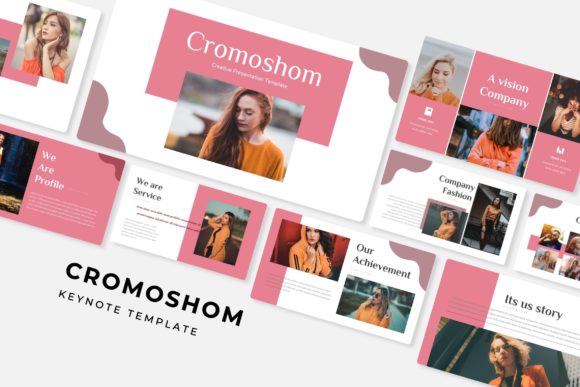
What immediately sets Cromoshom apart is its philosophy. It's not just one template; it's a toolkit. With 150+ total slides organized into 5 premade color palettes, you're essentially getting five distinct visual identities to start with. Each color scheme contains 30 carefully structured slides, providing a robust foundation for any project. This approach is invaluable for maintaining visual consistency. Whether you're a small business owner creating a weekly team update or a marketing professional developing a client pitch, you can select a color story that aligns with your brand and know that every subsequent slide will feel harmonious and intentional.
The design itself leans into a modern typography sensibility. It balances clean, readable sans-serif fonts for body text with more characterful display choices for headlines, creating a dynamic hierarchy that guides the viewer's eye. The inclusion of handcrafted infographics is a particular standout. Instead of struggling with clunky chart tools, you have access to beautiful, pre-designed data visualizations that you can simply edit with your own numbers. This alone can save hours of work and elevate the professionalism of any data-driven slide.
Practical Magic: Features That Actually Save Time
A beautiful template is useless if it's difficult to use. Cromoshom addresses this with features built for real-world workflow. The resizable and editable graphics and picture placeholders mean you're not locked into a rigid layout. Dragging and dropping your own images into pre-formatted spaces is intuitive, allowing for rapid customization without breaking the design's integrity. This is a godsend for content creators and entrepreneurs who need to iterate quickly.
Furthermore, the entire system is based on master slides. This is a critical feature for anyone serious about efficiency. Making a global change—like updating a logo, adjusting a font style, or tweaking a color—is as simple as editing the master slide once. The change then propagates through all 150+ slides, ensuring perfect consistency and saving you from the tedious, error-prone process of editing each slide individually. For those managing brand assets or preparing materials for a team, this centralized control is non-negotiable.
Unlocking Creative and Commercial Potential
The applications for a versatile template like this extend far beyond the boardroom. Think about the freelance designer crafting a brand style guide for a new client. The gallery and portfolio slides provide a stunning, professional way to showcase work. The section break slides create clear, visual pauses in the narrative, perfect for organizing complex information during a workshop or webinar.
For marketing assets, the potential is vast. You could adapt the slides to create compelling social media graphics for a carousel post, design a sleek digital product like an eBook or online course workbook, or even develop mockups for packaging design presentations. The clean, adaptable aesthetic also lends itself well to editorial layouts for digital magazines or lookbooks. Because the graphics are pixel-perfect, the output looks sharp across screens, from a laptop presentation to a high-resolution tablet display.
Making It Your Own: Integration and Pairing
While Cromoshom provides a fantastic starting point, its true power is unlocked when you integrate it into your broader brand identity. The included readme first file and links to free fonts mean you can ensure typographic consistency across your entire ecosystem—from your website to your printed business cards. This attention to detail is what separates amateur projects from professional ones.
A pro tip: use the template's color palettes as a springboard. You might love the structure of one set of slides but prefer the color story of another. Because everything is editable, you can mix and match elements, creating a truly custom feel. Consider how the template's style pairs with your existing logo design. If your logo is a bold, modern sans-serif, the template's clean lines will complement it beautifully. If your brand uses a more traditional serif, you might use the template's headings for impact and its body text for clarity, creating a balanced font pairing.
The Final Slide: A Tool, Not a Crutch
The Cromoshom Keynote Template is, at its core, a powerful design asset. It's a thoughtfully organized system that respects both aesthetics and function. It won't automatically make your content brilliant, but it will remove the visual barriers that often hinder brilliant content. By providing a professional, flexible, and efficient framework, it allows you to focus on what truly matters: your message, your story, and your connection with the audience. For anyone who regularly communicates visually, that's an investment that pays for itself in saved time and elevated impact.