Ganama Google Slides: 150+ Slides for a Polished Presentation
You’ve spent weeks perfecting your business idea, refining your product, and gathering your data. You sit down to create the presentation—the one that will secure funding, land a new client, or align your team—and you hit a wall. The default templates feel generic, the layouts are uninspired, and the thought of building a visually cohesive deck from scratch is overwhelming. This is where a thoughtfully designed asset like the Ganama Google Slide Template shifts from a nice-to-have to a genuine project lifesaver. It’s not just about having pretty slides; it’s about having a structured, professional framework that lets your content shine without demanding weeks of design work.
A Visual System, Not Just a Slide Deck
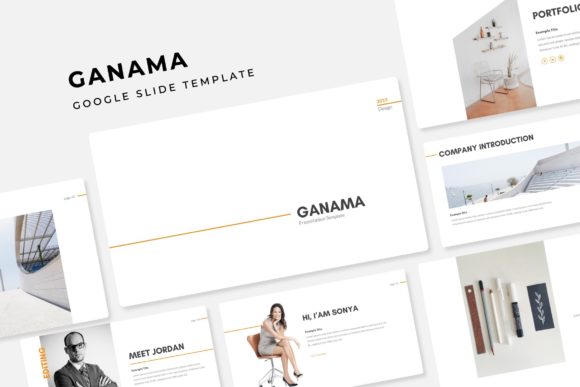
What immediately sets this template apart is its approach as a complete visual system. With over 150 total slides organized into five distinct color variations, you’re not just getting one look—you’re getting a versatile toolkit. Each of the five premade color themes includes 30 carefully crafted slides, covering everything from title sequences and team bios to data visualization and portfolio showcases. This built-in variety means you can maintain a fresh yet consistent aesthetic throughout a long presentation or adapt the template for different campaigns or clients without starting from zero. The handcrafted infographics are particularly valuable, transforming complex statistics and processes into clear, engaging visual stories that your audience can grasp at a glance.
For the entrepreneur or small business owner, this translates directly to professional presentation. Instead of wrestling with alignment, font sizes, and color harmony, you can focus on your message. The pixel-perfect illustrations and gallery and portfolio slides provide immediate credibility, making your work look polished and intentional. This is crucial for brand recognition; when every slide feels like it belongs to the same family, you reinforce your brand’s identity with every click. It’s a practical application of modern typography and design principles, packaged for someone who needs results, not a design degree.
Designed for Real-World Workflow and Flexibility
Time is a non-renewable resource for creatives and professionals. The Ganama template respects that with its drag & drop based on Master Slides functionality. This isn’t just a buzzword; it means the heavy lifting of layout structure is already done. You can swap out placeholder images, adjust text blocks, and rearrange sections with intuitive ease. The resizable and editable graphic elements ensure that you’re never stuck with a chart that’s too small or an icon that can’t be recolored to match your brand identity. This level of customization is what separates a generic template from a useful design asset.
Consider the practical applications beyond a standard investor pitch. This template is perfectly suited for creating marketing assets like product launch guides, internal training manuals, or client onboarding sequences. A content creator could use the portfolio slides to curate a stunning digital lookbook. A marketer might leverage the infographic slides to build a compelling case study for social media or a blog post. The included section break slides help pace your narrative, giving your audience visual breathing room and making dense information more digestible. This thoughtful structure supports better audience engagement by guiding the viewer’s eye and emphasizing key takeaways.
Practical Integration for Your Brand and Projects
Adopting a new template into your workflow should be seamless. The Ganama package includes 5 PPTX files—both standard and widescreen formats—ensuring compatibility whether you’re presenting on a laptop screen or a conference room projector. The inclusion of a Readme First file and links to the free fonts used is a critical, often overlooked detail. It eliminates the frustration of missing typefaces and ensures your presentation renders exactly as intended, preserving your visual consistency.
When thinking about integrating this into your projects, a few practical tips can maximize its value:
- Customize with Purpose: Start by selecting the color theme that best aligns with your project’s tone—whether it’s energetic, calm, professional, or creative. Then, use the master slide view to add your logo and set your brand’s primary fonts for headings and body text across all slides. This one-time setup locks in your brand identity from the start.
- Match Typography to Goals: The template’s clean, modern aesthetic pairs well with a wide range of font pairings. For a corporate report, pair it with a sturdy sans serif font for readability. For a creative pitch, consider a sophisticated serif font or a subtle script font for accent text. Always test how your chosen fonts look at presentation scale.
- Think Beyond the Screen: The high-resolution graphics and clear layouts make these slides ideal for export. Convert key slides into social media graphics for LinkedIn or Instagram. Use the infographic slides as a basis for a print material handout or a website hero image. The template becomes a hub for your digital products and editorial layouts.
Ultimately, the value of a tool like the Ganama Google Slide Template lies in its ability to remove friction from the creative and professional process. It provides a robust, aesthetically pleasing foundation that respects your time and elevates your output. For the small business owner presenting to stakeholders, the designer building a client mood board, or the marketer assembling a campaign toolkit, it offers a direct path to a more polished, consistent, and professional result. It’s about giving your ideas the visual platform they deserve, efficiently and effectively.