Design Smarter, Not Harder: The Rossario Google Slide Template
Let's be honest—starting a presentation from scratch feels like staring at a blank canvas with the clock ticking. You know the content needs to look polished, but wrestling with alignment, color schemes, and layout consistency eats up hours you simply don't have. Whether you're pitching to investors, teaching a workshop, or sharing quarterly results, the visual structure of your slides matters just as much as the words on them. That's where a thoughtfully built template system changes the game entirely.
What Exactly Is the Rossario Template?
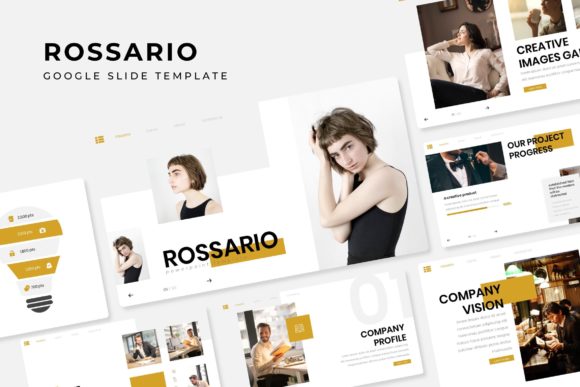
The Rossario Google Slide Template isn't just a single file you download and hope for the best. It's a comprehensive presentation toolkit built around 150+ total slides, organized into five premade color palettes. Each color variation contains 30 slides, giving you a full deck's worth of layouts without ever repeating yourself. The design language leans modern and clean—think sharp geometric shapes balanced with handcrafted infographics that feel intentional rather than generic.
What sets this apart from the hundreds of templates floating around the internet is the attention to detail. Every illustration is pixel-perfect, meaning they render crisply on screens of all sizes. Picture placeholders use a drag-and-drop system based on master slides, so swapping in your own images takes seconds rather than minutes of cropping and repositioning. You're not fighting the template—you're working with it.
Five Color Palettes, Five Brand Personalities
Color psychology isn't just marketing jargon. The palette you choose for a presentation shapes how your audience perceives your message before they read a single word. The Rossario template includes five distinct color variations, each crafted to evoke a different mood and professional context.
One palette might work beautifully for a tech startup seeking a sleek, authoritative presence. Another could suit a wellness brand that wants to feel approachable and grounded. Having 30 dedicated slides per color means you're not just tinting the same layout five ways—you're working with compositions designed to complement each palette's unique character. This kind of visual consistency strengthens brand recognition across every deck you produce, whether it's an internal meeting or a public-facing keynote.
For small business owners juggling multiple roles, this matters enormously. Instead of hiring a designer every time you need a polished presentation, you can maintain a cohesive visual identity using the same template system. Your marketing assets start speaking the same language, and your audience begins associating that visual thread with your credibility.
Infographics That Actually Tell a Story
We've all seen presentations where someone pastes a cluttered chart and hopes the audience figures it out. The handcrafted infographics included in the Rossario Google Slide Template take a different approach. Each one is designed to guide the viewer's eye through data or concepts in a logical sequence—whether that's a process flow, a comparison matrix, or a timeline.
These aren't generic clip-art placeholders. They're thoughtfully composed visual narratives that help presenters communicate complex ideas with clarity. If you're a content creator explaining a workflow, a marketer breaking down campaign results, or an entrepreneur illustrating a business model, these infographics do heavy lifting without requiring design expertise on your end.
The section break slides deserve a mention here too. Transitions between topics often feel abrupt in standard presentations. Dedicated section slides create natural breathing room, signaling to your audience that a new chapter is beginning. It's a subtle touch that makes a significant difference in how professional your delivery feels.
Beyond Presentations: Unexpected Creative Applications
While the Rossario template is built for Google Slides, its design assets extend far beyond traditional slide decks. The gallery and portfolio slides, for example, work beautifully as standalone visual layouts. A freelance photographer could adapt them into a digital lookbook. A crafter selling on Etsy might use the portfolio layouts to showcase product collections on their website or in email campaigns.
The resizable and editable graphics mean you're not locked into one output format. Export individual slides as images for social media graphics—Instagram carousels, Pinterest pins, or LinkedIn posts. Pull a single infographic layout and repurpose it as a blog header or a print material for a local event. The flexibility here is genuinely practical, especially for anyone managing multiple content channels on a limited budget.
Small business owners running pop-up shops or attending trade shows have found creative uses too. A well-designed slide exported as a poster can anchor a booth display. The same visual language can carry over into packaging inserts, thank-you cards, or product instruction sheets. When your design assets are cohesive, every customer touchpoint reinforces the same brand identity.
Practical Setup and What's Actually Included
The download package contains five PPTX files in widescreen format, one for each color variation. A Readme file walks you through setup, and the fonts used in the design are free to download—links are provided, so you won't hit any paywalls when installing typefaces. This is a detail that matters more than people realize. Nothing derails a project faster than discovering the beautiful serif font in your template costs $200 for a commercial license.
One important note: the photographs and images shown in preview screenshots are for illustration purposes only and aren't included in the download. You'll need to supply your own imagery, which actually works in your favor—it means your presentation will feature visuals that are genuinely relevant to your content rather than generic stock photos everyone recognizes.
Matching the Template to Your Project Goals
Before diving into slide customization, take ten minutes to clarify what your presentation needs to accomplish. Are you persuading, educating, informing, or inspiring? The answer shapes which slides you prioritize and how you arrange your content flow.
For a sales pitch, lean into the portfolio slides early to build credibility, then use infographics to present data that supports your claims. For a workshop or educational session, section break slides become essential structural markers. For a brand guidelines presentation, the clean layouts provide the neutral framework your brand assets need to shine without visual competition.
Testing matters too. Run through your completed deck on the actual device and screen you'll present on. Colors shift between monitors, and text that looks fine on your laptop might feel cramped on a projector. The master slide system in the Rossario template makes global adjustments straightforward—change a font size or swap a color once, and it cascades through the entire deck.
Font Pairing and Readability Considerations
The typography included with the template is chosen for on-screen readability, but context matters. If you're presenting in a large room, bump up body text sizes. If your audience will view the deck on their own screens—say, as a shared PDF—standard sizes work fine. Pay attention to contrast between text and background, especially in the darker color variations.
Should you want to introduce your own brand fonts alongside the template's included typefaces, do so sparingly. One display font for headlines paired with a clean sans serif for body text is a reliable formula. Avoid mixing more than two or three typefaces in a single deck. Consistency in typography is one of the fastest ways to make any presentation look professionally designed, even if you built it yourself on a Tuesday afternoon.
The Rossario Google Slide Template gives you a structured starting point that respects your time while delivering visual quality that holds up in professional settings. Whether you're building a brand from the ground up or refining an existing visual identity, having 150+ thoughtfully designed slides organized across five cohesive color systems means you spend less time formatting and more time focusing on the message that actually matters.