Streamline Your Next Presentation with the Ibanaz Google Slide Template
Every professional has been there: staring at a blank slide deck with a deadline looming, trying to force creativity out of thin air. You know the content is solid, but the visual presentation feels disjointed, or worse, generic. Whether you are pitching a new client, presenting quarterly results to stakeholders, or teaching a workshop, the visual architecture of your slides is just as critical as the data itself. This is where having a robust, versatile design asset like the Ibanaz Google Slide Template changes the workflow. It is not merely a collection of backgrounds; it is a comprehensive design system built to handle high-stakes presentations with style and efficiency.
A Deep Dive into Visual Flexibility
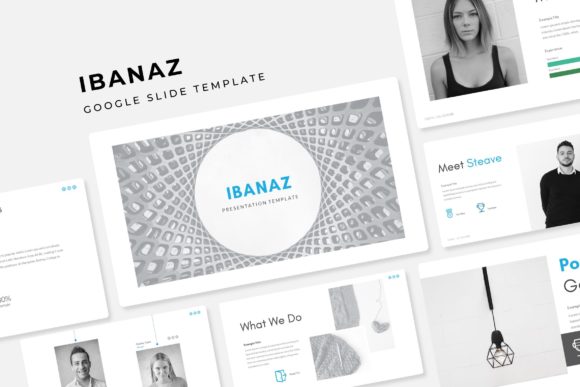
What immediately stands out about the Ibanaz suite is the sheer volume of content included without sacrificing quality. We often see templates that offer hundreds of slides, but they end up being repetitive variations of the same layout. That is not the case here. The package features over 150 total slides, strategically organized into five premade color palettes. Each color variation includes 30 unique slides, ensuring that you have a distinct layout for every phase of your narrative. Whether you need a data-heavy financial breakdown or a minimalist image showcase, the structure is already there.
The design language strikes a balance between modern professionalism and creative flair. It utilizes pixel-perfect illustrations that feel handcrafted rather than stock-standard. This attention to detail elevates the perceived value of your presentation. Instead of relying on standard clipart, the infographics included in this PowerPoint and Google Slides compatible set are sophisticated tools for data visualization. They help translate complex numbers into digestible, engaging graphics that keep your audience focused.
Practical Workflow: Speed Meets Precision
For the busy entrepreneur or designer, time is the most expensive resource. The Ibanaz template is engineered specifically to reduce production time while maintaining high design standards. One of the most practical features is the resizable and editable graphic picture placeholders. You do not need to be a Photoshop wizard to crop images into complex shapes. It is a true drag-and-drop experience. You simply grab your image and drop it into the designated area, and the template handles the masking instantly.
Furthermore, the entire deck is based on Master Slides. This is a crucial feature for anyone serious about design consistency. If you decide to change a font style, adjust a footer, or tweak a color scheme halfway through the project, doing it via the Master Slide ensures the change propagates across all 150+ slides instantly. This prevents the nightmare scenario of manually updating 30 individual slides because you decided to switch from a sans serif font to a serif font for better readability. It is a professional workflow feature that saves hours of tedious editing.
Strategic Applications for Branding and Marketing
A presentation is rarely just a presentation; it is an extension of your brand identity. The Ibanaz template excels here because of its adaptability. The five distinct color variations allow you to match the deck precisely to your client’s brand guidelines or your own corporate palette. This level of visual consistency is vital for building brand recognition. When your pitch deck looks and feels like your website and social media graphics, it reinforces trust and professionalism.
Consider the different contexts where this asset shines:
- Sales Pitches: Use the section break slides to clearly demarcate different phases of your proposal, guiding the client logically from the problem statement to your solution.
- Portfolio Reviews: Photographers, architects, and designers will find the Gallery and Portfolio slides indispensable. The layouts are designed to let the work breathe, using white space effectively to highlight the imagery.
- Internal Reporting: Use the handcrafted infographics to make quarterly reviews engaging. Instead of a wall of text, you can present market trends using custom charts and graphs that are easy to edit.
- Digital Products: If you are a course creator, you can use this template to design your slide decks for webinars or paid workshops, giving your educational content a premium, polished feel.
Typography and Readability: The Unsung Heroes
While the graphics and color schemes are the visual hook, the typography ensures the message is actually received. The Ibanaz template comes with a Readme First file and links to the free fonts used in the design. This is a small but significant detail that many template creators overlook. Nothing breaks the spell of a beautiful presentation faster than a "missing font" error message.
The layout prioritizes readability. Headings are bold and commanding, often utilizing modern display typography styles, while body text is kept clean and legible, typically in a complementary sans serif or serif font depending on the color variation. This hierarchy guides the viewer's eye naturally from the title to the key points. For marketers and bloggers repurposing content, this means your audience can scan slides quickly to grasp the value proposition without squinting at walls of text.
Optimizing Your Design Assets
To get the most out of the Ibanaz Google Slide Template, it helps to approach it with a strategic mindset. Before you even open the file, have your content outline ready. Know which slides correspond to your narrative arc. Are you starting with a strong "About Us" section? Do you need a heavy data section in the middle? The template’s 30 slides per color give you plenty of room to mix and match.
When customizing, pay attention to font pairing. While the template comes with recommended fonts, don't be afraid to experiment if your brand has specific typeface requirements. Just ensure that your chosen heading font contrasts well with your body font to maintain that visual hierarchy. Also, utilize the picture placeholders to their fullest extent. High-quality imagery combined with the template’s geometric masking creates a "wow" factor that standard rectangular photos simply cannot achieve.
Ultimately, the goal of any design asset is to solve a problem. The Ibanaz template solves the problem of time constraints and design inconsistency. It provides a professional framework that allows you to focus on your message, knowing that the visual delivery system is robust, stylish, and ready to impress. Whether you are a freelancer delivering a final product to a client or a business owner preparing for a conference, having this level of polish in your toolkit is a competitive advantage. It transforms the chore of slide design into a streamlined, creative process.