Fiont Power Point Template: A Versatile Design Asset for Your Next Project
Staring at a blank slide, cursor blinking, wondering how to transform a complex idea into a clear, compelling visual narrative is a universal experience for anyone who presents, pitches, or teaches. The right template doesn't just provide a starting point; it provides a framework for clarity and impact. The Fiont Power Point Template is designed to be that framework, offering a robust collection of slides that balance professional structure with creative flexibility.
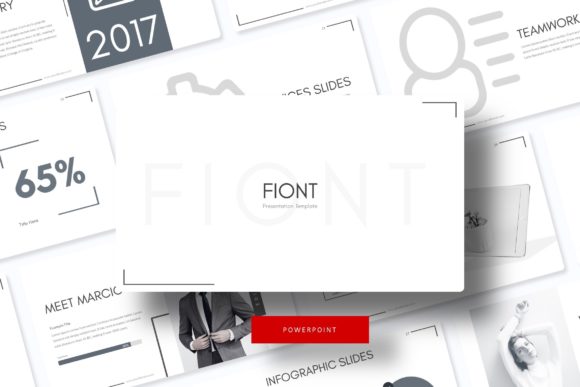
At its core, this package delivers significant value. It includes 150+ total slides, meticulously organized into 5 distinct color variations. Each color scheme contains 30 unique slides, giving you a cohesive yet diverse toolkit. This structure means you can switch the entire mood of your presentation with a single click, ensuring your visuals always align with the specific brand or topic at hand. The design is pixel-perfect, with handcrafted infographics and section break slides that guide your audience through your story seamlessly.
Beyond the Slideshow: Unpacking the Included Files
What you receive is a comprehensive suite designed for immediate use. The package includes 5 PPTX files for standard formats and 5 PPTX Widescreen files, covering the most common aspect ratios for modern displays and projectors. A crucial detail is the "Readme First" document, which provides the link to download the free font used in the design. This ensures you can maintain the exact intended typography without hunting for or purchasing a separate typeface. It's important to note that the preview photographs are for illustration only and are not included, keeping the template focused on its core function: a powerful, editable layout system.
The practical features are what make this template a workhorse for professionals. Every graphic is fully resizable and editable, allowing you to adjust charts, icons, and diagrams to fit your specific data. The picture placeholders utilize a simple drag-and-drop functionality, streamlining the process of inserting your own images. Built upon a clean Master Slides foundation, making global changes to fonts, colors, or logos is efficient and consistent, saving you hours of tedious manual editing.
Practical Applications for Designers and Entrepreneurs
The true test of any design asset is its versatility across real-world projects. The Fiont template's clean, modern aesthetic makes it suitable for a wide range of applications far beyond a standard business presentation.
- Brand Identity & Pitch Decks: For startups and small businesses, presenting a cohesive brand story is critical. Use the consistent color schemes and professional layout to build investor pitch decks, company overviews, or internal strategy documents that reinforce your brand identity.
- Marketing and Social Media Assets: Marketers and content creators can repurpose individual slides or sections. A single infographic slide can be exported as an image for a social media post, a blog graphic, or part of an email newsletter, maintaining visual consistency across all channels.
- Educational and Workshop Materials: The structured section breaks and clear information hierarchy are ideal for educators, trainers, and workshop facilitators. Create syllabi, course materials, or interactive workshop guides that are easy for participants to follow.
- Portfolio and Case Study Showcases: Creatives—designers, photographers, architects—can use the gallery and portfolio slide layouts to elegantly display their work. The drag-and-drop image placeholders make it simple to create a polished, professional-looking portfolio without advanced design software.
Making It Your Own: Customization and Best Practices
A template is a starting line, not the finish. To make the Fiont template truly yours, consider these practical steps:
First, align the color palette with your project's goals. While the five premade colors are professionally curated, don't hesitate to adjust them. Use your brand's exact hex codes in the Master Slides to ensure every element is on-brand. Second, leverage the built-in typography. The included font is chosen for its readability and modern appeal. Test it with your own text to ensure it works for your content's tone. If you need to pair it with another typeface (for example, a script font for accent headings), ensure there's enough contrast in style but harmony in mood to avoid visual dissonance.
Remember the principle of visual consistency. Because the template is built on Master Slides, changes you make there will propagate throughout the entire presentation. This is your most powerful tool for maintaining a professional, unified look. Use the section break slides to create clear narrative pauses, helping your audience digest information before moving to the next key point.
A Smart Foundation for Visual Communication
Ultimately, the Fiont Power Point Template is more than a collection of pre-designed slides. It's a foundation for clear, professional, and engaging visual communication. It solves the "blank page" problem by providing a structured yet flexible canvas, saving valuable time while elevating the quality of your output. Whether you're a solopreneur crafting your first pitch, a designer building client assets, or a marketer creating a campaign, having a reliable, versatile template like this in your toolkit is an investment in efficiency and impact. It allows you to focus on your message, confident that the visual framework supporting it is both beautiful and built to perform.