Mastering Visual Consistency: Why Your Slides Need a Theme
You know that sinking feeling when you open a presentation file and every slide looks like it was designed by a different person? One slide has a serif font, the next has a chaotic sans serif, and the images are all over the place. It happens to the best of us. When you are rushing to pitch a new client or explain a quarterly report, design consistency often falls by the wayside. But here is the reality: your audience notices. Inconsistent visuals break the flow of your story and can make even the strongest business case look unpolished. This is exactly why tools that enforce structure are so valuable. They take the guesswork out of the equation.
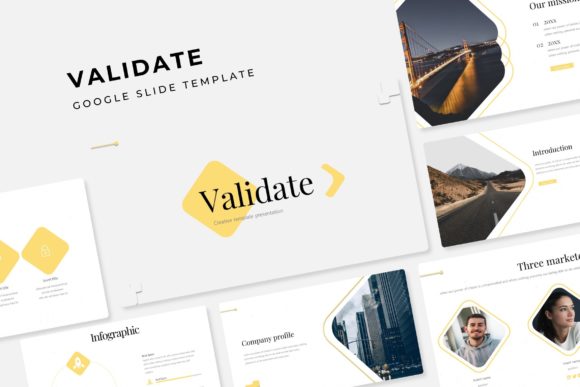
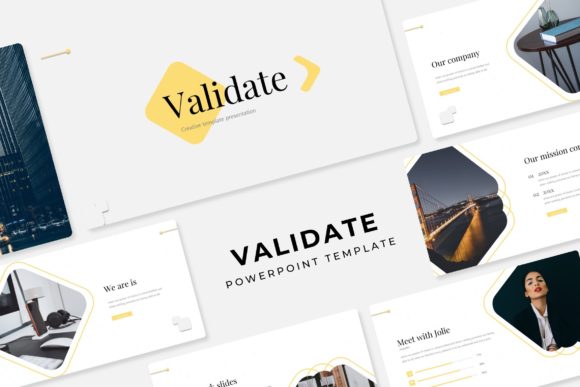
Imagine having a foundation where the heavy lifting is already done. That is the core value of the Validate Power Point Template. It is not just about having a slide deck; it is about having a robust design system that ensures your brand identity remains intact from the first slide to the last. We have all been there—spending hours resizing images, tweaking text boxes, and trying to align icons. A well-structured template eliminates that friction. By using a system based on Master Slides, you are not just picking colors; you are locking in a professional standard that elevates your visual communication instantly.
The Power of Pixel-Perfect Design Assets
For designers, small business owners, and content creators, the term "pixel-perfect" is music to the ears. It means that every element, from the handcrafted infographics to the gallery layouts, has been scrutinized for alignment and clarity. When you are presenting your brand to the world, whether it is through a pitch deck or a portfolio review, blurry graphics or misaligned text can undermine your credibility. The Validate Power Point Template features over 150 total slides, which gives you a massive library of options. You are not just getting a few generic layouts; you are getting a comprehensive toolkit designed to handle complex data and storytelling.
One of the biggest hurdles in modern typography and layout is responsiveness. We live in a multi-screen world. Your presentation might be viewed on a massive projector screen in a boardroom or a small tablet during a commute. Because these slides are designed as Widescreen PPTX files, they maintain their aspect ratio and quality across devices. The inclusion of resizable and editable graphic picture placeholders is a game-changer here. Instead of cropping your images to fit a rigid box, you can simply drag and drop your high-resolution photos into a container that adapts to your content. This flexibility allows you to maintain the integrity of your photography while keeping the overall design cohesive.
Streamlining Your Workflow with Master Slides
Time is money, especially for entrepreneurs and freelancers. If you are spending your afternoon manually updating the font style on 50 different slides because the client changed their mind about the header color, you are losing valuable billable hours. This is where the architecture of the Validate Power Point Template shines. By basing the entire structure on Master Slides, you gain control over the global design. Need to switch the entire color scheme? You can do it in a few clicks because the system is built with 5 premade color variations—30 slides for each template color.
This feature is particularly useful for agencies or businesses that manage multiple sub-brands. Let us say you have a parent brand and two distinct product lines. You can utilize the different color variations to distinguish between them while maintaining the core visual language of the master template. It ensures that all your marketing assets, from internal training decks to external sales pitches, look like they belong to the same family. This level of visual consistency is crucial for brand recognition. When your audience sees those distinct colors and layout styles, they immediately associate them with your business, building trust and familiarity over time.
Practical Applications Beyond the Boardroom
While we often associate PowerPoint with corporate presentations, the versatility of a high-quality template extends much further. Think about the needs of a creative entrepreneur or a blogger. You might be launching a new digital product, like an e-book or an online course. The Validate Power Point Template includes section break slides and portfolio slides that are perfect for this. You can repurpose the presentation structure to create a visually stunning PDF lookbook or a course curriculum outline. The handcrafted infographics are particularly valuable here. Instead of trying to explain a complex process with text alone, you can use the pre-designed data visualization elements to make your point clearly and engagingly.
Consider the realm of social media graphics as well. While the file format is PPTX, the individual slides are excellent sources for content. You can screenshot a particularly compelling layout or infographic, resize it for Instagram or LinkedIn, and you have an instant piece of content that looks professional. This is a smart way to repurpose your design assets without needing to jump into complex software like Photoshop or Illustrator. For packaging design or print materials, the clean lines and scalable graphics ensure that your concepts translate well from the digital screen to physical merchandise or invitations.
Choosing the Right Typography for Your Project
A template is only as good as the typography that holds it together. One of the standout features of this package is the attention paid to the font used. The creators have included a "Readme First" file along with the free font download links. This is a detail that separates premium assets from the rest. Nothing is worse than opening a template only to find that the fonts are missing or require an expensive license you did not budget for. By providing free font options, the template ensures that you can achieve the intended aesthetic immediately.
When selecting fonts for your own projects, readability should be your north star. A modern, sans serif font often works best for digital screens, offering clean lines that are easy to scan. However, if your brand identity leans more toward elegance or tradition, incorporating a serif font for headers can add a touch of class. The key is testing font pairings. Does your header font complement your body copy? Do they compete for attention? The typography included in the Validate Power Point Template has been curated to work harmoniously, but feel free to experiment. If you decide to swap fonts, ensure you maintain the hierarchy established by the master slides so the structure remains sound.
Maximizing Engagement and Professionalism
Ultimately, the goal of any visual communication is to engage your audience. Whether you are a marketer trying to win over a skeptical client or a hobbyist sharing a project proposal, the tools you use reflect your level of preparation. Using a template with 150+ slides might sound like overkill, but it is actually about having the right tool for every job. You might not use all the gallery slides for a financial report, but they will be perfect for your next portfolio review.
The ability to edit and resize graphics means you are never stuck with stock imagery that does not quite fit. You can tailor every aspect of the presentation to your specific needs. This customization is what turns a generic template into a powerful brand identity asset. It allows you to maintain a consistent voice and style, which is essential for building a recognizable presence in a crowded market. When your visuals are aligned with your message, your audience can focus on what you are saying, rather than being distracted by how you are saying it.
For those in the creative field, whether it is editorial design, web design, or creating merchandise, having a reliable set of design assets is non-negotiable. It streamlines your production process and frees up your mental energy to focus on the creative strategy. The Validate Power Point Template is more than just a collection of slides; it is a framework for better communication. It empowers you to present your ideas with clarity, confidence, and a level of polish that resonates with modern audiences. So, the next time you sit down to build a presentation, do not start from a blank screen. Start with a system designed to help you succeed.