Streamline Your Presentations with the Emmonne Keynote Template
There is a specific kind of frustration that sets in when you are staring at a blank slide deck, knowing that your idea is brilliant but your visual execution feels flat. Whether you are pitching a new service to potential clients, presenting a quarterly marketing report, or creating a visual guide for a new product launch, the structure of your presentation matters just as much as the data within it. This is where the Emmonne Keynote Template steps in to bridge the gap between a rough idea and a polished, professional delivery. It is not just about filling slides with text; it is about creating a cohesive visual narrative that keeps your audience engaged from the first slide to the last.
Visual Appeal That Works for Business
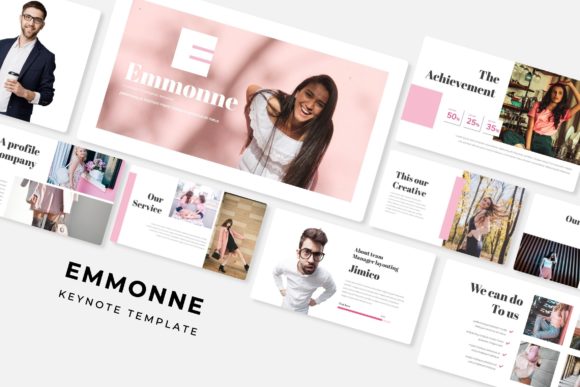
The primary draw of the Emmonne template is its versatility combined with a clean, modern aesthetic. It avoids the trap of being too "busy" or overly artistic, which can often distract from the message. Instead, it offers a balanced layout that prioritizes readability while maintaining a high-end design feel. The template includes over 150 total slides, which is a significant volume for a single toolkit. This depth ensures that you are not recycling the same three layouts over and over, which can make a presentation feel repetitive to the viewer.
What makes this particularly useful for small business owners and entrepreneurs is the inclusion of 5 premade color variations. Color psychology plays a massive role in branding. A soft pastel palette might work perfectly for a lifestyle coach or a wellness brand, whereas a deep navy and gold scheme might be more appropriate for a financial consultant or a tech startup. With the Emmonne template, you aren't locked into a single color story. You get 30 slides dedicated to each color variation, allowing you to select the palette that best aligns with your existing brand identity without having to manually adjust RGB codes across the entire document.
Practical Applications for Modern Brands
When we talk about design assets, we often think of static images or logos. However, a presentation file is a dynamic asset that serves multiple functions. For a marketing professional, the Emmonne Keynote Template can be the foundation for a comprehensive brand strategy deck. You can use the section break slides to clearly delineate between your market analysis, competitor research, and future goals. These transitions help the audience mentally "reset" and prepare for the next chunk of information.
For content creators and bloggers, the utility extends beyond the boardroom. Imagine you are hosting a webinar or an online workshop. You need a slide deck that functions as a visual aid, not a teleprompter. The gallery and portfolio slides included in this package are perfect for this. They allow you to showcase high-resolution photography of your work, whether you are a photographer displaying your latest shoot, a crafter showing off a new product line, or a coach sharing client testimonials. The layout is designed to let the images breathe, ensuring that your visual content takes center stage.
Furthermore, the handcrafted infographics are a standout feature. Data visualization is often the most dreaded part of presentation design. Creating charts and graphs from scratch is time-consuming and prone to alignment errors. These pre-designed infographics allow you to present complex data—like sales growth, user demographics, or project timelines—in a way that is visually digestible. This is crucial for maintaining audience engagement, especially when presenting to stakeholders who need to grasp numbers quickly.
Technical Efficiency: Drag, Drop, and Edit
One of the biggest barriers to good design is the technical skill required to execute it. The Emmonne template is built on Master Slides, which is a feature that significantly streamlines the editing process. If you have ever tried to move a text box in a presentation software only to have the entire layout shift or break, you understand the value of a well-structured master slide. It ensures that elements stay locked in their pixel-perfect positions, maintaining the integrity of the design even as you add your own content.
The picture placeholders are designed for a "drag and drop" workflow. This means you don't need to crop, resize, and center every single image manually. You simply drag your photo into the designated area, and the template handles the framing. For a busy entrepreneur juggling multiple roles, this efficiency is invaluable. It allows you to assemble a high-quality presentation in a fraction of the time it would take to build one from scratch.
Additionally, the illustrations included are resizable and editable. This is a feature that often gets overlooked until you need it. If you are using a vector icon to represent a specific concept, but the color clashes with your brand's secondary palette, you need the ability to change it. Because these graphics are editable, they act as flexible tools rather than static images. You can tweak them to fit your specific narrative, ensuring a cohesive look throughout your deck.
Building Brand Recognition Through Consistency
Consistency is the bedrock of brand recognition. When a potential client sees your presentation, your social media graphics, and your website, the visual language should feel familiar. Using a comprehensive template like Emmonne helps enforce this discipline. By utilizing the consistent typography and layout structures provided, you create a sense of reliability.
Think about the typography included in the package. The fonts used are selected to complement the modern layout. Good typography is invisible when done right—it guides the eye without causing strain. The "Readme First" file included with the download is a practical touch, ensuring that you can easily access and install the free fonts required to make the slides look exactly as they do in the preview. This attention to detail ensures that you don't open the file to find missing font warnings and broken layouts.
Practical Advice for Customization
To get the most out of the Emmonne Keynote Template, it is helpful to approach the editing process with a strategy. Don't just start swapping out text. First, identify which of the five color variations best suits your project. Look at your logo and your primary brand colors. If you have a vibrant, energetic brand, choose a variation that uses bold accent colors. If your brand is more minimalist and corporate, opt for the cleaner, more subdued palettes.
Next, consider your imagery. The template relies on high-quality photography to look its best. Because the placeholders are designed for widescreen formats, ensure your source images are high-resolution and well-lit. Blurry or pixelated photos will undermine the professional look of the template. If you don't have professional photos, consider using high-quality stock photography that matches the tone of your presentation.
Finally, utilize the section break slides effectively. In a long presentation, attention spans wander. These breaks serve as visual palate cleansers. Use them to summarize the key takeaways of the section you just finished or to introduce the topic of the next section with a compelling question. This pacing keeps the audience anchored and makes the information easier to digest.
Ideal for Diverse Creative Projects
While this is marketed as a presentation template, creative professionals often repurpose these assets. The slide layouts can be exported as high-resolution images for use in social media graphics. A slide designed for a "Team Member" introduction can easily become an Instagram post introducing a new staff member. A slide designed for a "Product Feature" can be adapted into a Pinterest graphic or a web banner.
For those in editorial design or creating digital products, the layout structures offer inspiration for e-book formatting or lookbooks. The balance of text and image areas is calculated to be visually pleasing, which is a principle that applies across all mediums of design. Whether you are preparing a pitch deck for investors, a workshop for students, or a visual portfolio for a client, the structural integrity of the Emmonne template provides a solid foundation to build upon.
In a world where visual communication is paramount, having a reliable, versatile, and aesthetically pleasing toolkit is not a luxury—it is a necessity. The Emmonne Keynote Template offers a practical solution for anyone looking to elevate their presentation game without requiring advanced design skills or hours of manual formatting. It provides the structure, the style, and the flexibility needed to communicate your message effectively and professionally.