Streamline Your Next Pitch with the Normalism Keynote Template
There is a specific kind of frustration that hits around 2:00 AM when you are trying to align text boxes in a presentation software. You have a brilliant idea, a solid business plan, or a crucial marketing update, but the delivery mechanism—the slide deck—looks disjointed, amateurish, or cluttered. For entrepreneurs, marketers, and creative professionals, the visual presentation of data is just as critical as the data itself. A messy deck can undermine credibility before you even speak a word. This is where the utility of a robust, pre-designed system comes into play, specifically the Normalism Keynote Template. It isn't just a collection of slides; it is a comprehensive toolkit designed to eliminate the design guesswork so you can focus entirely on your narrative.
Visual Harmony and the Power of Premade Color Palettes
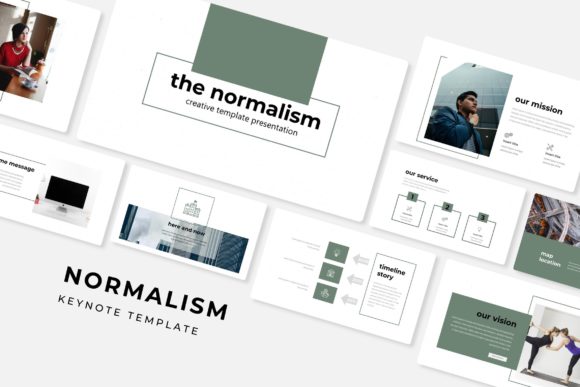
One of the most significant hurdles in design is color theory. Choosing colors that complement each other, maintain accessibility standards, and align with brand guidelines is time-consuming. The Normalism presentation solves this by offering 5 premade color variations. This feature is a massive time-saver for small business owners who might not have a dedicated graphic designer on staff. Instead of fiddling with hex codes, you simply select the color scheme that best matches your brand's existing identity—whether that is a cool, corporate blue or a vibrant, creative gradient.
With 30 slides dedicated to each template and a total of over 150 slides, the consistency remains tight throughout the presentation. This ensures that your opening agenda slide matches the tone of your closing "Thank You" slide. Visual consistency is the backbone of brand recognition. When you use the same styling for your infographics, headers, and body text, your audience subconsciously registers your brand as organized and reliable.
Beyond Text: Handcrafted Infographics and Data Visualization
Let’s be honest: nobody likes a wall of text. In the age of information overload, your audience needs to "see" the data to understand it. The Normalism Keynote Template includes handcrafted infographics that transform dry statistics into engaging visual stories. Whether you are breaking down quarterly sales figures for stakeholders or explaining a complex workflow to a new hire, these graphics provide clarity.
The inclusion of section break slides is another subtle but powerful tool. These act as visual pauses, allowing your audience to mentally digest the information you just presented before moving on to the next topic. It is a structural element often overlooked in DIY presentations but essential for professional flow. Furthermore, the gallery and portfolio slides are specifically optimized for visual content. If you are a photographer, architect, or designer, these layouts allow you to showcase high-resolution work without the cropping issues often found in standard templates.
Technical Flexibility: Drag, Drop, and Resize
For the modern professional, agility is key. The Normalism template is built on a Master Slide architecture. If you are new to Keynote or PowerPoint, this means the template controls the global styling. If you decide to change the font size or color scheme halfway through, doing it in the Master Slide updates the entire deck instantly. It saves hours of manual editing.
The graphics are resizable and editable, ensuring that you are never locked into a rigid layout. The drag & drop picture placeholders are particularly useful for content creators and marketers who need to swap out images frequently. You don't need to crop your photos beforehand; simply drop your image into the placeholder, and the template handles the framing. Because the illustrations are pixel-perfect, you can present on large conference screens or projectors without worrying about blurry edges or pixelation.
Practical Applications Across Industries
The versatility of the Normalism Keynote Template makes it suitable for a wide range of professional scenarios.
- Startups and Pitch Decks: When seeking investment, the clarity of your financial projections and market analysis is vital. The clean layouts help keep the focus on your numbers and your vision.
- Marketing Reports: Agencies can use the data visualization tools to present campaign results to clients in a digestible format, reinforcing the value of their services.
- Internal Training: HR departments can utilize the structured layouts to create onboarding materials or training guides that are easy to follow and retain.
- Educational Workshops: Teachers and speakers can break down complex topics using the infographic slides, making learning more interactive.
The package includes 5 PPTX files and 5 PPTX Widescreen formats, ensuring compatibility regardless of whether you are presenting in a standard meeting room or a modern widescreen auditorium. It also includes a Readme First file and links to the free fonts used in the design. This is a detail that matters; nothing breaks a design faster than opening a file and seeing the "missing font" error message. By providing the links, the template ensures that the typography—which plays a huge role in the mood of the presentation—remains exactly as the designer intended.
Choosing the Right Layout for Your Content
When working with a comprehensive toolkit like this, the challenge shifts from "how do I design this?" to "what content goes where?" A common mistake is trying to cram too much information onto a single slide. The Normalism Keynote Template provides enough variety that you can spread your content out logically.
Use the portfolio slides not just for images, but for showcasing customer testimonials or case studies. The visual hierarchy in these sections draws the eye to the key message. Similarly, the infographic slides can be used to explain processes, timelines, or hierarchies, not just statistics. Think of these assets as flexible containers for your ideas. The resizable graphics mean you can adapt a chart intended for financial data to show a production timeline simply by editing the text and adjusting the shapes.
Final Thoughts on Workflow Efficiency
Time is the most expensive resource for any entrepreneur or creative. Spending hours wrestling with alignment tools and font pairings is rarely a good return on investment. By utilizing a structured system like the Normalism Keynote Template, you streamline your workflow. You get a professional, cohesive aesthetic immediately, allowing you to dedicate your mental energy to refining your message and rehearsing your delivery.
Remember, the goal of any presentation is communication. The template handles the visual noise so your voice can be heard clearly. Whether you are pitching a new product, training your team, or presenting a portfolio, having a reliable, high-quality framework ensures that your first impression is a strong one. With its focus on clean design, ease of use, and comprehensive features, this toolkit is a solid addition to any designer's or business owner's digital library.