Streamline Your Workflow with the Bandaro Presentation Template
Every professional knows the sinking feeling of opening a blank PowerPoint slide deck and realizing you have to create a visually compelling narrative from scratch. Whether you are pitching a new client, presenting quarterly results to stakeholders, or teaching a workshop, the design of your presentation matters just as much as the content. A disjointed, poorly designed deck can distract from your message, while a cohesive, polished one builds immediate trust. That is where a robust design asset like the Bandaro PowerPoint Template comes into play. It is not just a set of slides; it is a comprehensive framework designed to handle the heavy lifting of visual communication, allowing you to focus on your story.
Visual Consistency Across 150+ Slides
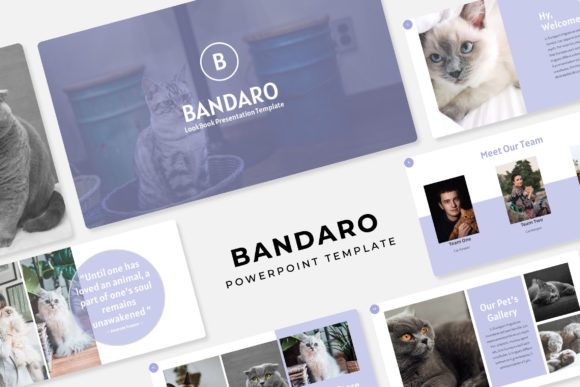
One of the biggest challenges in creating a long-form presentation is maintaining visual consistency. You start with good intentions, but by slide 40, the fonts are drifting, the color palette has shifted, and the alignment is off. The Bandaro template solves this by offering a massive library of over 150 total slides, structured across five premade color variations. This means you get 30 unique slide layouts for each color theme. For a brand strategist or marketing manager, this is invaluable. You can select the color scheme that aligns with your specific brand identity guidelines without ever needing to manually adjust hex codes or gradients. It ensures that from the title slide to the final call-to-action, your visual language remains uniform and professional.
Practical Applications for Entrepreneurs and Creatives
While the template is built for PowerPoint, its utility extends far beyond standard business meetings. Think of these slides as modular design assets that can be repurposed for various aspects of your business operations. For instance, the Gallery and Portfolio slides are perfect for photographers, interior designers, or crafters who need to showcase high-resolution images. The Section Break Slides allow you to segment complex information clearly, which is particularly useful for educators or consultants breaking down a process.
Furthermore, the pixel-perfect illustrations and handcrafted infographics included in the package serve a dual purpose. They are excellent for visualizing data in a corporate report, but they can also be screenshotted or exported to be used as standalone graphics for social media. Imagine taking a custom infographic from your presentation and posting it on Instagram or LinkedIn as a standalone piece of content. This cross-platform compatibility makes the Bandaro template a versatile tool for content creators and small business owners looking to maximize their design budget.
Master Slides and Workflow Efficiency
Time is a non-renewable resource, especially for small business owners wearing multiple hats. The technical backbone of the Bandaro template relies on Master Slides. If you have ever struggled with formatting issues where moving one element throws off the entire layout, you will appreciate this feature. Because the slides are pixel-perfect and based on a master layout system, the structural integrity of your presentation remains intact even as you customize it.
The drag and drop picture placeholder functionality is another massive time-saver. You do not need to be a PowerPoint wizard to insert your own photography. The placeholders are sized and shaped to fit the layout perfectly, allowing you to swap out the preview images with your own product shots or team headshots in seconds. This ease of use empowers entrepreneurs to update their decks quickly for different clients without hiring a graphic designer for every minor tweak.
Enhancing Brand Recognition and Engagement
Visual communication is about more than just making things look pretty; it is about psychological impact. When you use a high-quality, premium design template, you are signaling competence to your audience. The resizable and editable graphics allow you to scale elements without losing resolution, ensuring that even if you are projecting on a massive screen or viewing on a mobile device, your graphics remain crisp. This attention to detail helps improve audience engagement. Viewers are less likely to tune out when the visuals are stimulating and the layout is clean. By utilizing the included color variations, you can also adapt the same core presentation for different sub-brands or seasonal campaigns, reinforcing brand recognition through consistent yet varied visual cues.
Getting Started and Customization Tips
To get the most out of the Bandaro PowerPoint Template, it helps to approach the customization process strategically. Here are a few practical tips for integrating this asset into your workflow:
- Review the Readme File: The package includes a "Readme First" document and links to download the free fonts used in the design. Install these fonts before opening the file to ensure the typography renders exactly as the designer intended. Typography is a critical component of modern design, and changing the fonts without care can disrupt the hierarchy of the slide.
- Match Typography to Goals: While the template uses specific fonts, feel free to explore font pairing if you need to match a specific brand manual. If your brand uses a heavy serif for headings and a clean sans-serif for body text, apply these styles using the Master Slides to keep the formatting consistent.
- Utilize the Color Themes: Don't just stick to the first color variation. Review all five premade options. Sometimes a color palette you wouldn't have chosen initially might actually contrast better with your photography or evoke a different emotion that better suits your specific project goals.
- Focus on Readability: As you edit the text blocks, remember that presentation slides are meant to be glanced at, not read like a book. Use the "Section Break" slides to pause and reset the audience's attention, and keep the bullet points on the main content slides concise.
Ultimately, investing in a comprehensive template like this is about removing friction from the creative process. Whether you are a freelancer presenting a proposal, a teacher organizing a curriculum, or a marketer building a sales funnel, having a reliable, visually striking foundation allows you to communicate your ideas with clarity and authority. The Bandaro template provides that professional polish, ensuring your next presentation looks intentional, cohesive, and ready for the spotlight.