Colase Google Slide Template: Streamline Your Next Presentation
Building a professional presentation from scratch is a notorious time sink. You spend hours aligning text boxes, hunting for a consistent color palette, and struggling to create graphics that actually look polished. The Colase Google Slide Template cuts through that friction, offering a comprehensive design system built for clarity and visual impact. This isn't just a collection of slides; it's a toolkit designed to help you communicate ideas with confidence, whether you're pitching to clients, educating a team, or sharing a portfolio.
A Foundation of Flexibility and Design Precision
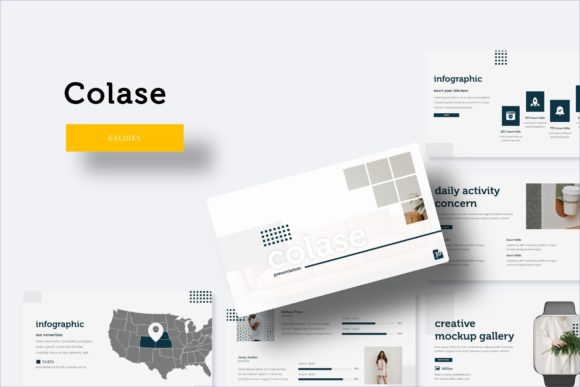
What sets this template apart is its commitment to structured versatility. With over 150 total slides, it provides a substantial library of layouts to choose from. The real strength lies in its organization: five premade color themes, each containing 30 meticulously crafted slides. This means you're not just getting one look, but five distinct, harmonious palettes ready to deploy. Switching your entire presentation's mood from a corporate blue to a creative teal is a matter of a few clicks, not a complete redesign.
Every element is built on master slides, ensuring pixel-perfect consistency across your entire deck. This foundational approach means your headers, footers, and content blocks will always align perfectly. The graphics aren't static images either; they're resizable and editable vector shapes. Need to adjust the size of a chart or change the color of an icon? You can do it directly within Google Slides without losing quality. The drag-and-drop picture placeholders simplify the process of adding your own images, letting you focus on your message rather than technical formatting.
Practical Applications Across Industries
The utility of a well-structured presentation template extends far beyond a simple business meeting. For entrepreneurs and small business owners, the Colase template is a branding asset. Use the consistent color schemes and design language to create investor decks that feel trustworthy and cohesive. Apply the same visual system to internal training materials or client proposals, reinforcing your brand identity at every touchpoint.
For marketers and content creators, the handcrafted infographics are a standout feature. Transform complex data, social media analytics, or campaign results into easy-to-understand visual stories. The gallery and portfolio slides are perfect for showcasing work, whether you're a photographer displaying a recent shoot, a designer presenting case studies, or a blogger highlighting key partnerships. The clean, modern typography ensures your content remains the star, with high readability for both on-screen viewing and printed handouts.
Educators and trainers will find immense value in the section break slides, which provide clear visual pauses to segment information logically. The template's structure helps maintain a natural flow, keeping audiences engaged from the introduction to the conclusion. Even for personal projects like creating a compelling family photo slideshow or a detailed plan for a community event, the professional polish elevates the final product.
Integrating Typography for Brand Cohesion
A presentation is a key piece of your visual communication puzzle. The included font recommendations play a crucial role in tying your entire message together. Choosing the right typeface is about more than just aesthetics; it's about personality and readability. A clean sans-serif font, often recommended in such kits, offers excellent legibility on screens and a modern, approachable feel. This makes it ideal for body text and supporting copy where clarity is paramount.
Consider how your font choice aligns with your project's goals. A formal report might call for a traditional serif font to convey authority, while a creative pitch could benefit from a more distinctive display font for headlines. The key is to test pairings—using one font for headings and another for body text—to create a visual hierarchy that guides the viewer's eye. Always prioritize readability; the most beautiful typeface is useless if your audience struggles to read the text from the back of the room.
What's Included and How to Get Started
The Colase Google Slide Template package is designed for immediate use. It includes five PPTX files optimized for widescreen presentations, corresponding to the five premade color themes. A detailed readme file is included, guiding you through setup and customization. To ensure the intended design integrity, the package specifies the free fonts used, providing download links so you can install them on your system. This attention to detail ensures that when you open the file, your slides look exactly as previewed.
It's important to note that the photographs and pictures shown in the preview are for illustration purposes only and are not included in the download. This is standard practice, allowing you to insert your own unique imagery that reflects your brand or topic. The template provides the framework; you provide the content that makes it yours.
Getting started is straightforward. Open the template in Google Slides, select the color theme that best suits your brand or topic, and begin replacing the placeholder content with your own text and images. Use the master slides to maintain consistency, and explore the infographic and portfolio layouts to present your information dynamically. The structure is intuitive, but its flexibility allows for deep customization to meet specific needs.
Ultimately, a great presentation template like this one is about saving time and reducing design anxiety. It provides a proven visual system so you can concentrate on what truly matters: crafting a compelling narrative and connecting with your audience. Whether you're building a brand, sharing knowledge, or selling an idea, starting with a solid design foundation makes all the difference.