Facemate Google Slide Template: Your Ultimate Presentation Toolkit
You know the feeling—you’ve got a brilliant idea for a pitch, a workshop, or a client update, but the thought of building a presentation from scratch makes you want to close your laptop. Between aligning boxes, picking colors that actually work together, and finding visuals that don’t look like they’re from 2005, the design process can eat up hours you simply don’t have. That’s where a thoughtfully built presentation template becomes less of a luxury and more of a practical necessity. The Facemate Google Slide Template is designed to cut through that friction, offering a robust, flexible system that lets you focus on your message rather than pixel-pushing.
What Makes This Template System Stand Out
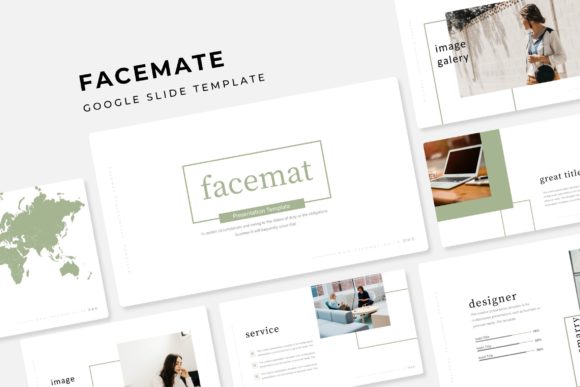
At its core, Facemate isn’t just a single slide deck—it’s a comprehensive toolkit built around versatility. With over 150 total slides spread across five premade color schemes, you’re getting thirty unique slide layouts for each color variation. That means whether you’re presenting quarterly results, showcasing a portfolio, or walking through a step-by-step process, there’s a slide designed specifically for that purpose. The color palettes aren’t random either; they’re carefully curated to feel modern and professional, so you can pick one that aligns with your brand identity without spending extra time tweaking hex codes.
One of the most practical features is the pixel-perfect illustrations and handcrafted infographics baked right into the template. These aren’t generic clip-art graphics—they’re custom-designed visual elements that help explain data, timelines, comparisons, and concepts in a way that feels polished and intentional. If you’ve ever struggled to make a simple chart look good, you’ll appreciate how much easier communication becomes when the visual framework is already handled for you.
Designed for Real-World Flexibility
Every element in the Facemate system is built on master slides, which is a technical detail that translates to a very practical benefit: consistency. When you update a font, color, or layout on the master slide, those changes ripple through the entire presentation automatically. This is a game-changer for anyone managing brand guidelines across multiple decks or working with a team where different people might be editing different sections.
The drag-and-drop picture placeholders are another feature that saves real time. Instead of manually resizing and cropping images to fit awkward boxes, you simply drag your photo into the designated area, and it snaps into place. The graphics are fully resizable and editable, so if you need to adjust an icon’s color to match your brand or resize an infographic element to emphasize a particular data point, you can do it without breaking the design. This kind of thoughtful engineering makes the template feel less like a rigid mold and more like a creative starting point.
Who Benefits Most from a Template Like This
Small business owners who regularly pitch to clients or investors will find the variety of slide types invaluable. Instead of recycling the same tired slide layouts for every meeting, you can present financials on a clean data-driven slide, introduce your team with a gallery layout, and break up sections with bold section break slides that keep your audience engaged. The portfolio and gallery slides are particularly useful for creative professionals—photographers, designers, consultants—who need to showcase work in a visually compelling way without building custom layouts each time.
Content creators and marketers will appreciate how easily the template adapts to different content formats. Need to create a social media strategy overview? There are slides for that. Want to present a content calendar visually? The infographic slides handle it beautifully. The widescreen format ensures your presentations look sharp on modern displays, whether you’re presenting in a conference room or sharing your screen on a video call.
Practical Details That Save You Headaches
The download package includes five PPTX files in widescreen format, one for each color variation. A readme file walks you through setup, and the fonts used in the design are free to download—the links are included, so you won’t hit a wall trying to figure out what typeface was used in the preview. It’s worth noting that the preview images use placeholder photographs for illustration purposes; the actual photographs aren’t bundled with the template. This is standard practice, but it’s good to know upfront so you can plan to source your own visuals.
For anyone who’s ever purchased a template only to discover it looks nothing like the preview because the fonts were missing or the images were proprietary, this kind of transparency matters. The Facemate template is designed with the end user in mind, offering clear documentation and accessible resources so you can get up and running quickly.
Making the Most of Your Investment
A template like this works best when you treat it as a foundation rather than a finished product. Start by selecting the color variation that’s closest to your brand, then customize the master slides with your logo, brand fonts, and color codes. From there, you can mix and match slide layouts depending on the specific needs of each presentation. The section break slides are perfect for creating visual breathing room between topics, while the infographic slides can turn dense information into something digestible and memorable.
Think about how your audience experiences your presentation. Long blocks of text on slides are a fast way to lose attention. Instead, use the gallery and portfolio slides to let visuals do the heavy lifting. Pair a bold statistic with a simple icon. Use a timeline infographic to walk through a process step by step. The Facemate template gives you the building blocks; how you assemble them depends on your story and your audience.
Whether you’re a freelancer building client decks, an educator creating course materials, or an entrepreneur preparing for your next big pitch, having a reliable, professionally designed template system removes one major friction point from your workflow. The Facemate Google Slide Template offers the kind of depth and flexibility that makes it a practical addition to any designer’s or business owner’s toolkit—saving time, maintaining quality, and helping you communicate with clarity and confidence.