Transform Your Next Pitch with the Bikehood Power Point Template
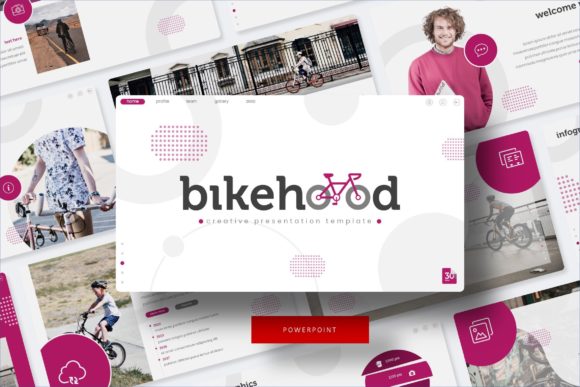
There is a specific kind of dread that sets in when you open a blank slide deck. You have the data, the strategy, and the vision, but staring at that empty white rectangle can be paralyzing. As entrepreneurs, designers, and marketers, we know that a presentation is rarely just a set of bullet points; it is a visual argument for your brand's credibility. If the design looks amateur, the audience subconsciously questions the quality of the content. This is where a robust design asset changes the game. We recently explored the Bikehood Power Point Template, a comprehensive toolkit that promises to eliminate the friction between your ideas and a polished, professional delivery. It is not just a set of slides; it is a visual framework designed for clarity and impact.
A Modular Approach to Visual Storytelling
What sets this template apart from the thousands of generic options available online is its sheer volume and modularity. The package includes over 150 total slides, but the real brilliance lies in the structure: it offers five premade color palettes, with 30 distinct slides tailored to each variation. This is incredibly practical for anyone managing multiple brands or clients. Instead of settling for a "one-size-fits-all" aesthetic, you can select a color scheme that aligns with specific brand guidelines or mood boards. Whether you are pitching a gritty, industrial startup or a sleek, modern tech firm, the structure remains consistent while the visual tone adapts to your needs.
For the busy creative, consistency is key. The Bikehood template is built entirely on Master Slides. If you have ever tried to edit a poorly constructed PowerPoint file, you know the frustration of text boxes that won't align or images that refuse to resize properly. This pixel-perfect architecture ensures that when you drag and drop your content, the layout holds its integrity. It treats PowerPoint less like a simple text editor and more like a professional design tool, bridging the gap between software like Adobe Illustrator and presentation software.
Practical Applications: Beyond the Boardroom
When we talk about presentation templates, the immediate association is the corporate quarterly review. However, the utility of the Bikehood Power Point Template extends far beyond standard business meetings. Its design features, particularly the handcrafted infographics and section break slides, make it a versatile asset for a variety of creative projects.
Consider the needs of a small business owner launching a new product. You need a deck for investors, certainly, but you also need a consistent visual language for your launch. The gallery and portfolio slides included in this template are perfect for creating a digital lookbook. You can compile product photography, resize the editable graphic placeholders, and export the slides as high-resolution PDFs for email marketing campaigns. This turns a presentation file into a dynamic layout tool for digital products and marketing assets.
For content creators and bloggers, this template serves as an excellent foundation for media kits. A media kit requires a balance of data visualization and aesthetic appeal to attract brand partnerships. By utilizing the handcrafted infographics, you can display your audience demographics and engagement metrics in a way that is visually digestible and impressive. The ability to swap out colors means you can match the kit to your personal brand identity, ensuring that your pitch feels cohesive with your website and social media graphics.
Even in the realm of education and workshops, the modular design shines. If you are a course creator, you can use the section break slides to clearly delineate different modules of your curriculum. The clean typography and ample white space help maintain focus, which is crucial for instructional design. It allows the educator to focus on the content rather than fussing with formatting, ensuring that the learning experience is smooth and professional.
Design Features That Save Time and Sanity
One of the standout features of the Bikehood template is the emphasis on "drag and drop" functionality paired with picture placeholders. We have all been there: trying to crop an image into a perfect circle or a specific aspect ratio within PowerPoint can be a nightmare. This template streamlines the process, allowing you to simply click a placeholder and upload your image. The formatting is automatic. This is a massive time-saver, particularly when you are working under tight deadlines or managing a high volume of visual content.
Furthermore, the inclusion of pixel-perfect illustrations adds a layer of sophistication that stock photos often cannot achieve. Illustrations can communicate complex abstract concepts—like growth, connectivity, or strategy—without the legal gray areas of stock photography. They also add a unique character to your deck, helping it stand out in a sea of generic presentations. When you are trying to build brand recognition, these subtle visual touches make a significant difference in how your message is received.
The typography choices within the template also deserve attention. A good presentation template respects the hierarchy of information. The Bikehood design ensures that headers, subheaders, and body text are balanced, aiding readability. This is essential for audience engagement; if your slides are cluttered or the font pairings are jarring, your audience will spend more time squinting at the screen than listening to you speak. The clean aesthetic of this template ensures that the visual elements support the speaker rather than competing for attention.
Integrating the Template into Your Workflow
Adopting a new design asset is only useful if it fits into your existing workflow. Because this is based on standard PowerPoint files (PPTX), it is universally accessible. You do not need an expensive subscription to specialized design software to use it. This democratization of design is vital for freelancers and small business owners who may not have the budget for a dedicated graphic designer but still require professional-grade visuals.
When you first open the files, you will find a "Readme First" document. Do not skip this. It contains details on the fonts used, including links to download free fonts. This is a critical detail that is often overlooked in premium templates. There is nothing worse than opening a file only to find that the typography has defaulted to Times New Roman because you are missing a specific font family. By providing the font links, the creators ensure that the visual integrity of the design remains intact from the moment you open the file.
As you begin customizing, think about how you can leverage the color variations. If you are a marketing professional pitching to a client, consider using the client’s brand colors. You can easily edit the Master Slides to input specific hex codes, ensuring that the presentation feels bespoke to their identity. This level of customization shows attention to detail and a commitment to the client’s vision, which can be a deciding factor in winning a contract.
Why Visual Consistency Matters
In the end, the goal of any design asset is to facilitate better communication. The Bikehood Power Point Template is not just about making things look pretty; it is about creating a visual system that fosters trust. When your slides are consistent, your data is clear, and your imagery is high-quality, you remove distractions. You allow your audience to focus on what truly matters: your message.
Whether you are a startup founder pitching for seed funding, a designer presenting a new brand identity, or a teacher structuring an online course, having a reliable, flexible, and visually appealing template is an investment in your professional image. It transforms the daunting task of presentation design into a streamlined, creative process, allowing you to present your best self to the world.