Hopers: The Google Slide Template Built for Visual Impact
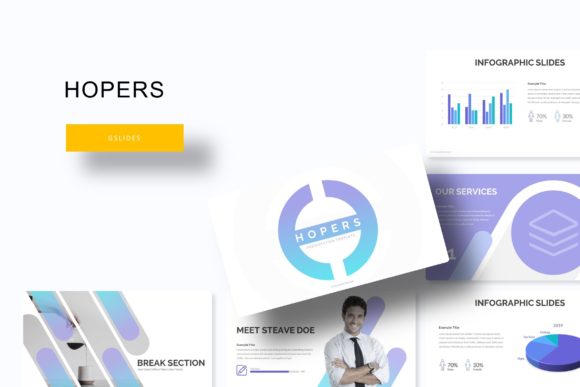
You know that feeling when you open a blank presentation and the cursor just blinks back at you? For designers, entrepreneurs, and content creators, the real struggle isn't having ideas—it's translating those ideas into a polished, cohesive visual story without spending hours on formatting. That's where a robust template system changes the game. The Hopers Google Slide Template isn't just another set of slides; it's a comprehensive design toolkit engineered to solve real presentation challenges, offering a staggering 150+ total slides organized across five premade color variations, with 30 meticulously crafted slides per template. This structure alone saves the most valuable resource any professional has: time.
A Foundation for Brand Consistency and Professional Polish
Imagine launching a new product line. You need a pitch deck for investors, a social media content calendar for your marketing team, and a portfolio showcase for potential clients. With Hopers, you're not starting from scratch three times. The five premade colors provide an immediate visual identity framework. You select the palette that aligns with your brand's core energy—whether it's the trust-inspiring blues of a financial consultant or the vibrant, creative tones of a design studio—and every slide, from section breaks to data infographics, automatically adopts that cohesive look. This built-in consistency is crucial for brand recognition. When your internal team meeting deck, your client-facing proposal, and your webinar slides all share the same professional visual language, it reinforces your brand's credibility at every touchpoint.
Practicality is woven into the template's DNA. The handcrafted infographics transform complex data into digestible visual stories, perfect for quarterly reports or case study presentations. The gallery and portfolio slides are drag-and-drop ready, with pixel-perfect illustrations and resizable, editable graphic placeholders. This means a photographer can swap in their latest shoot, or a blogger can insert their featured images, without wrestling with alignment or distortion. The presentation remains crisp and professional because it's all based on master slides, ensuring that a change to the color scheme or font globally updates every relevant element. It’s a system designed for real-world use, where deadlines are tight and revisions are constant.
Expanding Beyond the Slide Deck: A Versatile Design Asset
While the primary output is a presentation, the Hopers template's utility extends far beyond the conference room. Think of the included assets as raw material for multiple projects. The high-quality, editable graphics can be repurposed for social media carousels, providing a quick and visually consistent way to create Instagram or LinkedIn content. The clean layouts and professional typography serve as excellent inspiration for website hero sections or blog post headers. For those involved in packaging design or creating digital products like e-books or online courses, the master slide structure offers a lesson in modular design that can be adapted to other formats.
The value is also in what's included to get you started immediately. The package comes with five PPTX files (standard and widescreen) and, crucially, a "Readme First" guide. This isn't just a technical manual; it's a roadmap for customization. It details the free fonts used, with direct download links, eliminating the guesswork and potential licensing issues that can halt a project. For a small business owner or a freelance marketer, this is a significant time-saver. You can move from template to tailored presentation in minutes, not hours, ensuring your materials look professionally designed even if you're not a graphic design expert. The note about photographs not being included is a responsible clarification, reminding users to source their own imagery to maintain originality and avoid copyright infringement.
Making the Template Work for Your Unique Goals
The true power of a resource like Hopers is unlocked when you align it with your specific objectives. Are you a startup seeking funding? Use the clean, data-driven slides to build a compelling narrative around your metrics and vision. A freelance designer? The portfolio slides are your new best friend for showcasing your work in client meetings. A content creator planning a workshop? The modular structure lets you break down your curriculum into logical, visually engaging sections.
Remember, a template is a starting point, not a cage. The instruction to use the master slides is your key to efficiency. Before you dive into editing individual slides, take ten minutes to customize the master. Change the primary color to your exact brand hex code. Swap the placeholder font for your chosen brand typeface. Adjust the logo placement. These top-level changes will cascade through the entire presentation, guaranteeing visual harmony and saving you from repetitive adjustments. Test your font pairings within the template's framework; see how your chosen sans-serif for body text interacts with the template's headline style. This process of thoughtful customization is what transforms a generic template into a powerful brand asset.
Ultimately, the Hopers Google Slide Template offers a structured yet flexible solution for a common professional need: communicating ideas with clarity and visual appeal. It addresses the practical realities of branding, marketing, and design work by providing a scalable system that promotes consistency, saves time, and elevates the perceived quality of your work. It’s a tool designed for people who create, pitch, and persuade, understanding that a well-organized presentation is often the first step toward a successful outcome.