Master Your Next Presentation with Harnoc PowerPoint
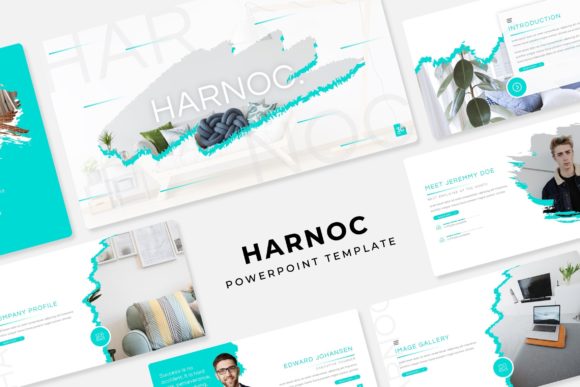
Picture this: You have a massive pitch tomorrow, or perhaps a quarterly review that needs to impress stakeholders. You open PowerPoint, stare at the blank white slide, and the creative block hits immediately. We have all been there. Finding a template that balances professional polish with creative flexibility is harder than it sounds. That is where the Harnoc Power Point Template steps in. It is not just another download; it is a comprehensive design system designed to take the stress out of visual communication. With over 150 total slides and five distinct color variations, this toolkit is built to handle everything from corporate boardrooms to creative agency pitches.
The true beauty of the Harnoc template lies in its adaptability. Whether you are a freelancer pitching a new client, a startup founder seeking investment, or a marketing manager updating the team, the structure is already there for you. It moves beyond generic layouts, offering a curated aesthetic that feels modern and intentional. Instead of spending hours aligning text boxes and matching hex codes, you can focus on what actually matters: your message and your brand story.
A Visual System Built for Speed and Style
One of the standout aspects of this collection is the sheer volume of content provided. You are not just getting a single file; you are getting 5 PPTX files in widescreen format, each representing a unique premade color palette. This means you can instantly match your deck to your specific brand guidelines without needing to dive into the color picker tools. If your brand is vibrant and energetic, there is a palette for that. If you are aiming for something sleek, corporate, and minimalist, there is a variation tailored to that mood as well.
For anyone involved in branding or marketing assets, consistency is king. The Harnoc template utilizes Master Slides, which is a game-changer for maintaining visual integrity throughout your deck. When you edit the Master Slide, those changes ripple down to every single page, ensuring your fonts, colors, and logos remain pixel-perfect. This feature alone saves a significant amount of time and prevents the embarrassing inconsistency of having a different logo size on slide 10 compared to slide 2.
Infographics and Visual Storytelling
Data can be dry. Presenting numbers on a screen often leads to "death by PowerPoint," where the audience tunes out. To combat this, the Harnoc collection includes handcrafted infographics. These are not generic clip-art shapes; they are designed to help you visualize complex processes, timelines, and statistics in a way that is digestible and engaging. Whether you are explaining a workflow to your team or showing growth metrics to investors, these visual aids help bridge the gap between raw data and understanding.
Furthermore, the inclusion of Gallery and Portfolio slides makes this an exceptional tool for creative professionals. If you are a photographer, interior designer, or graphic artist, your work speaks for itself. These slides are optimized to showcase high-resolution imagery without clutter. The Picture Placeholder feature is particularly useful here. You simply drag and drop your images into the designated area, and the template automatically crops and resizes them to fit the layout perfectly. It removes the technical friction of presentation design, allowing you to curate your portfolio with ease.
Practical Applications Across Industries
While the Harnoc template is excellent for standard business presentations, its utility extends much further. Think about the needs of a modern entrepreneur or content creator. You might need to create a visual mood board for a packaging design project, or perhaps a digital lookbook for a new clothing line. The Section Break Slides included in the template are perfect for separating chapters of a story, making the flow of information logical and aesthetically pleasing.
Here are a few specific scenarios where this template excels:
- Social Media Graphics: While designed for slides, the widescreen aspect ratio is perfect for LinkedIn carousels or YouTube video thumbnails. You can export individual slides as high-quality images to create a cohesive social media graphics feed.
- Digital Products: If you are selling an online course or an ebook, the Harnoc slides can serve as the foundation for your course materials or a visual summary of your digital products.
- Web Design Proposals: For web designers, presenting a sitemap or user flow is often necessary. The resizable and editable graphics allow you to mock up wireframes or site maps directly within the presentation.
- Event Invitations: Need a stylish invite for a webinar or a virtual summit? The modern typography and clean layouts can be repurposed into beautiful, downloadable PDF invitations.
Customization and Usability
A template is only as good as your ability to edit it. Harnoc scores high on usability. Because it is based on a Master Slide architecture, the file structure is clean and organized. You do not have to hunt through layers to find a text box. Everything is grouped logically, making it accessible even for those who might not be PowerPoint experts.
The graphics are resizable and editable, meaning you can scale elements up or down without losing quality. This is crucial for print materials or posters where resolution matters. If you decide a specific icon doesn't fit your style, you can ungroup the vector elements and modify the shapes or colors to better suit your brand identity. This level of control ensures that your final presentation doesn't look like it came "out of the box." It looks like it was custom-built for you.
Typography and Professional Polish
The text styling in the Harnoc template is designed for readability. In editorial layouts or dense business decks, the choice of typeface can make or break the audience's ability to absorb information. The included readme first file is a helpful addition, pointing you toward the free font download links. By installing these specific fonts, you ensure that the presentation renders exactly as the designer intended, maintaining that pixel-perfect look across different devices.
Using a premium font or a well-chosen typeface elevates the perceived value of your content. It signals professionalism and attention to detail. Whether you are using a bold display font for headers to grab attention or a clean sans serif font for body text to ensure legibility on screens, the typography choices in Harnoc support a hierarchy that guides the viewer's eye naturally.
Final Thoughts on Value and Utility
In a world where visual communication is constant, having a reliable set of design assets is not a luxury; it is a necessity. The Harnoc Power Point Template offers a robust solution for anyone looking to streamline their workflow. It bridges the gap between a blank canvas and a finished product, offering the flexibility of custom design with the efficiency of a pre-built system.
Whether you are preparing a logo design proposal, a quarterly marketing report, or a creative pitch for merchandise, this template provides the tools to do it well. It allows you to focus on strategy and storytelling, knowing that the visual framework is solid, professional, and ready to impress. For the designer, the entrepreneur, or the busy professional, it is a versatile asset that adapts to your needs and helps you communicate with clarity and style.